


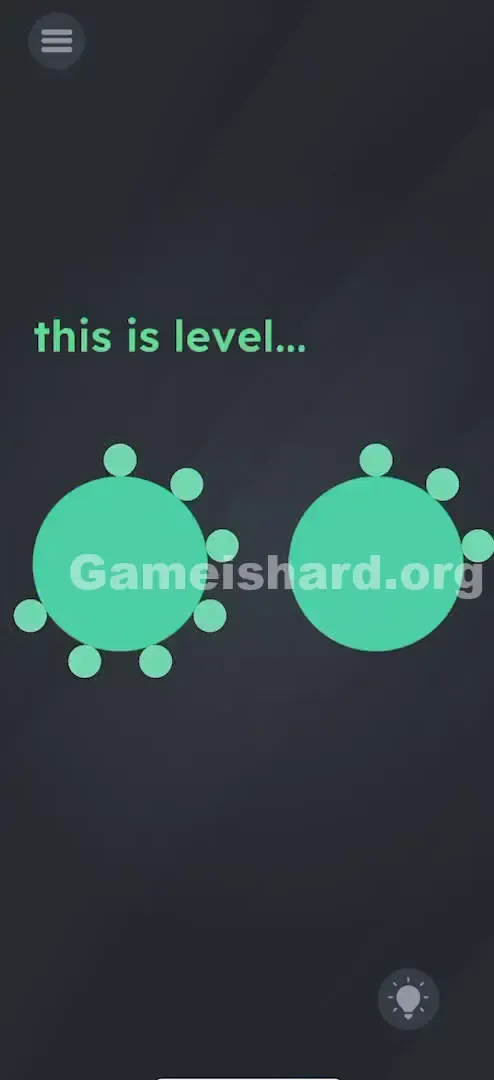
App updates can occasionally reorder puzzles. If this level 73 guide doesn’t match what’s on your screen, no stress! Flip through our All Levels index to locate your exact puzzle using its visual layout.
Level Overview
What Makes This Puzzle Tricky
You begin Level 73 with an almost empty screen—just the phrase "this is level..." hanging mid-sentence, plus two oversized blue circles facing you like silent sentinels. No keyboard. No buttons. No hints. It feels stripped bare—almost broken. But that emptiness is the challenge.
Your Goal
This level asks you to complete “this is level…” by entering the current level number—but there’s no obvious way to type or select digits. Instead, you must use the circles themselves as interactive inputs to reveal “73” visually.
Mechanics at Play
- Hidden Counters: Each circle functions as a tap-activated counter tracking how many times you’ve pressed it.
- Sequence Logic: Inputs follow standard left-to-right reading order—tens digit first, then ones digit.
- Delayed Feedback: Numbers don’t appear instantly—you must pause after tapping to trigger the display.
- Contextual Awareness: Success hinges entirely on knowing you’re on Level 73. No hidden math or riddles—just pure level awareness. It’s not about reflexes—it’s about recognizing where you are in the game.
What Appears on Your Screen
The screen is minimal: a dark grey background, the teal text “this is level...” centered near the top, and two large, identical blue circles dominating the center. They look inert—like static shapes, not controls. No animations. No labels. Just silence and space.
No extra elements clutter the view—no hidden objects, no sliders, no movable text. The menu icon sits top-left; the hint bulb rests bottom-right. That ellipsis at the end of the prompt? It’s waiting—for you to supply the answer.
Common Mistakes to Avoid
The Trap
The biggest hurdle is zero immediate feedback. Most games respond to taps with sound, animation, or color change—here, nothing happens at first. Players assume their taps aren’t registering and abandon the idea before giving it enough tries.
First Instincts That Fail
- Dragging: Trying to pull the circles together into shapes like “8” or infinity symbols.
- Shaking: Assuming the level needs “waking up” since tapping does nothing at first.
- Holding: Long-pressing hoping for a fill effect or color shift.
- Voice Commands: Yelling “seventy-three!” because the dots resemble speaker icons.
Player Reactions
I stared for over two minutes. Tried dragging the word “level” into the circles. Attempted double-tapping. Eventually tapped the left circle out of sheer impatience—and suddenly “1” popped up. I’d overshot and had to restart. Classic facepalm moment.
Step-by-Step Solution
Preparing the Move
You need to generate “73”. The left circle represents the tens digit (7); the right circle holds the ones digit (3).
Executing the Solution
- Focus on the Left Circle: Tap the left blue circle cleanly and deliberately exactly 7 times . Say each number aloud if needed—precision matters more than speed.
- Focus on the Right Circle: Tap the right blue circle exactly 3 times .
- Verification: Stop tapping completely. Wait one full second—the number 7 will appear on the left circle and 3 on the right.
If It Did Not Work
- Did you tap too many times? Overshooting (e.g., 8 taps) prevents completion. There’s no in-level reset—restarting is quicker than waiting for the counter to wrap.
- Did it skip a tap? Rapid-fire tapping can cause missed inputs. Keep taps distinct and rhythmic—not frantic.
- Nothing appeared? Either the count was off or you didn’t pause long enough. The display only triggers when both counters hit their exact targets—or after a brief delay.
Small Details That Matter
Accuracy isn’t about placement—the circles have wide tap zones—but about clean, intentional touches. The engine registers each tap on finger lift (“Touch Up”), not touch-down.
- Tap Center: Aim near the middle of each circle for reliable detection.
- Don’t Swipe: A slight drag during tap registers as movement—not a count. Lift straight up.
- The “Wait” Logic: Numbers often won’t show until you pause post-tapping. Don’t expect instant feedback—even “1” may take a beat to appear. Counting aloud (“one… two… three…”) helped me avoid doubt and stay accurate.
Why This Solution Works
At its core, this is a simple conditional check: If (Left_Count == 7 AND Right_Count == 3), then success. But the twist is hiding the counter UI—removing real-time feedback forces reliance on memory and rhythm.
It also leans heavily on meta-knowledge: the answer is literally your current level. Swap this same screen to Level 42, and the solution becomes “4” and “2”. The puzzle shifts with your progress—not the visuals.
Bonus Tip
For speed runs or replays:
- Glance at the level number before loading—or check the pause menu.
- Tap Left 7x .
- Tap Right 3x .
- No need to wait between taps—just ensure each is separate and registered. Skip dragging the text entirely—it’s decorative, not interactive.
Alternative Attempts on Game Is Hard Level 73 (What Doesn’t Work, and Why)
- Dragging the circles: They’re fixed UI elements—not draggable objects.
- Alternating taps (left-right-left): Makes counting error-prone—finish one digit fully before moving on.
- Shaking the phone: Gyro input is disabled here—zero effect.
- Pinching or zooming: Multi-touch gestures aren’t supported.
- Waiting passively: This isn’t a timer-based puzzle—action is required.
- Tapping blank areas: The space below the circles has no function.
Common Mistakes for Game Is Hard Level 73
- Miscounting: Hitting 6 or 8 instead of 7 on the left circle is the #1 issue.
- Skipping order discipline: While technically possible to tap right first, left-to-right reduces mental load.
- Overcomplicating: Searching for hidden clues or math instead of accepting “73” as literal.
- Treating circles like dials: Sliding or rotating won’t work—only discrete taps register.
- Rage-tapping: Fast, uncontrolled taps guarantee miscounts and restarts.
Pattern Recognition: How to Spot This Trick in Future Game Is Hard Levels
The Tell
Spot two or more identical geometric shapes (circles, squares, triangles) placed side-by-side with no other interactables? That’s a strong signal of a tap-counter puzzle—especially if they resist dragging.
The Habit
When a level poses “What level is this?” or “Complete the sentence,” always check your actual level number first—pause menu, header, or loading screen. The answer is almost always the number itself—no decoding needed.
Game Is Hard Level 73 FAQ (Short, Useful)
Q: I tapped 7 and 3 times but nothing happened in Game is hard Level 73? A: You likely miscounted or tapped too fast for one input to register. Pause for a second—if still blank, restart and tap slower.
Q: Can I tap the right circle first in Game is hard Level 73? A: Yes—the code usually accepts either order—but left-to-right matches natural reading flow and cuts down on errors.
Q: What if I go over the number in Game is hard Level 73? A: Tapping 8 times means restarting is faster than waiting for the counter to cycle back to zero (if it even does).
Q: Is there a hidden clue in the text in Game is hard Level 73? A: No. “this is level...” is purely the prompt—the ellipsis signals missing input, not a riddle.
More Game Is Hard Solutions
Hit a wall on another puzzle? Our guides cut straight to the solution—no filler, no fluff. Just what you need to move forward and feel clever again. Share this with anyone stuck endlessly tapping their screen!