App updates can sometimes shift puzzle order. If this level 76 walkthrough doesn’t match what you’re seeing, no stress! Browse our All Levels directory to locate your exact puzzle using its visual layout.
Target the dark area below the visible wires to find the loose parts.
Level Overview
What Makes This Puzzle Tricky
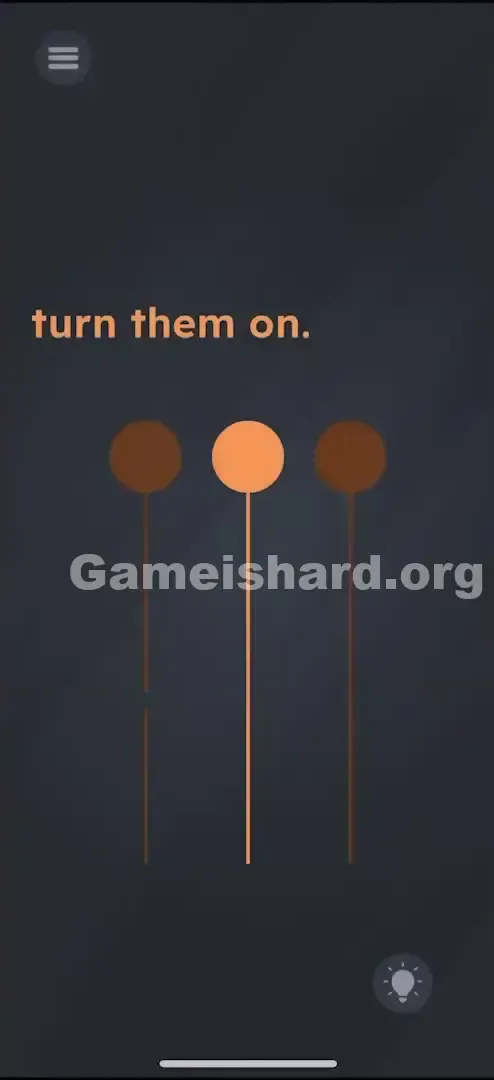
It’s pitch black. Three pendant lights hang silently — only the center one glows. The prompt reads “turn them on,” but tapping the bulbs does nothing. That frustrating moment when you realize the problem isn’t the lamp itself — it’s the wiring behind it. Classic Game is hard misdirection.
Your Goal
Your goal is to restore power to both unlit lamps by repairing their broken circuits. The tools you need aren’t front-and-center — they’re cleverly concealed just beyond the visible frame. This isn’t about logic or timing; it’s a hands-on repair task disguised as a simple lighting puzzle.
How the Game Responds
- Hidden Object: Key components remain invisible until you move elements into view.
- Drag & Drop: You must manually reposition parts to bridge gaps.
- Rotation: One component must be turned to match the wire’s orientation before it locks in.
- Precision Snapping: Fragments must land directly over breaks to complete the circuit.
It’s not a typo — it’s a minimalist circuit board masquerading as an illustration.
What Appears on Your Screen
Let’s map the scene: a dark grey backdrop with “turn them on.” centered at the top.
Beneath it, three identical pendant lights dangle from thin wires.
- The Left Lamp: Dark (unlit). Its wire appears intact — but looks unusually thin near the base.
- The Middle Lamp: Bright orange (lit). A working reference point — no action needed here.
- The Right Lamp: Dark (unlit). Its wire seems slightly truncated compared to the others.
No switches. No buttons. Just wires, bulbs, and silence.
Common Mistakes to Avoid
The Trap
“UI blindness” strikes again. Most players assume the image is static — that everything important fits within the screen. But the solution lives outside the frame. The game tricks you into treating the display as fixed, when in fact, scrolling reveals the real puzzle.
First Instincts That Fail
- Tapping the Bulbs: The natural first move — tap left, tap right. Nothing happens.
- Shaking the Device: A common reflex for “broken” puzzles — but shaking won’t reconnect severed wires.
- Tilting the Phone: Gravity-based thinking feels logical, but the bulbs won’t swing into place or share power.
Player Reactions
I wasted nearly a minute trying to drag light from the middle bulb to the others — convinced I could “transfer” electricity. Felt brilliant… until zero response. Then, while swiping up absentmindedly, I spotted a loose wire fragment sitting idle at the bottom like forgotten hardware. Instant facepalm.
Step-by-Step Solution
Preparing the Move
Set aside the bulbs. Focus instead on continuity — the issue lies in incomplete wiring. To uncover the missing pieces, you’ll need to expose the lower portion of the scene.
Executing the Solution
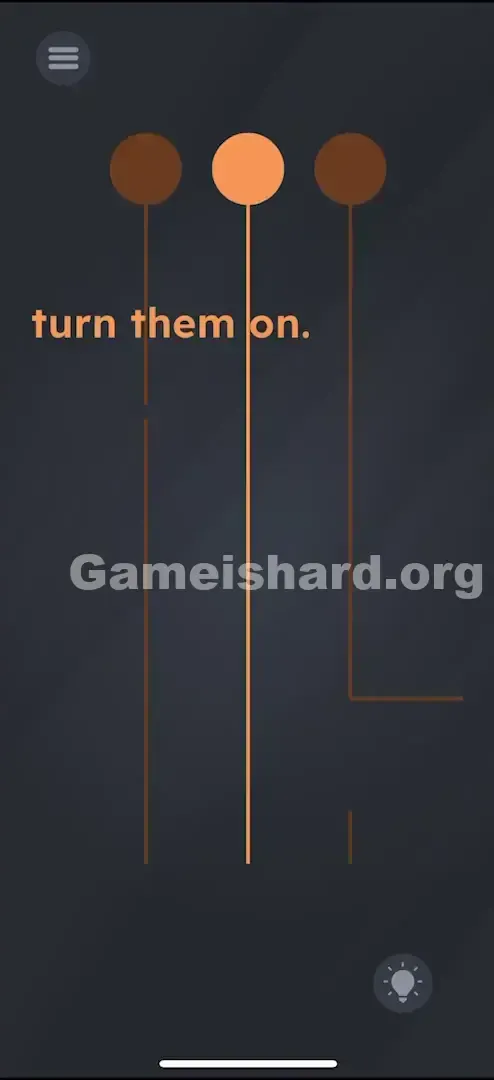
- Drag Up: Touch the background or space near the lamps and pull the entire view upward. You’re not moving the lights — you’re revealing hidden content beneath them.
- Locate the Parts: Once scrolled down, two disconnected wire segments appear — one small and straight under the left lamp, another L-shaped near the right lamp.
- There is a small, straight segment under the left light.
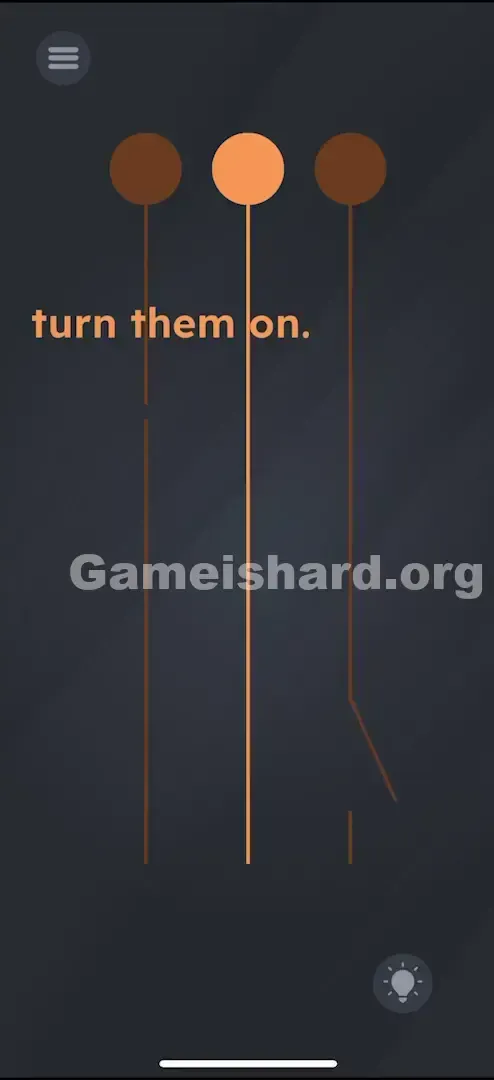
- There is an L-shaped (or slightly bent) segment near the right light.
- Fix the Left Wire: Tap and drag the tiny vertical piece upward until it snaps into the break in the left lamp’s wire. The bulb lights instantly.
- Fix the Right Wire: Tap the L-shaped segment. Crucial Step: Tap once or twice to rotate it upright so it aligns cleanly with the hanging wire above. Then drag it up to seal the gap in the right lamp’s connection.
- Crucial Step: Tap it once or twice to rotate it until it aligns vertically with the wire above.
- Drag it up to connect the gap in the right wire.
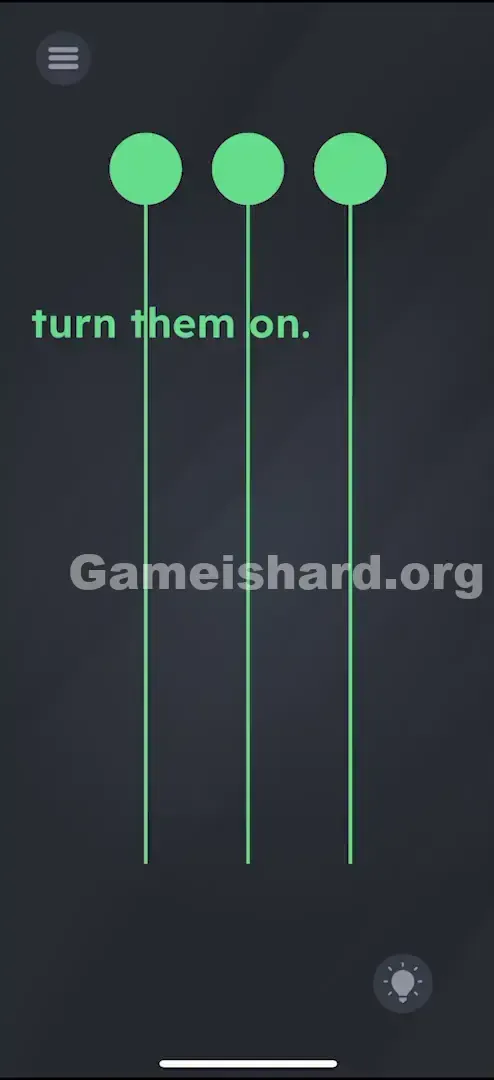
- Verification: With both gaps repaired, current flows freely — all three bulbs blaze orange. Level complete.
If It Did Not Work
- Can't find the pieces? You haven’t scrolled far enough. Pull the lamps almost to the top edge of your screen.
- Right wire won’t lock? The rotation is off. It must mirror the wire’s vertical path — tap to adjust orientation.
Small Details That Matter
Accuracy matters — but not perfection.
- The Snap: You don’t need pixel-perfect placement. The game uses magnetic alignment — get close, and it auto-snaps.
- The Left Piece: It’s minuscule. Keep your finger out of the way so you can see the gap and confirm the snap.
- Drag Speed: Move deliberately. Flinging pieces risks losing them off-screen or behind interface elements.
Think of it like delicate soldering — slow, steady, and precise.
Why This Solution Works
This level tests spatial reasoning and object permanence.
- Hidden Workspace: The puzzle extends beyond your viewport. Just because part of the wire disappears off-screen doesn’t mean it ends there.
- Component Assembly: Unlike earlier levels relying on taps or swipes, this demands physical assembly — combining distinct objects to activate a third (the lamp).
It reinforces Game is hard’s core idea: every element — even unseen ones — is part of the interactive environment.
Bonus Tip
For speed or efficiency:
- Swipe Up immediately to uncover the hidden floor area.
- Tap the Right Piece to rotate it vertically.
- Drag it to the right wire gap.
- Drag the tiny Left Piece to the left wire gap.
- Done.
Skip bulb-tapping entirely — they’re status indicators, not controls.
Alternative Attempts on Game Is Hard Level 76 (What Doesn’t Work, and Why)
Here are dead ends we tested — so you don’t waste time:
- Dragging the lit bulb toward others: Electricity doesn’t transfer like fire — no “light sharing.”
- Multitouching all bulbs: Holding them simultaneously triggers nothing — no surge, no reset.
- Swiping across the middle wire: Wires aren’t interactive for cutting or splitting.
- Shaking the device: The breaks are structural, not loose connections — motion changes nothing.
- Typing “ON”: The text is purely instructional — not editable or responsive.
- Boosting screen brightness: A clever meta-move, but the game ignores system-level settings.
Common Mistakes for Game Is Hard Level 76
- Skipping rotation on the Right Piece: Dropping the L-shape without aligning it causes rejection. Tap to rotate first.
- Overlooking the Left Piece: Its size makes it easy to miss — scroll fully down to spot it.
- Dragging bulbs instead of wires: Bulbs are anchored — you bring the wire to them, not vice versa.
- Waiting for animation: No blinking, pulsing, or timed cues — it’s a static state until repaired.
- Dismissing the “L” as junk: Its bend is intentional — you must straighten it to use it.
Pattern Recognition: How to Spot This Trick in Future Game Is Hard Levels
The Tell
If any object hangs from the top or trails off-screen — especially wires, strings, or pipes — drag toward that direction. Off-screen space often holds critical parts.
The Habit
On load, test all four directions (Up, Down, Left, Right). If the view shifts, treat that newly revealed area as prime real estate for solutions.
Game Is Hard Level 76 FAQ (Short, Useful)
Q: I can't find the wire pieces in Game is hard Level 76! A: Drag the background upward firmly. They’re hidden just below the visible screen edge.
Q: The right wire piece won't stick in Game is hard Level 76. A: It is likely rotated wrong. Tap it once or twice so it aligns vertically with the hanging wire, then drag it to the gap.
Q: Can I fix the wires in any order in Game is hard Level 76? A: Yes. You can repair the left or right circuit first — success depends only on both being complete.
Q: Is there a trick to the middle light in Game is hard Level 76? A: No. It’s purely a visual cue showing what a powered lamp looks like — not part of the solution.
More Game Is Hard Solutions
That’s how you reignite all three lamps in Game is hard Level 76. The game thrives on hiding essential pieces just outside your field of view. If this walkthrough helped you patch those wires without rage-quitting, pass it along to friends still tapping futilely at dark bulbs. We keep every guide concise, actionable, and built for quick wins. Head to the main site for your next challenge — because Game is hard always has another trick up its sleeve.