App updates can sometimes shuffle the order of puzzles. If this level 72 walkthrough doesn't match your screen, don't worry! You can browse our All Levels guide to find your exact puzzle by its picture.
You need to physically combine the text words to generate the missing pieces.
Level Overview
What Makes This Puzzle Tricky
You’re faced with a screen that feels unfinished—four empty outlines sit waiting, but only one blue box appears in your inventory. It’s easy to assume a glitch or a hidden clue is missing. You might tap frantically or swipe across blank space, hoping something appears. But no extra boxes will drop from nowhere—the trick lies elsewhere.
Your Goal
Your mission is straightforward: fill all four outlined slots with solid blue squares. The catch? You start with just one. To succeed, you’ll need to craft the rest using what’s already on screen—not search for hidden items.
Key Mechanics involved
- Text Dragging: Words aren’t static labels—they’re draggable game objects.
- Object Spawning: Merging two elements triggers new item generation.
- Placement Logic: Each outline must be fully occupied for the level to register as complete.
- Linguistic Deconstruction: Interpreting the phrase “more boxes” not as a question—but as a literal instruction to produce more boxes. It’s not a typo. It’s your toolkit.
What Appears on Your Screen
Let’s map out exactly what’s in front of you—if you’ve just stepped away frustrated, here’s your visual reset:
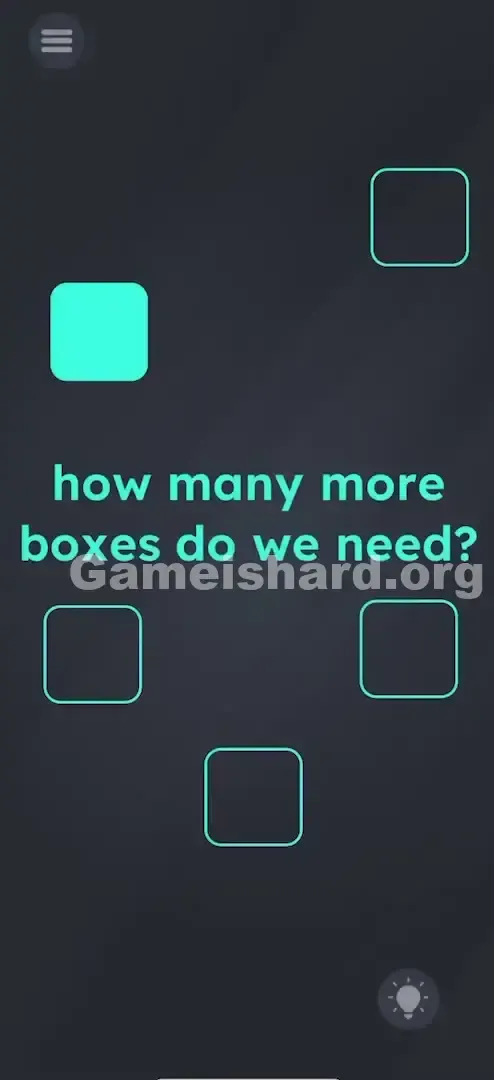
- The Text: Centered in teal font, the prompt reads: "how many more boxes do we need?"
- The Inventory: Just one solid blue square floats on the left side of the screen.
- The Targets: Four empty square outlines are scattered—one top right, one middle left, one middle right, and one bottom center.
- The Background: Sleek dark gray, consistent with the game’s minimalist style.
- The UI: Menu icon in the top-left corner, hint bulb in the bottom-right. Importantly, there are no extra buttons, no “+” icons, and no hidden toggles—just text and shapes.
Common Mistakes to Avoid
The Trap
The real hurdle is “inventory panic.” With four blanks and one box, your instincts scream stretch, duplicate, reuse. Many players rapidly drag the same square between outlines or tap it repeatedly, hoping for a multiplier effect. That won’t work—the puzzle isn’t about stretching resources. It’s about creating them.
First Instincts That Fail
Some try zooming in on the blue square to enlarge it. Others shake their device, convinced loose boxes are rattling around inside. A few even attempt dragging the outlines themselves—stacking them over the single box like puzzle layers. But the game only allows movement for specific interactive elements—and the text is one of them.
Player Reactions
My first encounter with level 72 lasted over two minutes of idle tapping. I was convinced I’d missed a gesture or a secret tap sequence. Then my finger accidentally brushed the word “more,” and it moved. Lightbulb moment—and instant facepalm.
Step-by-Step Solution
Preparing the Move
Pause for a second. Don’t scan the outlines—scan the sentence: "how many more boxes do we need?" Focus on “more” and “boxes.” Those two words hold your solution.
Executing the Solution
- Place the First Box: Grab the lone solid blue square. Drag and drop it into any of the four empty outlines—it’ll snap in cleanly. One slot filled, three remain.
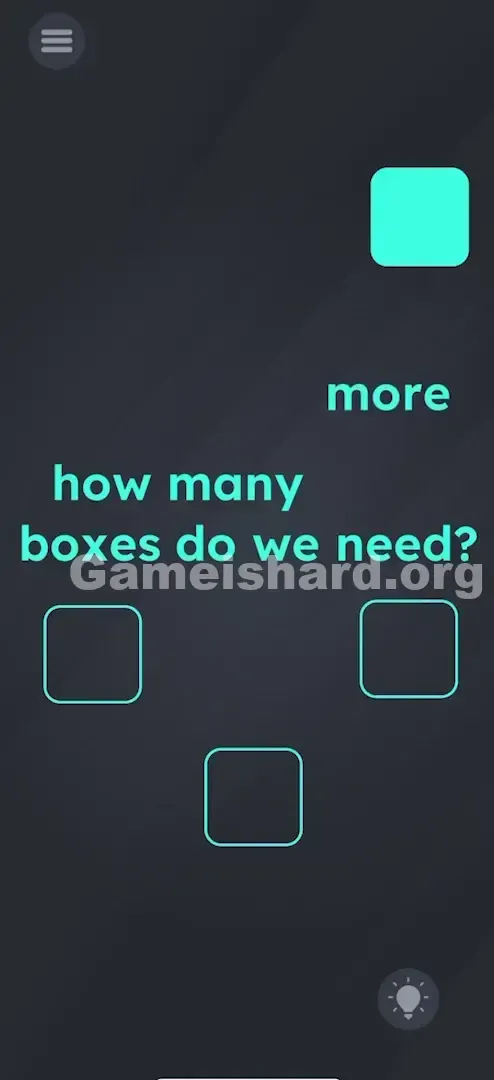
- Create Supplies: Tap and hold on the word "more" in the sentence.
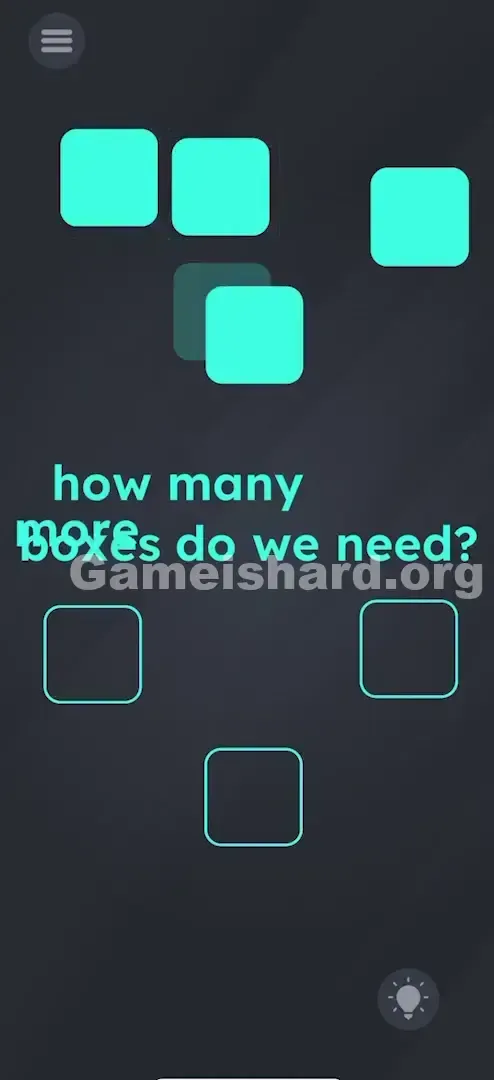
- Combine Text: Drag "more" directly over the word "boxes."
- Watch the Magic: When "more" lands on "boxes," three fresh blue squares instantly appear on screen.
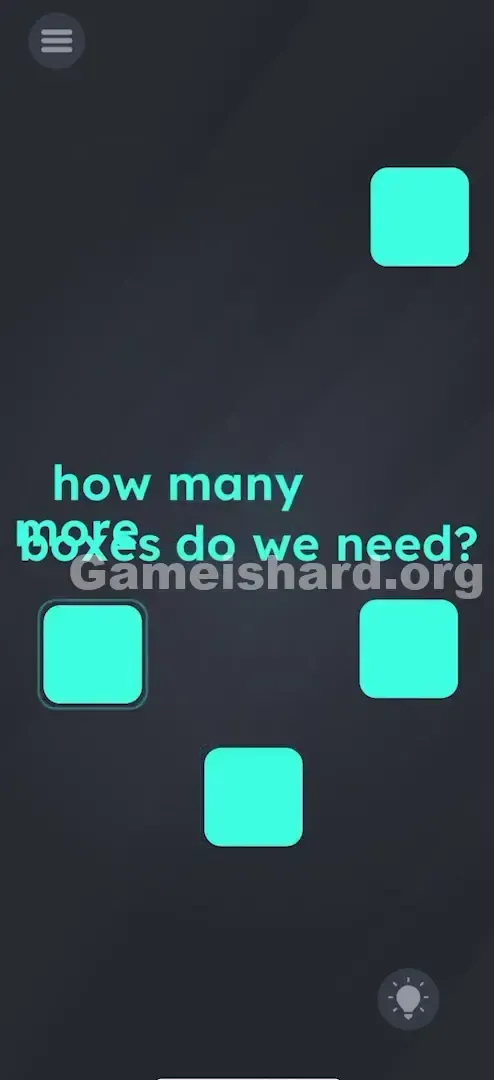
- Finish the Job: Drag each of those three new squares into the remaining three empty outlines—one at a time.
If It Did Not Work
- It didn't spawn: Confirm you're dragging "more" onto "boxes"—not the reverse. Order matters in this interaction.
- The box won't stick: Precision isn’t strict—you just need the center of the blue square mostly within the outline’s boundary. Half-in, half-out won’t register.
- I accidentally moved the text too far: If words scatter and clutter the screen, restart (top-left button). It’s quicker than reassembling a jumbled sentence.
Small Details That Matter
Success can hinge on subtle touch accuracy—especially on smaller screens or with larger fingers. Here’s what fine-tunes the action:
- The Drop Zone: Aim to drop "more" squarely over the center of "boxes." Grazing the edge may fail to trigger the spawn.
- Visual Feedback: Look for a small bounce or pop animation when the new boxes appear. If nothing happens, lift and try again.
- Snap Mechanics: Blue squares loosely adhere to outlines—they don’t magnetically lock, but as long as the square’s center sits inside the outline’s border, it counts.
- I fixed it by... moving the first box to the top-right outline right away. Clearing the central text area made dragging "more" onto "boxes" much smoother.
Why This Solution Works
This level hinges on literal language play. You’re asked how many more boxes you need—so the game gives you the means to make them. By merging “more” with “boxes,” you activate a built-in production mechanic.
It reinforces a core principle for the rest of Game is Hard: text isn’t just instructions—it’s active inventory. Like keys or levers in classic adventure games, words here have physics, collision, and interactivity. The prompt isn’t telling you what to do—it is the toolset.
Bonus Tip
For speed runs or repeat attempts, use this optimized flow:
- Use your right thumb to place the starting box in the bottom outline.
- At the same time, use your left thumb to drag "more" onto "boxes."
- As soon as the three new boxes appear, quickly distribute them to the remaining outlines.
- Skip re-reading the prompt—it’s not needed once you know the trick.
- Avoid dragging "boxes" onto "more"—it’s slower and less reliable.
Alternative Attempts of Game Is Hard Level 72 (What Doesn’t Work, and Why)
Here’s a list of dead ends—so you skip them entirely:
- Dragging "boxes" into the outlines: The game expects shapes, not text. Won’t register.
- Tapping "more" repeatedly: It’s not a button—it only responds to drag-and-drop.
- Shaking the phone: Works in earlier levels (like Level 12), but not here.
- Drawing inside outlines: Finger-drawing isn’t supported on this level.
- Dragging outlines toward the box: Outlines are fixed background elements—non-movable.
- Waiting passively: Nothing unlocks over time. Action is required.
- Splitting "boxes" apart: The word is a single draggable unit—no letter-level manipulation.
Common Mistakes for Game Is Hard Level 72
- Overlooking the text: Fixating on shapes while ignoring the sentence that holds the answer.
- Dragging the wrong word: Attempting to move "need," "do," or "we" instead of "more."
- Forgetting the first box: Spawning three new squares but leaving the original unplaced—four slots must all be filled.
- Misplacing boxes: Dropping them near outlines instead of into them.
- Restarting too early: Assuming a bug when the spawn hasn’t triggered yet—just try the word combo again.
- Overcomplicating it: Searching for math patterns (e.g., letter counts) when the solution is purely physical interaction.
Pattern Recognition: How to Spot This Trick in Future Game Is Hard Levels
The tell
If a level shows a clear shortage—like “feed 3 dogs” with only 1 bone—immediately inspect the text. Missing items are usually embedded in or generated from the prompt itself.
The habit
Build a “text check” reflex: at the start of every level, lightly tap and drag each word. If it moves, it’s part of the solution. If it doesn’t budge, it’s decorative. This 2-second habit saves massive time later on.
Frequently Asked Questions of Game Is Hard Level 72 (Short, Useful)
Q: Can I spawn more than three boxes in Game is hard Level 72? A: No. The script spawns exactly three—enough to fill the remaining open slots. After spawning, the word interaction locks out.
Q: Does it matter which word I drag in Game is hard Level 72? A: Yes—dragging the modifier ("more") onto the noun ("boxes") is the designed trigger.
Q: Is there a specific order to fill the boxes in Game is hard Level 72? A: No. Fill any outline first—top, bottom, or side. Completion is based on total count, not sequence.
Q: Why isn't the text moving when I touch it in Game is hard Level 72? A: You may be tapping the gaps between letters. Target the colored pixels of the letters themselves for best response.
More Game Is Hard Solutions
That’s how you conquer Game is hard Level 72. We write these guides so you get that satisfying “Aha!” without slogging through bloated videos. If this saved you from stress-scrolling or hair-pulling, share it with a friend stuck on the same puzzle. Next level? Expect even more clever curveballs.