

App updates can sometimes shuffle the order of puzzles. If this level 77 walkthrough doesn't match your screen, don't worry! You can browse our All Levels guide to find your exact puzzle by its picture.
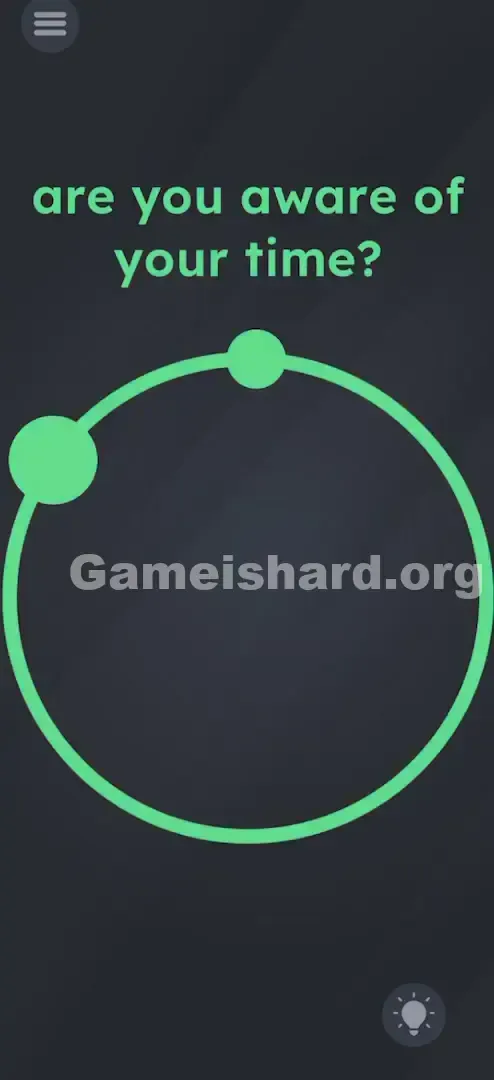
You are treating the circle on the screen like an analog clock face.
Level Overview
What Makes This Puzzle Tricky
At first glance, this level feels like a glitch—not a puzzle. You’re met with just a plain circle, a single dot, and the cryptic phrase “are you aware of your time?” It looks more like minimalist design than gameplay. But it’s not decorative—it’s functional. The game isn’t broken; it’s quietly nudging you to step outside the app and check reality—specifically, the time in your phone’s status bar.
Your Goal
You’re not typing or tapping your way out—you’re manually calibrating a clock. There are no numerals, no ticking hands, and no menu to open. Your job is to position two dots on the circle to replicate the current time—exactly as it appears on your device’s system clock.
Key Mechanics
- Hidden UI Elements: The “hands” are just draggable dots—no visual cues until you interact.
- Real-World Data: The answer lives outside the game—in your phone’s internal clock.
- Drag & Drop: Interaction is tactile; you must grab and reposition each dot.
- Precision: Rough placement often works, but accuracy helps—especially near minute boundaries. It’s less a riddle and more a real-time interface test.
What Appears on Your Screen
To someone walking into the room, it’d seem oddly bare.
- The Text: At the top, in familiar blue font, reads: are you aware of your time?
- The Object: A clean, unfilled circle sits centered on screen.
- The Detail: A light-blue dot rests at the top edge—usually aligned with the 12 o’clock mark.
- The Trap: That dot looks fixed, like part of the background—but it’s interactive. And there’s actually a second dot hidden beneath it.
- The Background: A muted, textured slate grey—zero distractions, zero hints beyond the question itself.
Common Mistakes to Avoid
The Trap
This level exploits UI expectation bias. We expect clocks to look like clocks—numbers, hands, tick marks. Instead, you get abstraction. Players instinctively shake the screen, tap endlessly, or wait for something to happen—missing that the circle is the clock face, and the dots are the hands.
First Instincts That Fail
- Waiting: Many sit still, assuming “aware of your time” means waiting for a timer—no countdown exists.
- Adjusting system time: Some quit the app to change their phone’s clock, thinking the game will sync—unnecessary and ineffective.
- Tapping only: A quick tap won’t do it. You need to press and drag—not just select.
Player Reactions
My first reaction? Confusion. I stared for over a minute, convinced it was a loading screen or a trick. Then I tapped—and the dot moved. Pulling it aside revealed the second dot underneath. Honestly? Felt silly—but that’s how this level works.
Step-by-Step Solution
Preparing the Move
Glance at your phone’s status bar—or any nearby clock—and note the exact time. Example: if it’s 4:30, that’s your target.
Executing the Solution
- Locate the Hands: Tap and hold the visible dot on the circle. You’ll discover two dots—one larger (hour hand), one smaller (minute hand).
- Move the Hour Hand: Drag the bigger dot to where the hour hand would point on a real analog clock (e.g., for 4:00, aim for the bottom-right quadrant).
- Move the Minute Hand: Drag the smaller dot to the corresponding minute position (e.g., for 4:30, place it straight down at the 6 o’clock spot).
- Hold for Victory: Release both dots when positioned. The level clears instantly.
If It Did Not Work
If nothing happens, double-check your alignment.
- Check AM/PM: Not needed—positions repeat every 12 hours.
- Precision: For times like 4:37, aim between the 7 and 8 markers—not just the nearest number.
- The “Hour” Drift: Remember—the hour hand moves gradually. At 6:50, it’s nearly at the 7, not pinned to the 6. Adjust accordingly.
Small Details That Matter
Touch responsiveness matters here.
- The Snap Zone: The game accepts slight variance—but too far off (e.g., 85° instead of 90° for 3:00) won’t register.
- Overlapping Dots: They often start stacked at 12 o’clock. Slide one away first to tell them apart.
- My Fix: I kept failing because I placed the hour hand rigidly on the hour number. Real clocks don’t work that way—if it’s 2:45, the hour hand belongs three-quarters toward the 3.
Why This Solution Works
This level hinges on external data translation: the answer isn’t encoded in the level—it’s pulled from your real-world context and mapped back onto the interface.
It also tests skeuomorphic recognition—your ability to see a blank circle + dot + “time” and instantly interpret it as a clock, even without traditional markers.
Bonus Tip
For speed or replay:
- Check Time First: Don’t touch anything until you’ve confirmed the current time.
- Separate the Dots: Immediately drag one aside to distinguish hour from minute.
- Set Minutes First: Easier to nail the minute hand’s position, then fine-tune the hour hand.
- Aim for Quadrants: Exact degrees aren’t always required—getting the general zone right usually suffices.
Alternative Attempts of Game Is Hard Level 77 (What Doesn’t Work, and Why)
- Shaking the phone: Not a physics-based puzzle—nothing dislodges or falls.
- Waiting for movement: No auto-animation—the hands only move when you drag them.
- Typing numbers: No keyboard appears; no input field exists.
- Setting to 12:00: Only works if it’s actually noon or midnight—otherwise, it fails.
- Dragging the text: “Time” is a clue, not an interactive element.
Common Mistakes for Game Is Hard Level 77
- Swapping hands: Using the big dot for minutes and small for hours.
- Ignoring hour drift: Placing the hour hand directly on the number—even at 6:55, it should be almost at the 7.
- Treating it as a timer: No countdown or delay involved.
- Hunting for hidden numbers: No secret digits hiding in shadows or textures.
- Guessing loosely: Vague placement rarely triggers completion—aim deliberately.
- Using outdated time: If your phone just switched time zones, use the displayed time—not what you think it should be.
Pattern Recognition: How to Spot This Trick in Future Game Is Hard Levels
The Tell
Any level asking about you—“your battery,” “your name,” “your time”—means the answer lives outside the app. It’s a prompt to consult your device, not decode pixels.
The Habit
See a circle + dot + personal question? Assume it’s a real-world interface. Check your status bar first—before scanning for clues, tapping randomly, or overthinking the art.
Game Is Hard Level 77 FAQ (Short, Useful)
Q: Do I need to change my phone's time to solve Level 77? A: No. Just read the current time and match the hands to it. Changing system settings is overkill.
Q: Which dot is which in Game is hard Level 77? A: The bigger dot is the Hour hand. The smaller dot is the Minute hand.
Q: I set the time correctly but it won't finish in Game is hard Level 77? A: Try adjusting the hour hand slightly forward. If it's half past the hour, the hour hand should be halfway between the two "numbers."
Q: Does it use 24-hour time or 12-hour time in Game is hard Level 77? A: Analog clocks are always 12-hour cycles. Just match the visual position. 14:00 is the same position as 2:00.
More Game Is Hard Solutions
If you got stuck on the clock, wait until you see what they do with the "volume" puzzles later. These guides cut the fluff so you can get back to feeling smart. If this helped you stop staring at a blue circle, send the link to a friend who is also stuck. Good luck with Game is hard Level 28 .