


App updates can occasionally reorder puzzles. If this level 287 guide doesn’t match what’s on your screen, no problem! Head to our All Levels page to locate your exact puzzle using its visual layout.
You’re essentially tapping the blank areas where missing numbers logically belong—making them appear on demand.
Level Overview
What Makes This Puzzle Tricky
You tap 4, scan for 5—and find only darkness. The game jumps straight to 6. Most mobile puzzles give you all elements upfront, even if they’re buried or scrambled. Not here. Level 287 deliberately hides critical interaction points, making the interface feel incomplete—or even deceptive.
Your Goal
The goal is straightforward but easy to misstep: tap numbers in ascending order from 1 to 11. The challenge lies in maintaining perfect sequence fidelity while working with invisible elements the UI refuses to show.
This level hinges on three key mechanics:
- Hidden object: The missing digits are present—they’re just invisible.
- Sequence timing: One wrong tap order resets the entire chain.
- UI trap: You must tap empty space—not a button—to progress. It’s not a bug. It’s intentional design.
What Appears on Your Screen
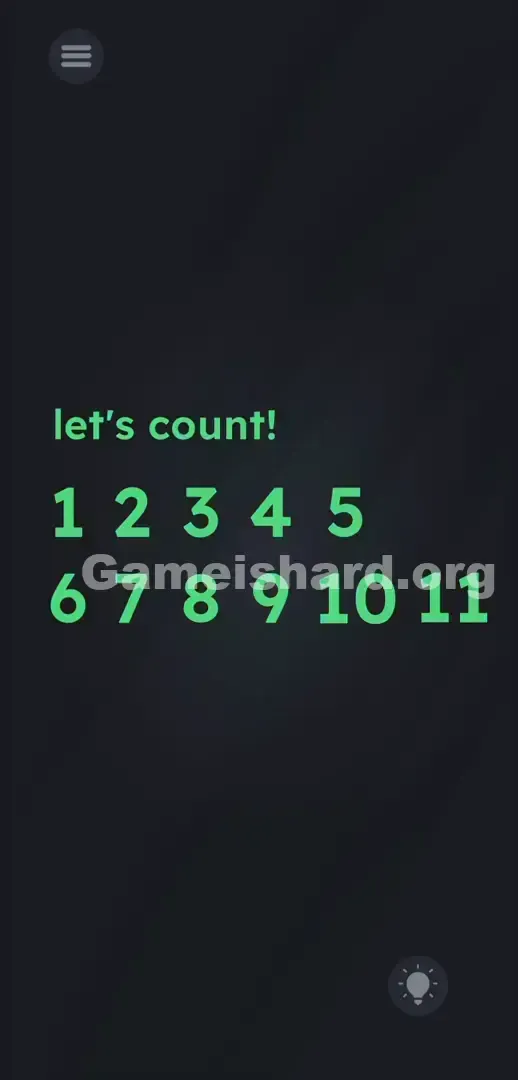
The layout resembles a hastily assembled quiz sheet. A deep, shadowy gradient fills the background. At the top, the prompt “let's count!” appears in bold teal lowercase.
Below it, two rows of large teal numerals sit side by side. The top row shows 1 2 3 4 —and ends abruptly in a wide, unmarked gap after the 4.
The bottom row starts aligned beneath the first digit and reads 6 7 8 9 10 —then cuts off into another stretch of empty darkness after the 10.
Standard interface icons anchor the corners: a three-line menu icon sits top-left; the lightbulb hint button rests bottom-right. Nothing animates or shifts. The glaring disconnect? Two gaping holes in an otherwise clean numerical progression.
Common Mistakes to Avoid
The Trap
UI conditioning works against you here. Gamers instinctively interact only with visible elements—glowing buttons, outlined objects, highlighted zones. Blank space registers as inert background. Level 287 weaponizes that reflex, making players assume 5 and 11 are truly absent—not cleverly concealed in plain sight.
First Instincts That Fail
Many waste time trying flawed approaches: dragging the “let's count!” text into the gaps (no effect), merging digits like 2+3 to create 5 (nothing happens), or shaking the device hoping numbers fall from above (zero response).
Player Reactions
I spent nearly three minutes dragging the hint lightbulb across the void, convinced it would “light up” the missing digits. Total facepalm moment. Then—by accident—I tapped the space beside 4 while swiping, and poof: the 5 appeared. Sometimes brute-force tapping pays off.
Step-by-Step Solution
Preparing the Move
Put down any dragging impulses. Hold your phone steady. Study the top row spacing: the gap after 4 is precisely sized for one more digit. Same goes for the gap after 10 on the bottom row. Those blank zones are your targets—just invisible.
Executing the Solution
- Tap the visible number 1 .
- Tap 2 , then 3 , then 4 in rapid sequence.
- Tap directly into the dark, empty void immediately to the right of the 4 . A bright teal 5 will instantly materialize.
- Without pausing, drop down to the bottom row and tap the visible 6 .
- Continue the sequence cleanly: tap 7 , 8 , 9 , and 10 .
- Finally, tap the empty dark space directly to the right of the 10 . The hidden 11 will appear, triggering the level complete screen.
If It Did Not Work
- The sequence keeps resetting: You’re tapping out of order. Tapping 6 before revealing 5 breaks the chain—restart from 1 .
- I tap the space, but nothing happens: Your aim is slightly off. The 5’s hitbox aligns perfectly with the top row’s horizontal line. Tap dead center—not higher or lower.
- The game froze: If taps stop registering entirely—especially on the visible 1 —force-close the app and relaunch. Idle time can cause temporary touch input lag.
Why This Solution Works
This stage tests whether you’ll follow logic over appearance. It sets a firm rule (“count up”)—then violates visual expectations by hiding essential steps.
Its core idea is negative UI: the instruction is a red herring; the real puzzle lives in the emptiness. We expect developers to draw interactive elements—but here, function exists without form. You know 5 belongs there. You know 11 caps the sequence. The level demands action based on reasoning—not just sight. Treating blank space as a functional element is a skill you’ll need again soon.
Bonus Tip
Skip overcomplicating the void. For replays or speedruns, rely on rhythm and repetition.
- Ignore the top text prompt—don’t touch or drag it.
- Tap 1 through 4 at a consistent pace.
- Treat the gap right of 4 like a permanent, invisible button—tap it confidently.
- Flow smoothly into tapping 6 through 10 .
- Tap the gap right of 10 to seal the win.
- Keep your thumb aligned with the horizontal centerline of each number row.
Frequently Asked Questions
Why did the level stop registering my taps? You likely tapped out of order—hitting 6 before unlocking 5 breaks the counting flow. Restart from 1 to reset.
Where exactly is the hidden 5 located? It sits on the same horizontal plane as the top row—just tap the dark space immediately to the right of the 4 .
Do I need to drag any numbers together to solve math equations? No. This level requires zero arithmetic or dragging—only precise, ordered taps.
Is there a hidden 12 somewhere off-screen? No. Revealing 11 triggers the completion screen instantly. No scrolling, swiping, or searching beyond what’s visible.
More Game Is Hard Solutions
Stuck on the next challenge? Our guides cut past fluff and deliver only the actionable mechanics you need—fast, focused, and frustration-free. Share this Game is hard Level 287 walkthrough with friends on Discord or Reddit so they stop staring at blank spots. Tap with confidence, trust the pattern, and move on to the next test.