App updates can sometimes shift puzzle order. If this level 283 walkthrough doesn’t match what’s on your screen, no stress! Flip through our All Levels directory to locate your exact puzzle by image.
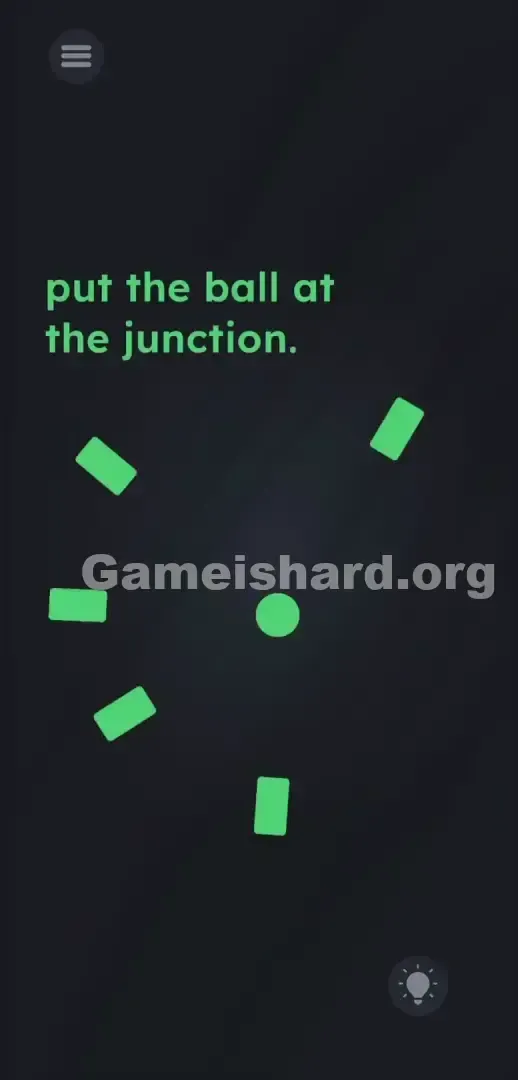
Drop the ball directly into the empty negative space in the middle of the screen to form an invisible crosshair.
Level Overview
What Makes This Puzzle Tricky
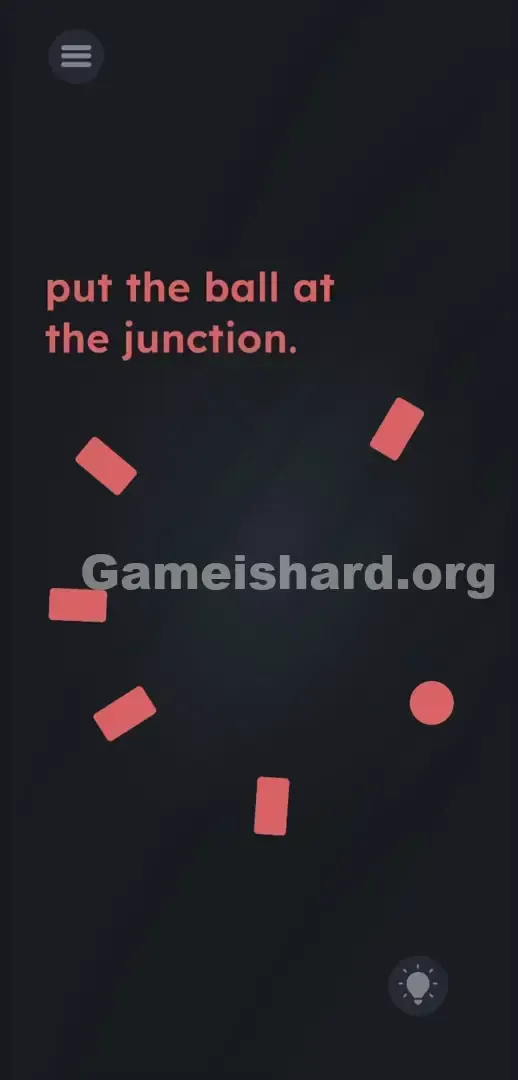
You start the level. The instruction says “Put the ball at the junction.” But there’s no visible junction—just isolated red shapes floating in darkness. You’re looking at an unfinished sketch. Game designers love subverting expectations—and level 283 does just that by withholding the very thing it asks you to find. It tells you to go somewhere, but refuses to show you the destination.
Your Goal
Pinpoint where the hidden junction lives—and place the ball there. This isn’t about trial and error; it’s about reading spatial cues. Those red rectangles aren’t random clutter. They’re deliberate signposts pointing straight to the answer—if you know how to follow them.
Here are the mechanics designed to slow you down on this stage:
- Hidden object: The target intersection isn’t drawn—it exists only in your mind.
- UI drag: You must manually reposition the ball across the playfield.
- Logic trap: The game counts on your brain glossing over the angles of the rectangles. It’s not a mistake. It’s intentional design.
What Appears on Your Screen
The layout is stripped-down and clean: black background, subtle red elements, almost like modern art.
- Top Left: Standard three-line menu toggle.
- Top Center: Instructional text—"put the ball at the junction."
- The Center Area: Five short, pale red rectangular blocks arranged loosely in a wide, open circle. Each is rotated at a unique angle.
- Right Side: A solid red ball sitting just outside the circular formation, near its edge.
- Bottom Right: Circular lightbulb icon for buying hints. The spacing feels off at first glance. All five rectangles tilt inward—but stop short, leaving a large, obvious void right at the screen’s geometric center.
Common Mistakes to Avoid
The Trap
Most players hunt for a real, visible junction—something bold and unmistakable. That’s where UI Blindness kicks in. Years of gaming train us to spot bright targets, crosses, or overlapping lines. When none appear, many assume they need to build the junction themselves. They waste time trying to force rectangles together or stack them. The level traps you in misdirected interaction.
First Instincts That Fail
Dragging the rectangles is step one toward frustration. Shaking your phone hoping things fall into place? Step two. Tapping the word “junction” to see if it transforms? Step three. None of these work. The five red lines are fixed—part of the background art—not movable puzzle parts. Rotation, merging, or repositioning them is impossible.
Player Reactions
I dragged the ball into every corner before pausing to study the angles. I tried slamming it into the instruction text. I even covered the word “junction” with it. Total facepalm moment when I finally saw the rectangles weren’t decoration—they were literal arrows aiming at one precise spot.
Step-by-Step Solution
Preparing the Move
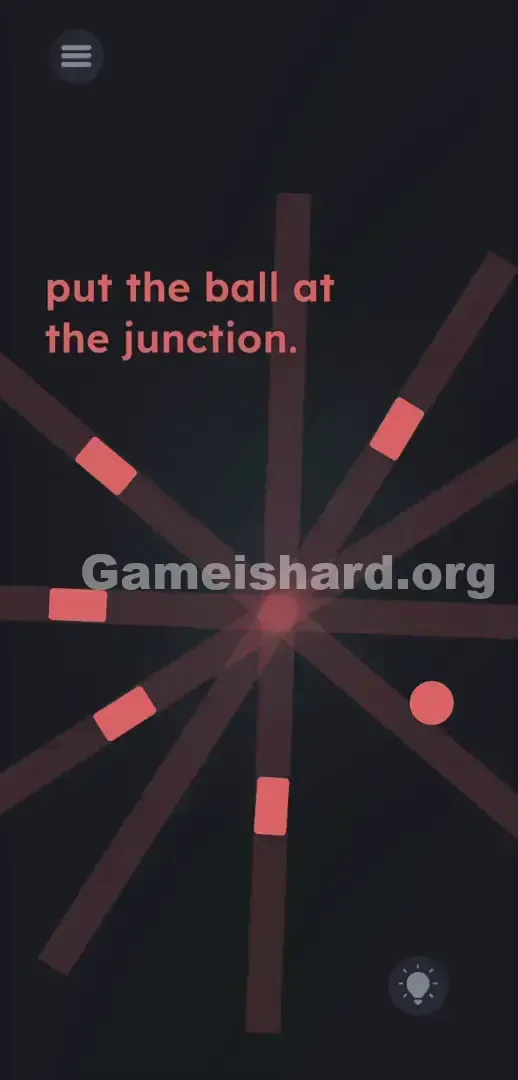
Pause your finger for a second. Study the five red rectangles like they’re laser emitters. Every single one points—unmistakably—at the same blank patch in the center of the screen.
Executing the Solution
- Focus on the five red rectangular lines and mentally draw a straight line extending out from the flat end of each one.
- Find the exact invisible focal point in the dead center of the screen where all five of those imaginary lines cross.
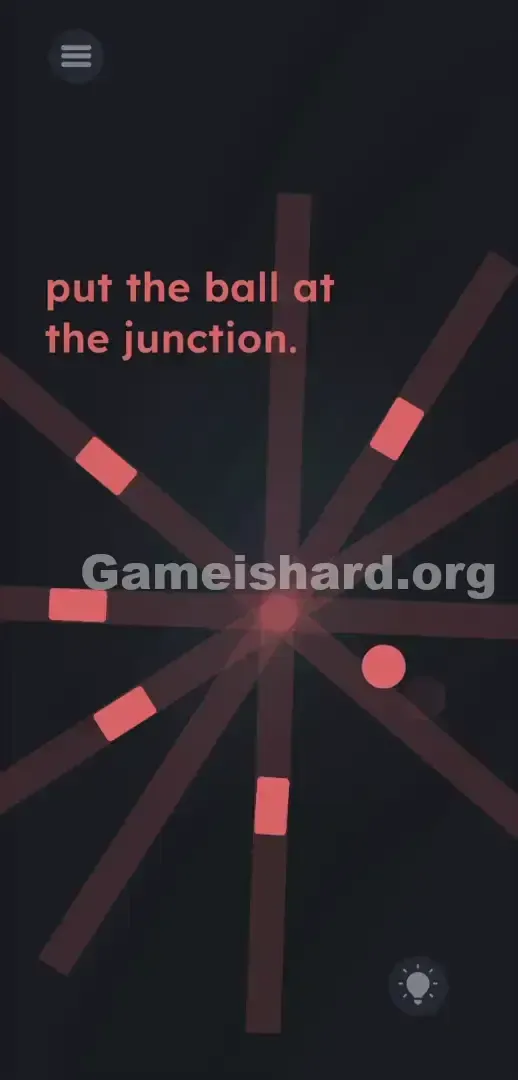
- Tap and hold the red ball located on the right side of the screen.
- Drag the ball directly onto that invisible center point.
- Release your finger. Wiggle the object slightly if the stage does not clear immediately.
If It Did Not Work
- Nothing happened when I dropped it: Your placement is slightly off. The hit box for the invisible junction is very small. Grab the ball again and nudge it a few pixels left, right, up, or down.
- The ball bounced back: You missed the target zone entirely. Re-evaluate your imaginary lines. The spot is exactly equidistant from all five shapes.
- I can't move the ball: You might be accidentally swiping your screen edge. Tap directly in the center of the shape and hold for a fraction of a second before dragging.
Why This Solution Works
This level tests pure spatial reasoning. It forces you to treat emptiness as meaningful space. Those rectangles aren’t set dressing—they’re directional guides.
That aligns perfectly with the game’s core idea: instructions are often red herrings; the real puzzle lives in the interface itself. Level 283 removes the finish line entirely—and challenges you to reconstruct it using visual logic. It proves brute-force tapping won’t cut it. You have to observe the geometry laid out for you. Here, silence—the blank center—is the most important puzzle piece.
Bonus Tip
Skip the overanalysis. Whether you’re replaying or rushing through, use this lightning-fast sequence:
- Ignore the text prompt completely.
- Grab the red ball .
- Drag it to the exact middle of the circular gap formed by the five blocks.
- Drop it. Don’t waste seconds trying to interact with “junction” in the text. Don’t shake your device. Aim for dead center—and move on.
Frequently Asked Questions (Short, Useful)
Why won't the red lines move when I swipe them? Because they’re static background elements. They’re painted onto the screen to guide your eyes—not meant to be manipulated.
Where exactly is the junction supposed to be? It’s fully invisible. It sits at the precise midpoint between all five red lines. Picture an X drawn across the center of the screen—the junction is exactly where the lines would meet.
Does tilting or shaking the device do anything here? No. This level relies solely on standard drag-and-drop. Keep your phone steady.
I put the ball in the middle and it won't solve. Why? You missed the ultra-precise trigger zone. The target area is tiny. Gently rotate or nudge the ball in tiny circles around the center until the level registers the correct overlap.
More Game Is Hard Solutions
We skip filler. Our guides exist to get you unstuck—fast. When a game misleads you outright, we give you the coordinates to win.
Share this guide with anyone currently stuck on this deceptively simple geometry challenge. Keep solving.