App updates occasionally rearrange puzzle order. If this level 286 walkthrough doesn’t match what’s on your screen, no stress! Flip through our All Levels directory to locate your exact puzzle using its visual layout.
Treat the colored background tiles behind the shapes exactly like a classic Wordle grid to determine where each shape belongs.
Level Overview
What Makes This Puzzle Tricky
Pop culture references often signal a twist—and level 286 delivers one hard. You open Game Is Hard to see “have you played wordle?” staring back at you. But instead of letters and a keyboard, you’re handed four clean white geometric shapes. At first glance, it mimics a child’s shape-matching game—simple, intuitive, harmless. Don’t be fooled. This is pure misdirection: the interface lies, and the real challenge hides in plain sight.
Your Goal
Your job is to drag the loose white shapes from the bottom of the screen into the four empty target boxes aligned directly beneath them. To succeed, you must override instinct and apply Wordle’s color-coded logic—not to letters, but to shapes positioned over colored backgrounds.
- UI drag : Moving bottom shapes into designated drop zones.
- Logic trap : Relying on external puzzle knowledge instead of in-game cues.
- Visual misdirection : Using familiar shapes to obscure the importance of background colors. It’s not a mistake—it’s intentional design.
What Appears on Your Screen
The layout is clean, minimal—and deliberately misleading. At the top, the prompt “have you played wordle?” appears in unassuming lowercase type.
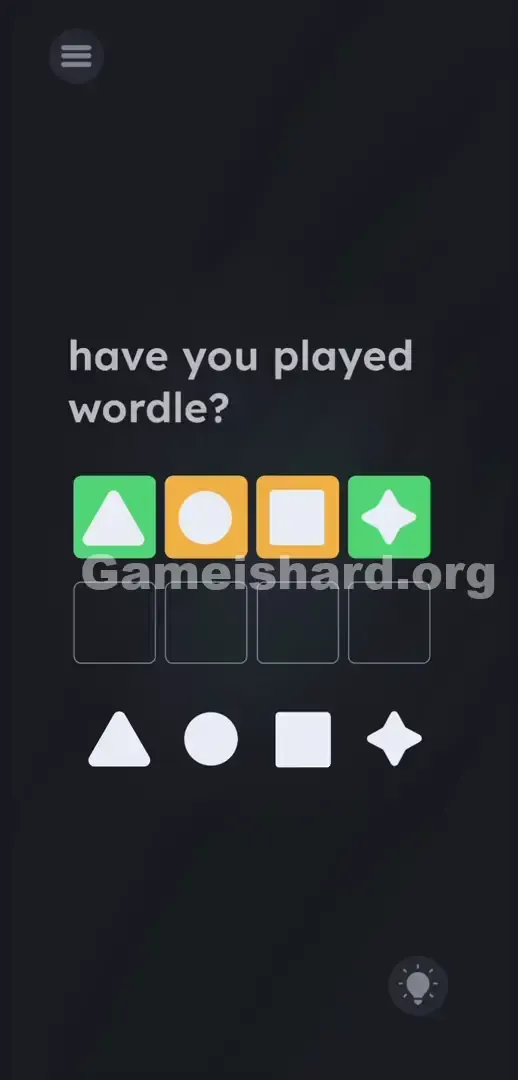
Below it sits a row of four shapes, each nested inside a vividly colored square. Left to right: a white Triangle inside a green box, a white Circle inside a yellow box, a white Square inside a yellow box, and a white four-pointed Star inside a green box.
Directly under that row, four faintly outlined, empty squares wait—your target drop zones.
At the very bottom of the screen sit four draggable, solid white shapes: a Triangle, a Circle, a Square, and a Star. They’re spaced slightly apart, clearly meant to be moved—but where? That’s the catch.
Common Mistakes to Avoid
The Trap
Level 286 weaponizes UI blindness. We’ve spent years learning to match shapes visually—so when you see a triangle above, your brain screams “put the triangle underneath!” That’s the trap. Those background colors aren’t decoration—they’re immutable instructions. Most players fail here because they treat the colors as irrelevant, fixating solely on shape identity. The game disguises a logic puzzle as a toddler activity—then punishes you for playing along.
First Instincts That Fail
When stuck, players commonly waste time trying tactics that go nowhere:
- Placing each shape directly below its identical counterpart. Guaranteed to fail.
- Tapping the colored boxes hoping to change them. They’re locked.
- Attempting to drag the text “have you played wordle?” into the boxes. It’s static.
- Swiping or tapping elsewhere looking for a hidden keyboard. None exists. This level demands you import Wordle’s rules—no exceptions. Without that context, intuition works against you.
Player Reactions
I stared at those two yellow boxes for nearly two minutes—dragging, resetting, second-guessing. Tried shaking my phone. Even tapped the question text like it might respond. Then it clicked: it was Wordle—just wearing geometry-shaped glasses. The developer knew exactly how my muscle memory would betray me—and nailed it.
Step-by-Step Solution
Preparing the Move
Pause. Stop looking at the shapes. Focus only on the colors behind them. In Wordle, green = correct letter, correct position. Yellow = correct letter, wrong position. Apply that rule here. Your goal isn’t to match shapes—it’s to place shapes where their background color says they belong.
Executing the Solution
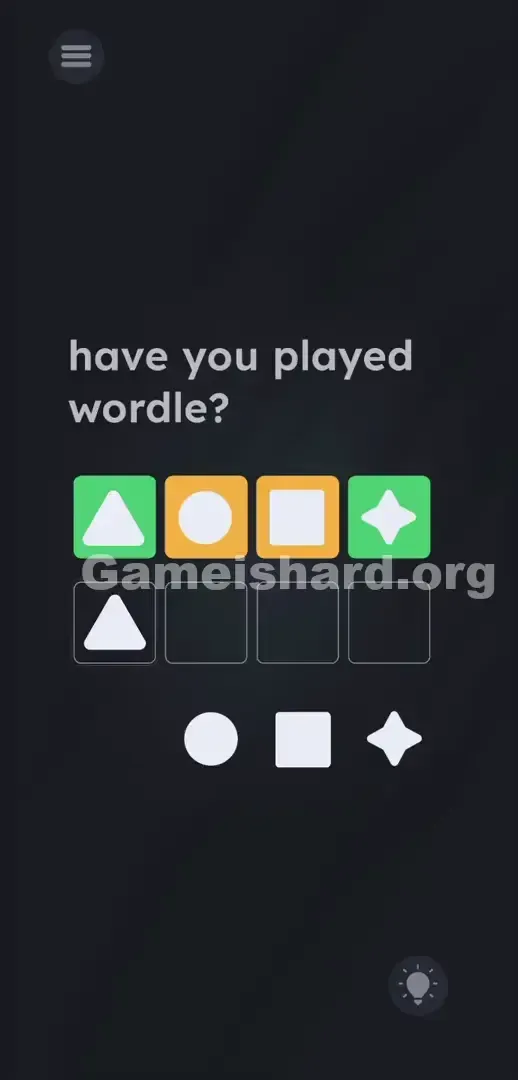
- Look at the anchors. Green means “lock it here.” Grab the loose white Triangle and drop it into the first empty outlined box—the green box above confirms it’s spot-on.
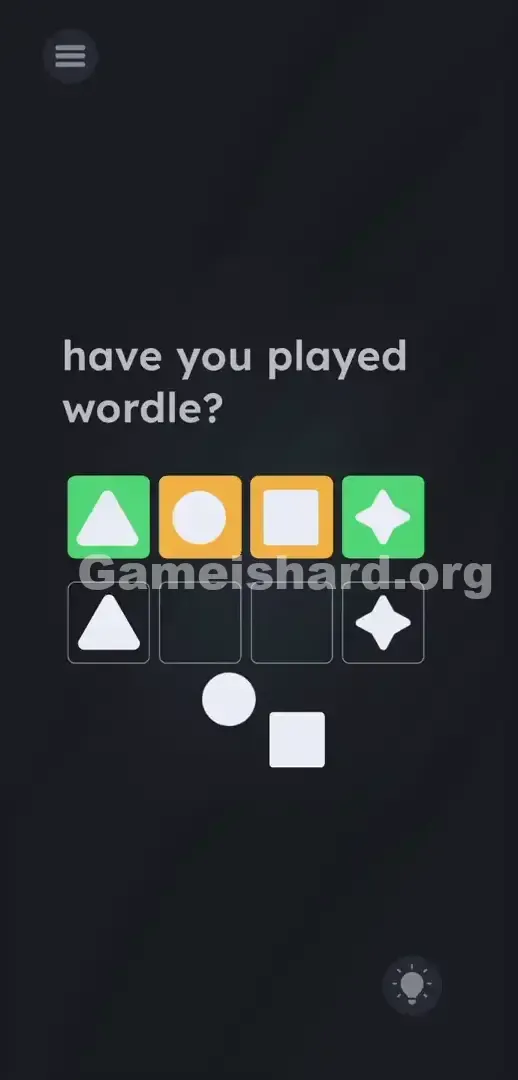
- Lock the second anchor. Grab the loose white Star and place it in the fourth empty box on the far right. Green again—no guesswork needed. Leave both alone now.
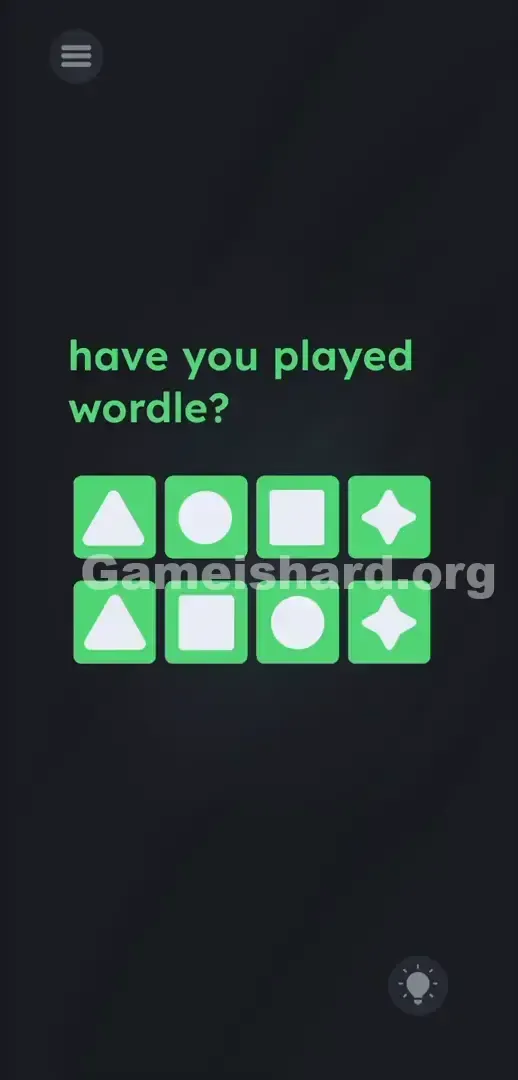
- Execute the swap. Grab the white Square—but don’t put it under the yellow Square. Drop it into the second empty box instead. The yellow box over the Circle tells you the Circle belongs in the puzzle, just not there—so you fill that slot with the other yellow-associated shape.
- Finish the puzzle. Grab the white Circle and place it in the third empty box. The yellow box over the Square told you the Square was misplaced—swapping them satisfies Wordle’s yellow logic and completes the grid.
If It Did Not Work
- The level won't clear: Make sure each shape lands dead-center in its outlined box. A rushed drag may leave it hovering just outside the valid zone—pull it out fully and re-drop with precision.
- Shapes snap back: You’re likely dragging them onto the top colored row instead of the empty outlined boxes below it. Only the lower row accepts drops.
- Screen unresponsiveness: If shapes won’t budge, force-close the app. Rapid tapping can glitch drag physics—restart and move smoothly.
Why This Solution Works
This level is a sharp exercise in meta-puzzle awareness. The prompt “have you played wordle?” isn’t flavor—it’s the instruction manual. Ignore it, and you’re solving the wrong puzzle.
It treats basic geometry like Wordle letters: same rules, new symbols. The real test isn’t visual matching—it’s recognizing that UI cues (like shape familiarity) are camouflage. The developer banks on your automatic impulse to match by form—and buries the true logic in color. It’s elegant, deceptive, and brilliantly executed.
Bonus Tip
For a quick, no-think solve—especially on replay—follow this precise sequence:
- Scan only the top-row colors.
- Place Triangle in slot 1.
- Place Star in slot 4.
- Swap the middle two: Square goes in slot 2.
- Circle goes in slot 3. Skip tapping the text or prodding the colored boxes—only the white shapes at the bottom are interactive.
Frequently Asked Questions
Do I need to type anything for this level? No keyboard appears or functions. Despite the Wordle reference, interaction is limited to dragging the white shapes from the bottom into the empty outlined boxes.
Why do the middle shapes need to be swapped? Their background boxes are yellow—Wordle’s signal that the shape belongs in the answer, but not in that position. Swapping Circle and Square fixes both placements at once.
I don’t know how to play Wordle—is this unsolvable? Not at all—just less intuitive. Stick to the color rule: green = keep it there, yellow = swap it with the other yellow. Follow that, and you’ll pass instantly.
Why won’t the white shapes snap into place? You’re probably dragging them too high—onto the colored row instead of the outlined drop zones beneath it. Aim for the center of each empty box to register the drop.
More Game Is Hard Solutions
Our guides cut straight to the core mechanics—no filler, no delays, just the precise moves and reasoning you need to conquer even the toughest levels. Share this walkthrough with your Discord squad if they’re grinding on level 286. Onward to the next challenge—keep pushing!