App updates can sometimes shuffle the order of puzzles. If this level 291 walkthrough doesn't match your screen, don't worry! You can browse our All Levels guide to find your exact puzzle by its picture.
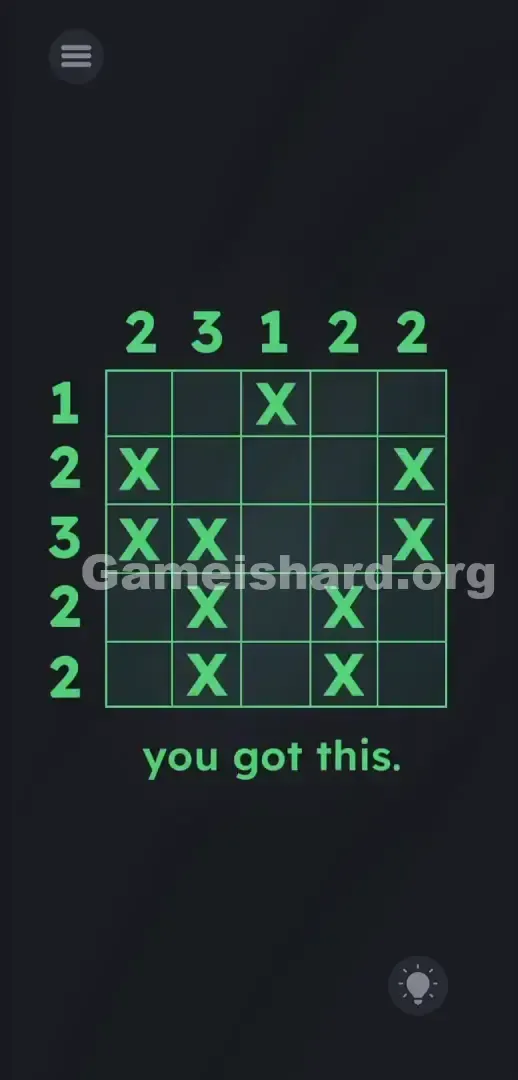
You need to clear away 15 of the shapes and leave exactly 10 X s on the board in a specific layout to pass.
Level Overview
What Makes This Puzzle Tricky
The screen is packed with bold blue text. You scan the grid. You tap the bottom prompt—nothing responds. You tilt your phone—still nothing. After dozens of levels built on misdirection and hidden mechanics, this one drops a clean logic puzzle without warning. That sudden shift catches many players off guard.
Your Goal
This is a compact Nonogram (or Picross) challenge. You’re given a 5x5 grid filled entirely with blue X s. Your job is to erase the right ones—acting like a digital eraser—so that each row and column ends up holding exactly the number of X s shown beside it.
- Logic trap: Assuming physics or drag-based tricks when only deduction matters.
- UI interaction: Precise tapping—not dragging—to remove individual X s.
- Multi-touch: Clearing large sections quickly by tapping multiple targets.
- Hidden pattern: Pinpointing where those final 10 X s must land to satisfy all clues.
It’s not a mistake. It’s intentional design.
What Appears on Your Screen
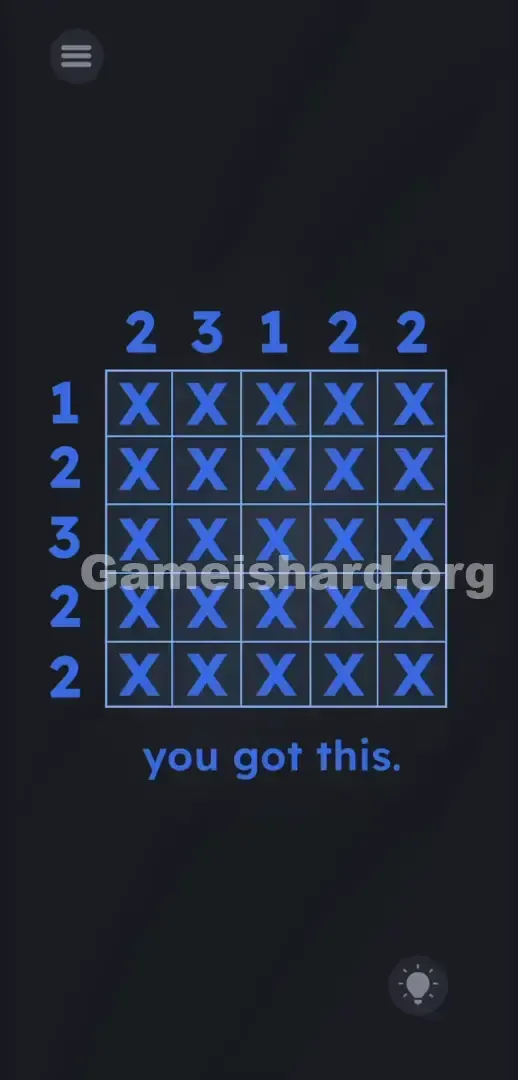
A dark background frames a tight 5x5 grid—every cell holds a blue X .
Above the grid sit five column clues: 2 3 1 2 2.
To the left sit five row clues: 1 2 3 2 2.
At the bottom, lowercase text reads: you got this. A hamburger menu sits top-left; a hint bulb rests bottom-right.
No floating letters. No draggable numbers. No hidden sliders. The grid is fully responsive—and everything else is static.
Common Mistakes to Avoid
The Trap
UI Blindness cuts both ways. Throughout most of Game Is Hard, you learn to ignore literal meaning and treat on-screen text as manipulable objects. That habit makes it hard to switch gears—even when the game finally tells the truth.
Here, the trick isn’t deception—it’s expectation. The layout mimics earlier puzzles where numbers are props to move or combine. But this time? Those numbers mean exactly what they say. The real trap is overthinking.
First Instincts That Fail
Players instinctively try dragging X s out of the grid. They add, subtract, or stack the clue numbers. Some rotate their device hoping gravity will shift elements—or swipe wildly across “you got this” searching for a secret button. Pause. Breathe. Count instead.
Player Reactions
I spent nearly five minutes flipping my phone sideways, dragging clue numbers into empty spaces, even speaking aloud hoping voice commands would trigger something. Facepalm. It really is just pure logic. The developers flipped the script—and trolled us by playing completely straight.
Step-by-Step Solution
Preparing the Move
Forget hidden mechanics. Read the clues plainly: Top numbers = how many X s must remain in each column. Left numbers = how many X s must stay in each row. Tap an X to delete it. Tap an empty cell to restore it.
Executing the Solution
You’ll remove 15 X s—here’s the precise sequence to solve it instantly.
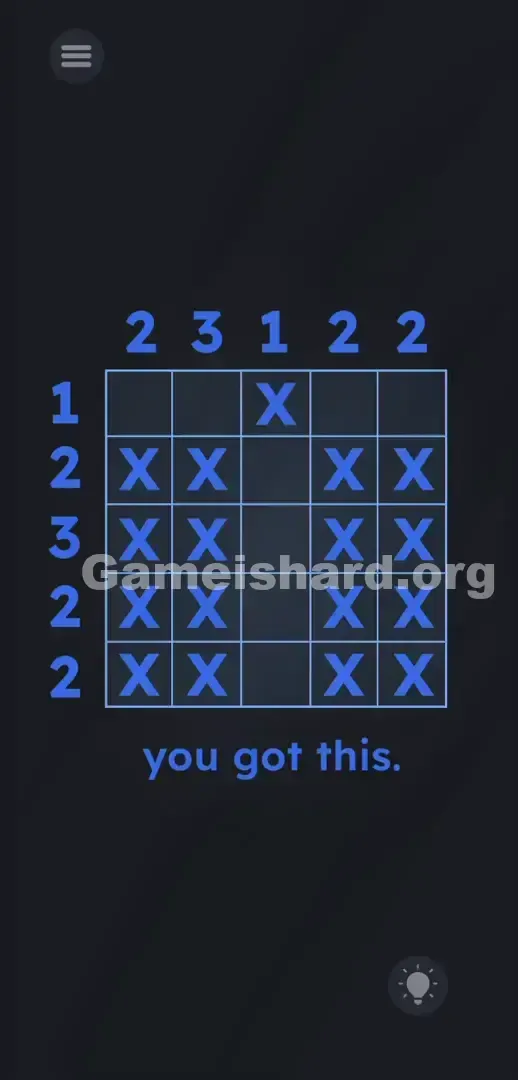
- Attack Row 1. The top number for Column 3 is 1 . The left number for Row 1 is 1 . Leave the X exactly where Row 1 and Column 3 cross. Tap the other four X s in Row 1 to delete them. Tap the other four X s in Column 3 to delete them.
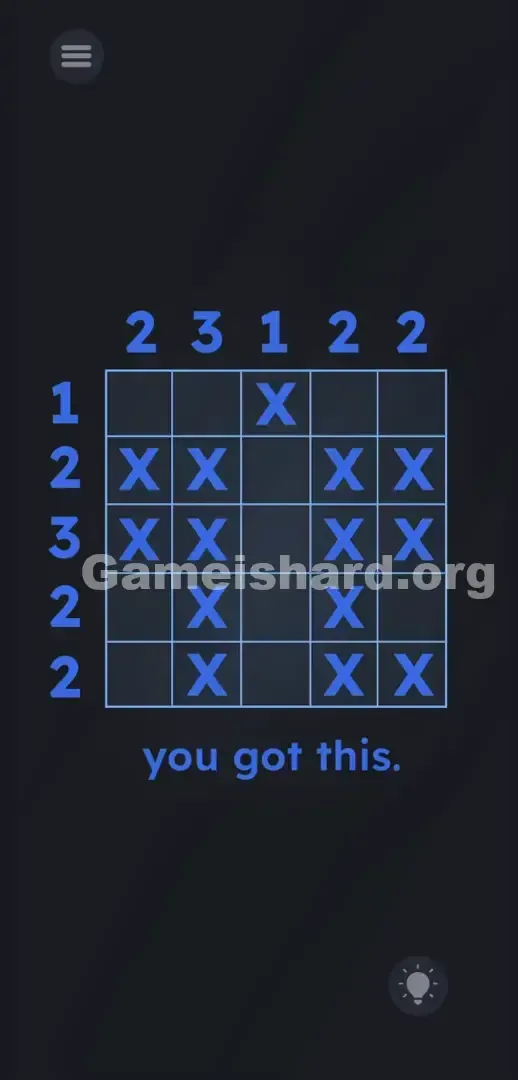
- Clear Row 2. The requirement is 2 . Leave the 2nd and 4th X . Erase the 1st and 5th X .
- Clear Row 3. The requirement is 3 . Leave the 1st, 2nd, and 4th X . Erase the 5th X .
- Clear Row 4. The requirement is 2 . Leave the 1st and 5th X . Erase the 2nd and 4th X .
- Clear Row 5. The requirement is 2 . Leave the 2nd and 5th X . Erase the 1st and 4th X .
If It Did Not Work
If the win screen doesn’t appear after your final tap, double-check Column 2—it needs exactly three X s. One common slip-up is accidentally deleting a required X while tapping rapidly. If the grid becomes too messy, simply tap any blank cell to refill the entire grid and restart from Step 1.
Why This Solution Works
This level tests mental agility—not pattern recognition. Game Is Hard trains you to distrust language and reinterpret UI elements as physical tools. By level 291, your brain expects subterfuge.
Instead, you get clarity: a strict, rule-driven puzzle where instructions are honest and the interface is the mechanic. The core skill is basic grid logic—if a row needs two X s and only two spots remain viable after elimination, those spots must be filled. It’s pure deduction. The real hurdle? Believing the game finally means what it says.
Bonus Tip
Skip shape-guessing. Do this instead:
- Start with the overlapping 1s (Row 1, Column 3).
- Lock that single X in place—and wipe all others in that row and column right away.
- Track remaining open slots per column. Once a column hits its target count, tap every extra X in that column to clear it faster.
- Never swipe—only tap. Swipes won’t register.
Frequently Asked Questions
Why won't the level end? Either one X remains unerased—or one was deleted by mistake. Recheck all row and column totals.
Can I reset the grid if I mess up? Yes. Tap any blank cell to instantly restore all X s—no app restart needed.
Do the letters have to be next to each other? No. Unlike classic Picross, adjacency isn’t required—only the final count per row/column matters.
Is there a hidden object behind the text? Nope. The bottom prompt is decorative. Ignore it completely.
More Game Is Hard Solutions
We know you want answers—not filler. Our guides cut straight to the action: exact taps, smart shortcuts, and no fluff.
If this walkthrough saved your sanity, share it with your squad on Discord. Keep grinding through the grid. Visit thegameishard.org for the next round of solutions—because yes, the game will start lying again soon.