

App updates can occasionally shift puzzle order. If this level 282 walkthrough doesn’t match what you see, no problem! Use our All Levels directory to locate your exact puzzle by image.
You must manually rearrange the on-screen text—because the third circle is programmed to reject more than two taps.
Level Overview
What Makes This Puzzle Tricky
You’re tapping relentlessly—and the game says “tap four times.” You do just that. Nothing happens. Level 282 stares back, unimpressed. The interface deliberately misleads you about how this puzzle actually works.
Your Goal
On the surface, it’s straightforward: illuminate all four circles. Instructions sit neatly beneath them. But following them leads straight to a dead end. To win, you need to rewrite the rules—not just obey them.
Here are the core mechanics required to solve this stage:
- Text drag / UI drag
- Hidden tap limit
- Logic trap
- Sequential tapping It’s not a mistake—it’s intentional design.
What Appears on Your Screen
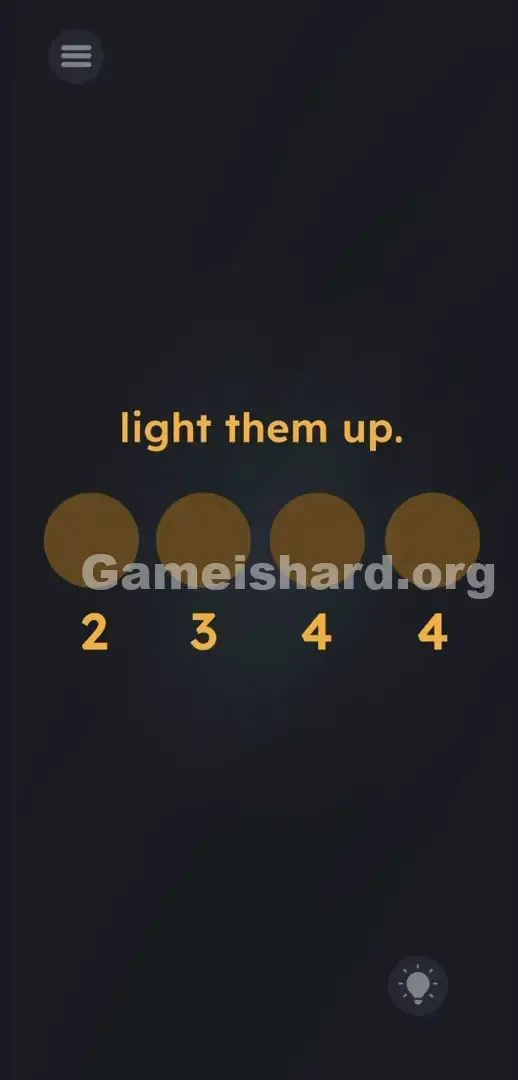
The screen is stark and clean. A deep black background. Centered at the top: the prompt “light them up.”
Beneath it sit four identical dark brown circles—like dormant bulbs or inactive buttons.
Below those circles runs a row of bright yellow numbers: 2 , 3 , 4 , 4 —each aligned precisely under its corresponding circle.
A hint icon rests in the bottom-right corner. The hamburger menu sits top-left.
Everything feels deceptively simple. Uniform spacing. Consistent colors. The UI trains you to treat those numbers as static labels—not interactive elements. That’s precisely why you’re stuck.
Common Mistakes to Avoid
The Trap
This puzzle exploits UI Blindness—a common mental shortcut. We’re wired to read instructions, then act. You see the 4 under the third circle, tap four times… and nothing. Why? Because that circle has an invisible cap: it only accepts two taps. The developers gave you impossible directions on purpose—to force you to question the interface itself.
First Instincts That Fail
Players try everything except the right move. Tapping all circles at once? No. Long-pressing? No. Shaking the device? Still no. Even tapping the phrase “light them up” does nothing. Many assume the app is broken—especially when the third circle stops responding entirely.
Player Reactions
I spent nearly five minutes jabbing my screen in frustration. Thought my touchscreen was failing. Cleaned the glass. Restarted the app. Then—by accident—I swiped across the number row and watched the “2” lift off the screen like a draggable tile. Total “aha!” moment.
Step-by-Step Solution
Preparing the Move
Pause before touching any circle. Shift your attention down to the yellow number row: 2 , 3 , 4 , 4 . The third circle is the bottleneck—it only responds to two taps. So we’ll give it a “2” by moving the one from the far left.
Executing the Solution
- Press and hold your finger directly on the 2 located under the far-left circle.
- Drag the 2 across the screen to the right.
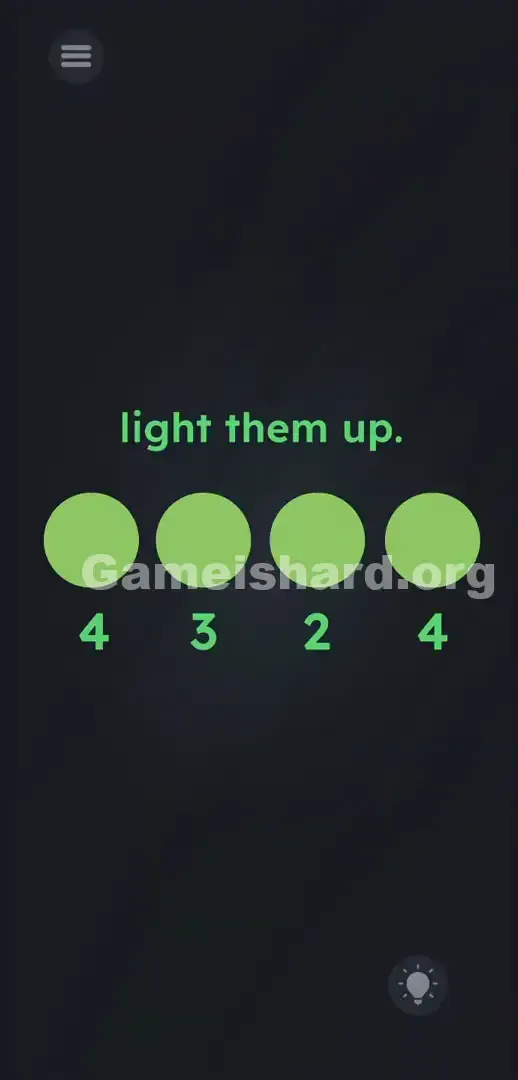
- Drop it exactly over the first 4 (the one under the third circle). The numbers will swap positions immediately.
- Verify your new sequence. Reading left to right, it should now say 4 , 3 , 2 , 4 .
- Tap the first circle exactly four times until it lights up bright yellow.
- Tap the second circle three times. It lights up.
- Tap the third circle twice. It lights up perfectly.
- Tap the fourth circle four times. Level cleared.
If It Did Not Work
If the 2 snaps back into place, your drop wasn’t precise enough—you must land it directly on top of the target number to activate the swap.
If circles still won’t light, you may be tapping too quickly. The game requires slight pauses between taps. Slow down—count each tap aloud: One. Two. Three. Four. Treat it like a deliberate rhythm, not a speed test.
Why This Solution Works
This level challenges your willingness to discard assumptions. Game is hard Level 282 uses a “Linguistic Deconstruction” tactic—the numbers aren’t commands; they’re physical objects sharing space with the circles.
Letters and digits behave like movable puzzle pieces. When a button refuses to respond, the fix isn’t brute force—it’s redefining the input. The instructions are camouflage; the real puzzle lives in the UI. Making numbers draggable punishes blind obedience—and rewards players who test the edges of the screen.
Bonus Tip
Skip the trial-and-error entirely. Don’t touch any circle at the start. Follow this foolproof sequence to breeze through:
- Grab the 2 .
- Drop it on the first 4 .
- Confirm the numbers now read 4 , 3 , 2 , 4 .
- Tap the circles left to right, matching the updated counts. No tilting, no multi-touch—just clean drag-and-drop logic.
Frequently Asked Questions
Why won't the third circle light up when I tap it four times? It’s hardcoded to accept only two taps. Pushing past that limit halts progress. You must physically change its required value.
Can I swap any other numbers in this level? No. Only swapping the first “2” with the first “4” satisfies the hidden constraint. Moving the “3” or final “4” won’t resolve the tap cap.
My numbers won’t move when I drag them. What's wrong? Ensure your finger touches the yellow digit itself—not the black space around it. Dragging empty areas registers as a scroll, not a grab.
Do I have to tap the circles in order from left to right? Technically, order doesn’t affect the final trigger—but tapping left-to-right helps you track counts accurately and avoid accidental over-taps.
More Game Is Hard Solutions
Hit another deceptive puzzle? We’ve got every solution ready—fast, precise, and zero fluff. Share this guide with your Discord crew if they’re currently losing their minds over a stubborn circle. Keep dragging, keep tapping, and conquer the game.