App updates can sometimes shuffle the order of puzzles. If this level 99 walkthrough doesn't match your screen, don't worry! You can browse our All Levels guide to find your exact puzzle by its picture.
Level Overview
What Makes This Puzzle Tricky
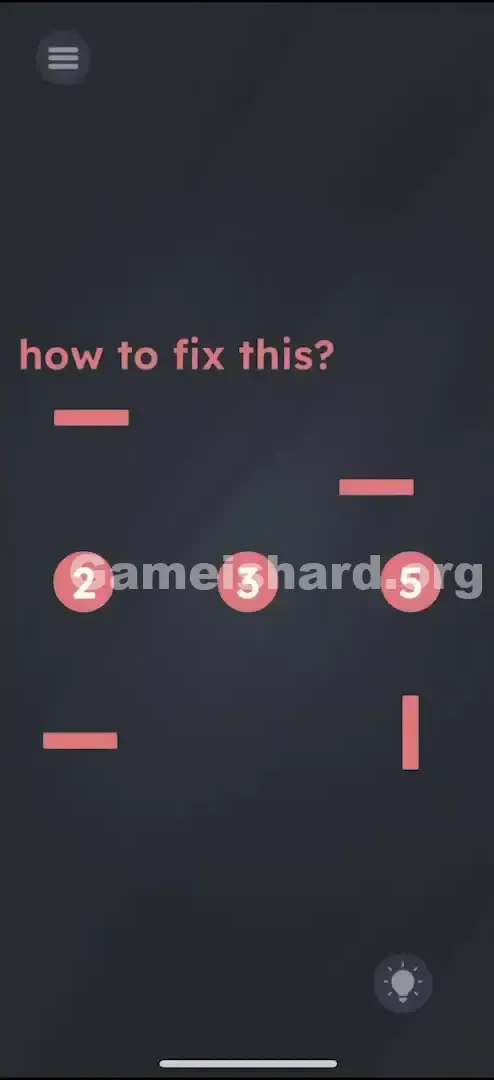
You’re staring at three numbers — 2, 3, and 5 — with no operators in sight. The prompt “how to fix this?” feels vague, even misleading. Tapping the numbers does nothing. It’s not broken — it’s deliberately stripped down. This isn’t about solving math; it’s about reconstructing the equation from scratch.
Your Goal
Your task is to build a true mathematical statement using only the available elements. Since the numbers suggest addition, you’ll need to craft both the “+” and “=” symbols yourself — using the pink bars scattered nearby.
Key Mechanics
- Object Assembly: Combine two separate UI components into a functional symbol.
- Drag & Drop: Move the pink bars — not the numbers — to form new shapes.
- Snap Zones: Bars lock into place automatically when aligned correctly.
- Visual Logic: Recognize that “+” = crossed lines and “=” = two parallel lines. This isn’t arithmetic — it’s symbolic carpentry.
What Appears on Your Screen
Let's break down the layout you're given:
- Top Text: The phrase "how to fix this?" appears in pink at the top.
- The Numbers: Centered on screen are three circular tiles showing 2 , 3 , and 5 .
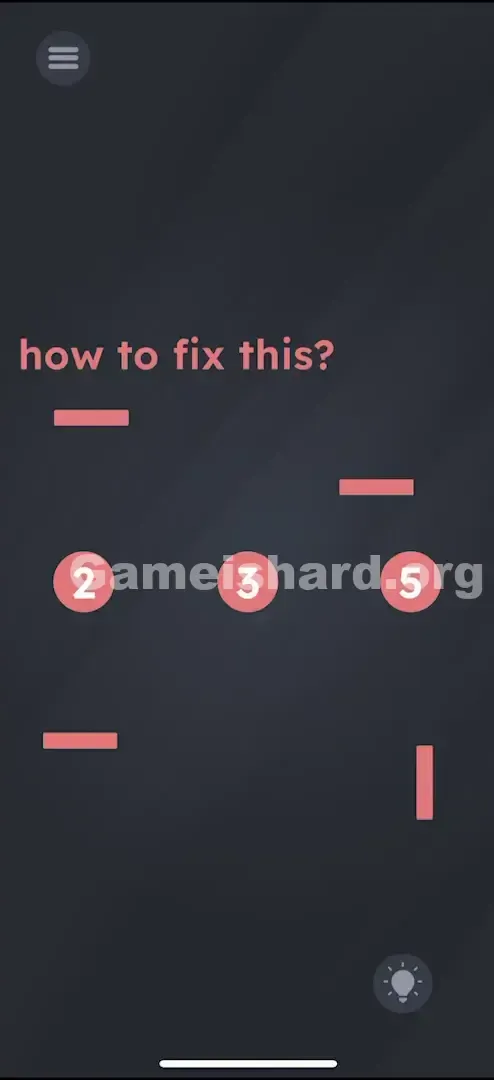
- The Debris: Four pink rectangular bars float loosely near the numbers — most are horizontal, one stands vertically, all resembling stray dashes or minus signs.
- Some are horizontal (lying flat).
- One is vertical (standing up).
- They look like stray hyphens or minus signs.
- The Gap: Clear space separates 2 from 3, and 3 from 5 — your construction zone. No animations. No highlights. Just still, silent elements waiting for your input.
Common Mistakes to Avoid
The Trap
The biggest mental hurdle is “math reflex”: seeing numbers and instinctively searching for operations or equations. You might waste time testing combinations like “2 × ? = 5” or “5 − 3 = ?”, but there’s no keypad or dropdown menu — just raw geometry.
First Instincts That Fail
- Trying to move the numbers: The digits 2, 3, and 5 are locked in place — dragging them has zero effect.
- Shaking the device: A common Game is hard habit, but it triggers nothing here.
- Hunting for hidden controls: There are no secret taps or invisible buttons hiding in shadows or corners.
Player Reactions
I spent nearly a minute tilting my phone, convinced gravity would nudge the bars into position. Then I accidentally dragged the vertical bar onto a horizontal one — snap — and saw the “+” appear. Instant clarity. Total facepalm moment.
Step-by-Step Solution
Preparing the Move
Tune out the question at the top. Focus solely on the four pink bars. Identify which one is upright — that’s your “+” crossbar. The rest are horizontal.
Executing the Solution
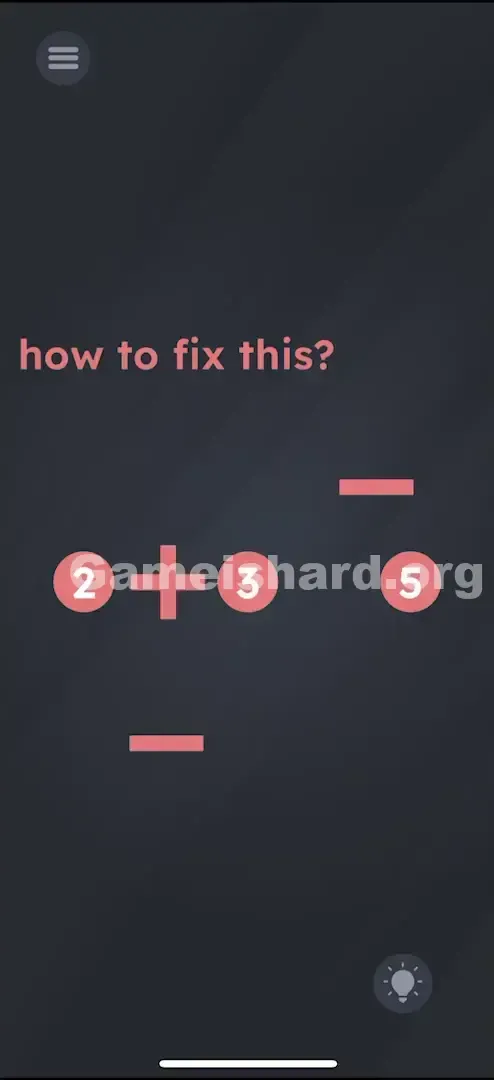
- Build the Plus (+): Pick up the vertical bar and drop it precisely onto the horizontal bar positioned between the number 2 and the number 3 .
- Verify the Plus: When aligned correctly, they intersect cleanly to form a “+”. Your equation now reads “2 + 3”.
- Build the Equals (=): Take the two leftover horizontal bars and layer one slightly above the other in the gap between 3 and 5 .
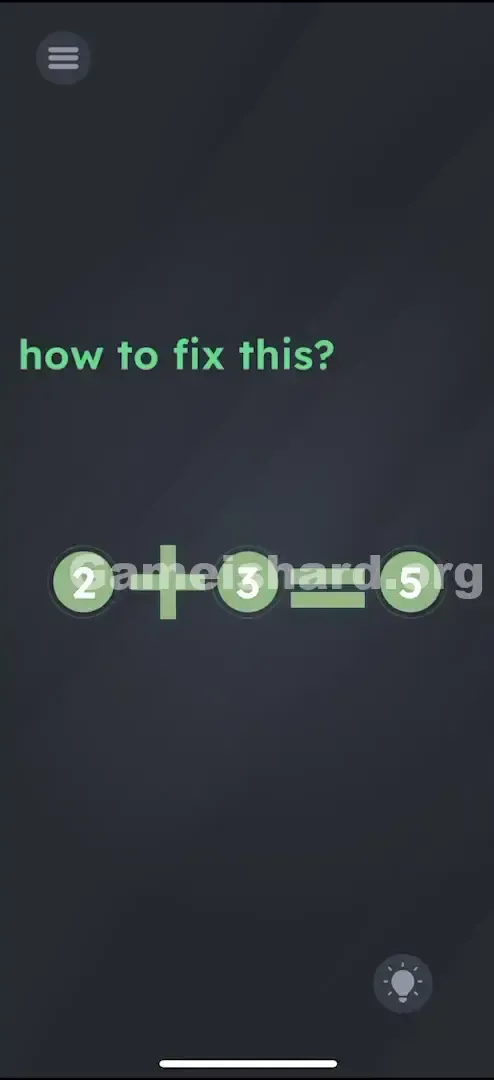
- Verify the Equals: Position them parallel and evenly spaced — they’ll snap into an “=” shape. Final result: “2 + 3 = 5”.
If It Did Not Work
- It won't snap: You may be placing bars too far apart or off-center. For “+”, aim dead center on the horizontal bar. For “=”, keep spacing consistent — think of two evenly spaced lines.
- I ran out of bars: Double-check — you should have exactly four bars total (one vertical, three horizontal). If one seems missing, restart the level — occasional rendering glitches can hide UI elements.
Small Details That Matter
Precision matters — these bars respond to tight alignment.
- For the Plus (+): The game recognizes only a true perpendicular intersection. Off-center placement yields an “L” or “T”, not a “+”.
- For the Equals (=): Don’t overlap the bars — align them parallel with a small, uniform gap. Imagine two sandwich slices: top and bottom, not stacked.
- My fix: I kept dropping the upper bar too high. My workaround? Anchor the lower bar first, then gently slide the upper one down until the spacing looked clean and balanced.
Why This Solution Works
Level 99 is built on symbol deconstruction. Instead of presenting ready-made operators, it gives you their building blocks — and challenges you to reassemble them.
It shifts your thinking from “What does this symbol mean?” to “What shape is this symbol made of?” A “+” becomes two rectangles crossing at right angles; an “=” becomes two identical bars in parallel alignment. This reflects the game’s core idea: every on-screen element behaves like a physical object — text, symbols, and numbers are all manipulable parts of the interface.
Bonus Tip
For maximum speed or minimal frustration, follow this streamlined sequence:
- Grab the vertical stick .
- Drop it on the horizontal stick between 2 and 3.
- Grab the stray horizontal stick .
- Hover it above the stick between 3 and 5 until it looks like = .
- Don't touch the numbers.
Alternative Attempts on Game Is Hard Level 99 (What Doesn’t Work, and Why)
Here’s a list of dead ends I tested — so you can skip them entirely:
- Tapping the "2" and "3" repeatedly: No interaction exists here. This isn’t a tap-based puzzle.
- Dragging the "5" leftward: The numbers are static anchors — moving them isn’t possible.
- Forming a minus sign (-): Leaving bars as standalone dashes yields “2 – 3 – 5”, which evaluates to –6 — not equal to 5.
- Dragging the question text: Unlike some levels, “how to fix this?” is purely decorative and non-interactive.
- Pinching to zoom: Zooming has no effect on bar size or placement.
- Tilting the device: Gravity plays no role — all movement must be manual.
Common Mistakes for Game Is Hard Level 99
- Placing “+” in the wrong spot: A “+” between 3 and 5 creates “2 ? 3 + 5”, breaking the intended logic. Symbols must sit where they belong: “+” between 2 and 3, “=” between 3 and 5.
- Misaligned bars: Dropping the vertical bar near the edge of the horizontal one creates an unrecognizable shape — the game needs symmetry.
- Ignoring correctness: Building “2 = 3 + 5” looks right visually but fails mathematically (2 ≠ 8), so the level won’t validate.
- Skipping the “=”: Many players stop after making “2 + 3”, forgetting the full equation requires both operators.
- Attempting rotation: Horizontal bars can’t be rotated — only the single vertical bar works for the “+”.
Pattern Recognition: How to Spot This Trick in Future Game Is Hard Levels
The Tell
When numbers appear without operators — and loose geometric shapes float nearby — assume you’re meant to construct the missing symbols. Lines, dots, or curves aren’t clutter — they’re spare parts.
The Habit
Ask yourself: “Do these loose elements combine into a familiar symbol?”
Two dots + a line → likely ÷. Two diagonal lines → probably ×. Always treat floating shapes as functional components, not decoration.
Game Is Hard Level 99 FAQ (Short, Useful)
Q: Can I rotate the horizontal bars to make them vertical in Game is hard Level 99? A: No. Rotation isn’t supported. Use the one pre-oriented vertical bar for the “+”.
Q: I made the signs but the level won't end in Game is hard Level 99. Why? A: Double-check symbol placement — “2 + 3 = 5” must read left to right. Swapping “+” and “=” breaks validation.
Q: Do I need to tap a "submit" button in Game is hard Level 99? A: No. The level completes automatically once the correct configuration locks in.
Q: Are the numbers movable in Game is hard Level 99? A: No. The digits 2, 3, and 5 stay fixed to define where symbols belong.
More Game Is Hard Solutions
That’s Game is hard Level 99 solved. If this walkthrough saved your sanity (and your phone), we’ve got dozens more — no filler, just fast, accurate answers. Because what you really want is to reach Level 100. Share this with your squad if they’re stuck — and happy puzzling!