App updates can sometimes shuffle the order of puzzles. If this level 56 walkthrough doesn't match your screen, don't worry! You can browse our All Levels guide to find your exact puzzle by its picture.
(Clarification: The shapes stick together like magnets. You are essentially building a digital "0" out of three tetris-like blocks.)
Level Overview
What Makes This Puzzle Tricky
You’re staring at the screen — it simply says “we need a zero.” No keyboard. No number pad. Just three green geometric pieces floating in space — two L-shaped blocks and a tiny square. You try sketching a circle? Nothing happens. You tilt or shake your phone? Still nothing. This level leans into “construction logic”: you’re not hunting for a zero — you’re assembling one from scratch.
Your Goal
Your mission is to build the numeral “0” using only the green shapes on screen. Forget arithmetic — this is pure spatial assembly, like solving a minimalist jigsaw puzzle.
Key Mechanics
- Object Merging: Certain elements snap together on contact — think magnetic docking.
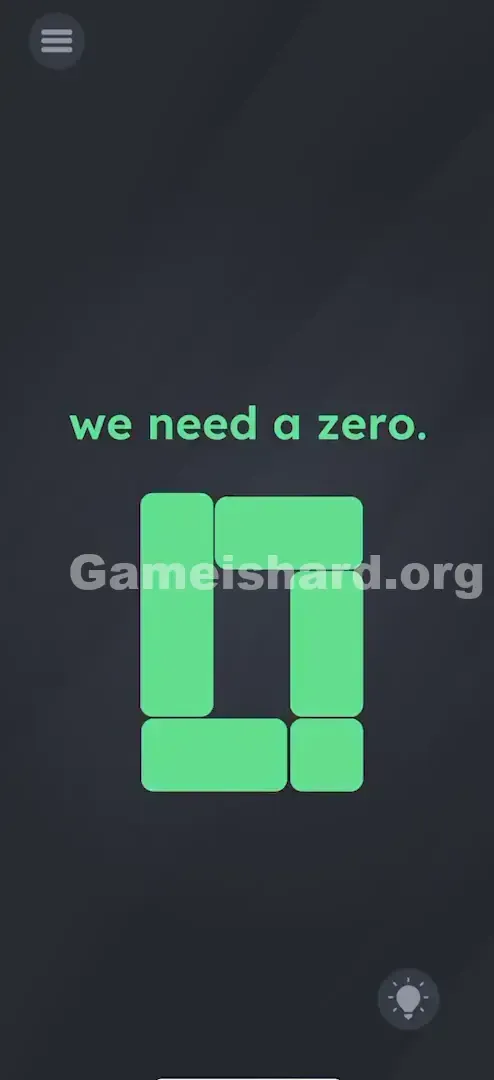
- Shape Recognition: Success hinges on seeing how negative space forms a hollow rectangle (a digital zero), not a filled shape.
- Drag & Drop: Tap, hold, and slide — that’s your only input method.
- Sequential Assembly: Order matters. You can’t combine all three at once — step-by-step construction is required.
It’s not a mistake — it’s intentional. The prompt spells out exactly what to build; the challenge lies in interpreting how.
What Appears on Your Screen
The interface is clean and stripped down.
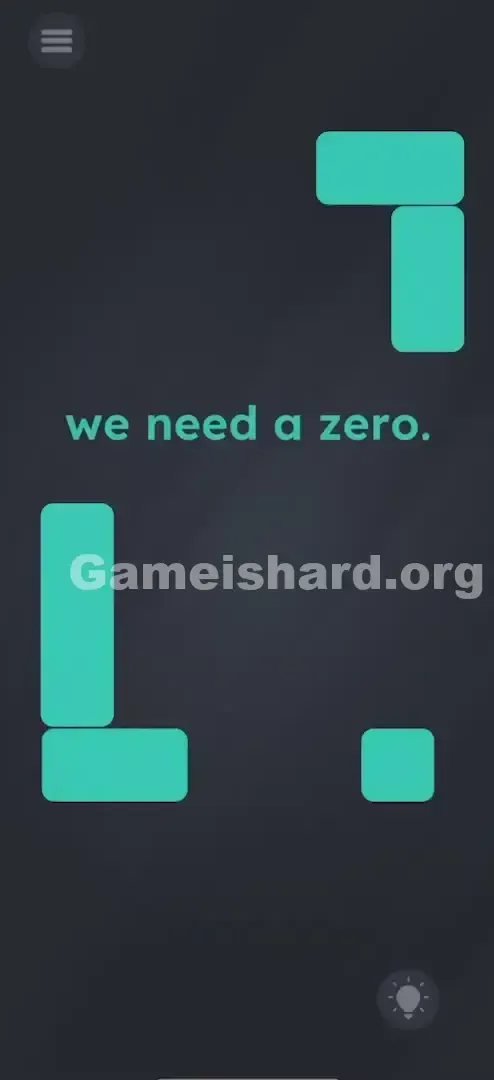
- Center Text: “we need a zero.” sits front and center — simple, direct, and slightly taunting.
- Top Right: A large inverted “L” (green), rotated like a backwards corner.
- Bottom Left: A standard “L” (green), mirroring the top one.
- Bottom Right: A compact green square — small but critical.
- Background: Neutral dark grey — no distractions, no hidden UI.
No buttons, no countdowns, no secret panels. Every tool you need is visible — just waiting to be connected in the right way.
Common Mistakes to Avoid
The Trap
The biggest mental hurdle is “Tetris reflex.” Your brain sees angular blocks and defaults to stacking or fitting them into grids. You might instinctively try lining them up neatly at the bottom — but Game is Hard isn’t about placement. It’s about silhouette. The “0” here isn’t curvy — it’s pixel-perfect, like an old-school LED display.
First Instincts That Fail
- Drawing a Zero: Many tap and drag their finger in a circle, hoping for recognition.
- Hunting for Hidden Digits: Some scan the level number (“56”) or prompt text, searching for a concealed zero.
- Shaking the Device: A common last resort — but it does absolutely nothing here.
Player Reactions
I stared at this longer than I’d admit. Tried dragging the big L-shape down — nothing. Thought the game froze. Turns out, I was grabbing the wrong piece entirely. The “aha” moment came when I realized only the tiny square acts as the control point — everything else follows its lead.
Step-by-Step Solution
Preparing the Move
Set the text aside. Focus solely on the three green components: the top inverted L, the bottom standard L, and the small square. Your canvas is the full screen — no boundaries, no grid.
Executing the Solution
- Grab the Square: Tap and hold the small green square near the bottom right.
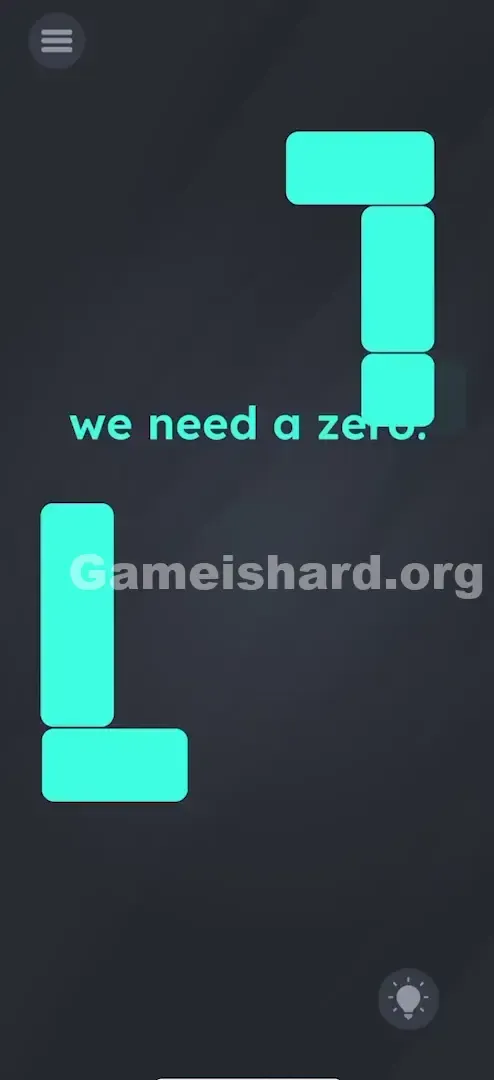
- The First Merge: Drag it over to the bottom-left “L” shape. Aim for the open corner — they’ll snap together instantly. Confirmation: now moving the square also moves the attached L. They’re locked as one unit.
- Verification: They should snap together. Now, when you move the square, the "L" moves with it. They are one unit.
- The Final Assembly: Keep holding the square (now fused with the bottom L). Drag the entire combo upward toward the top-right inverted L.
- Complete the Loop: Slot the merged piece into place so all three form a clean, hollow rectangle — the unmistakable outline of a digital “0”.
If It Did Not Work
- "It won't move!": The large L-shapes are fixed until you use the square as a lever. Always initiate movement from the square — it’s your only movable anchor.
- "They aren't sticking": You need slight overlap — the connection zone is forgiving, but you must make physical contact.
- "I made a rectangle but nothing happened": Double-check — a zero requires an empty center. If it’s solid, you’ve built a block, not a digit.
Small Details That Matter
Alignment doesn’t need to be perfect — the game uses smart snap zones. When dragging the square to the bottom L, you just need to get close enough for the merge trigger to fire.
Once combined, physics shift: the bottom L becomes a passive extension of the square. Trying to grab the L portion of the new unit often fails — always grip and drag from the square itself. It’s the pivot point.
I solved it by shifting focus: the big pieces feel draggable, but they’re locked. The little square isn’t just another piece — it’s the key that unlocks the whole puzzle.
Why This Solution Works
This level tests “affordance awareness” — how clearly an object suggests its own use (e.g., a handle implies pulling). Here, the game subverts expectations: the largest shapes appear interactive but aren’t; the smallest one looks trivial but is essential. It also demands recognizing “0” as a digital glyph — rectangular and hollow — not a handwritten loop. You’re thinking like a retro display engineer, not a calligrapher.
A recurring theme in Game is Hard: the UI is the puzzle. These aren’t decorative props — they’re functional building blocks.
Bonus Tip
For speed or replay: remember the sequence:
- Right → Left (square to bottom L)
- Bottom → Top (merged piece to top L)
- Done.
Don’t fuss over exact positioning — the snap mechanic handles most of the alignment. And never waste time trying to move the top L — it stays put until the final connection.
Alternative Attempts on Game Is Hard Level 56 (What Doesn’t Work, and Why)
- Dragging the top shape down: It’s anchored — immovable until the final merge. You bring the parts to it, not vice versa.
- Pinching to zoom: Not supported. This isn’t a viewer — it’s a builder.
- Spelling “ZERO”: The prompt text is static — no letters to manipulate.
- Tapping the “0” in “Level 56”: A clever trick elsewhere, but irrelevant here.
- Shaking to rearrange: Pieces stay fixed unless dragged — gravity’s off.
- Waiting for hints: The hint button works, but costs coins or ads. Patience is free — and usually enough.
Common Mistakes for Game Is Hard Level 56
- Filling the center: A zero needs breathing room — if it’s solid, you’ve built a brick, not a digit.
- Grabbing the L instead of the square: Touch priority favors the square — it’s designed to be the control point.
- Quitting early because the top L won’t budge: This trips up nearly everyone — it’s meant to feel broken, but it’s deliberate.
- Confusing “O” with “0”: Think LCD screen, not cursive script — sharp corners, straight edges, hollow core.
- Restarting too quickly: If snapping feels sluggish, just nudge the square gently near the join point — it’ll catch.
Pattern Recognition: How to Spot This Trick in Future Game Is Hard Levels
The Tell
Spot blocky, segmented shapes resembling calculator digits (like 7-segment displays)? Expect to assemble numbers or letters.
The Habit
When faced with loose geometry:
- Test mobility first — drag every piece individually.
- Test merging — bump shapes together to see what sticks.
- Think low-res: visualize how classic digital clocks or arcade scoreboards render characters.
Game Is Hard Level 56 FAQ (Short, Useful)
Q: Why won't the top piece move on Game is hard Level 56? A: It's locked in place. You have to build the rest of the zero and bring it up to the top piece.
Q: Does the order of merging matter on Game is hard Level 56? A: Yes. You usually need to merge the movable pieces first (square + bottom L) before connecting to the static piece (top L).
Q: I made the shape but the level didn't end on Game is hard Level 56? A: Check your alignment. It needs to look like a proper digital zero. Wiggle it slightly into place until it "snaps" and turns green/completes.
Q: Can I separate the pieces after merging them in Game is hard Level 56? A: No. Once they merge, they are glued for good. If you messed it up badly (unlikely here), you might need to restart the level.
More Game Is Hard Solutions
Stuck on the next puzzle? We’ve got straight-to-the-point guides for every single level of Game is Hard. We cut the fluff so you can get back to feeling like a genius. Bookmark us and keep your streak alive!
Good luck with Game is hard Level 57 —it gets weirder from here.