App updates can sometimes shuffle the order of puzzles. If this level 34 walkthrough doesn't match your screen, don't worry! You can browse our All Levels guide to find your exact puzzle by its picture.
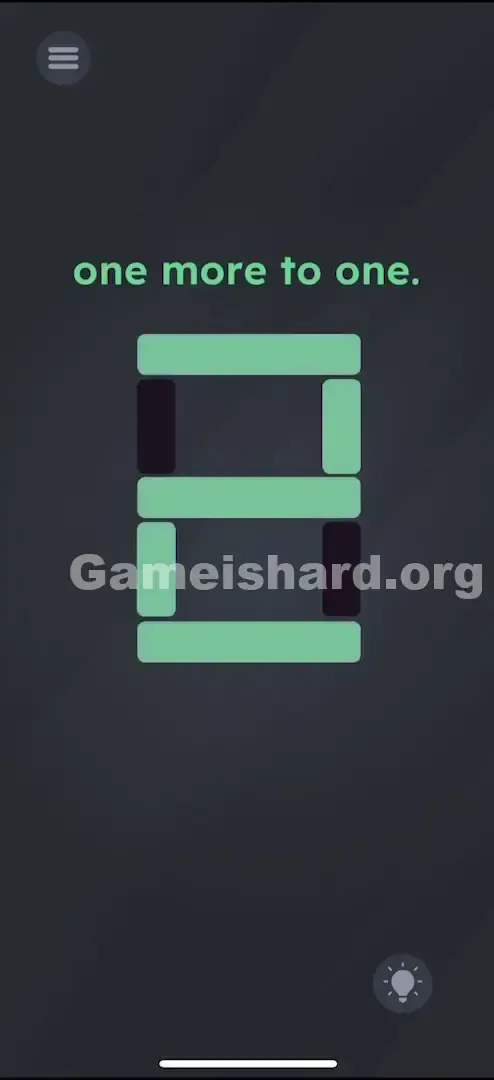
Make sure every other bar is turned OFF so the display clearly reads "2".
Level Overview
What Makes This Puzzle Tricky
You land on Game is hard Level 34 and see a familiar digital display—like something from an old alarm clock or sports scoreboard. The phrase "one more to one" feels cryptic at first, but it’s really just basic arithmetic wrapped in puzzle language. The real challenge hits when you instinctively tap the dark segments—and nothing happens. This level demands engineering thinking, not just tapping.
Your Goal
Your mission is to shape the segmented display into the correct digit. That phrase—"one more to one"—is shorthand for 1 + 1. So you’re not building “1.” You’re building the result: the number 2.
How the Game Responds
- Control Panel Logic: Each purple button outside the display toggles a specific internal segment.
- Pattern Recognition: You’ll need to mentally map the classic 7-segment layout of the digit “2.”
- Toggle State: Buttons act as simple on/off switches—not momentary triggers. It’s not a typo. It’s intentional design.
What Appears on Your Screen
The screen is minimal and focused.
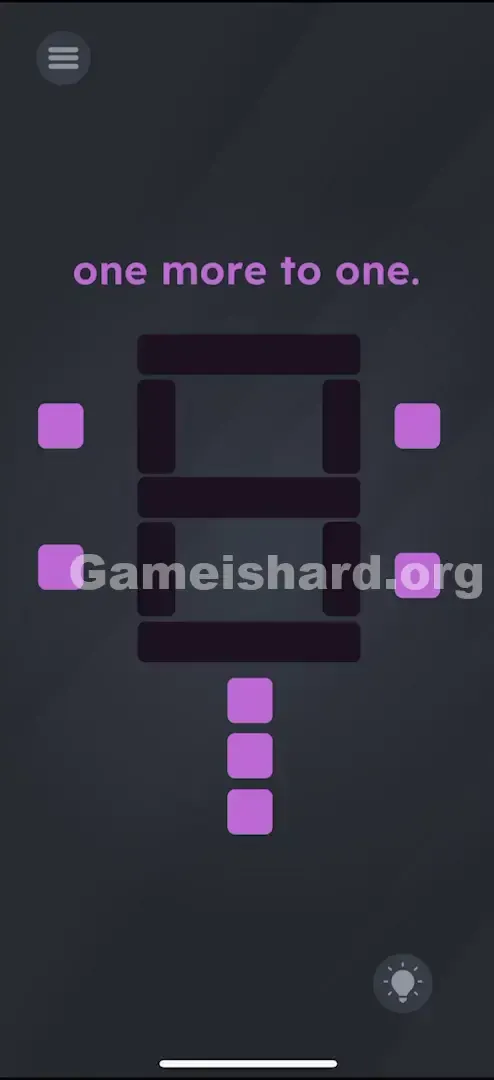
- Top Text: "one more to one." Your only clue.
- Center: A large, blank “8”-shaped skeleton made of seven possible segments—a standard 7-segment display. All segments start dark (off).
- Surroundings: Purple square buttons placed strategically around it—two on the left, two on the right, and three stacked vertically at the bottom.
- Two on the left.
- Two on the right.
- Three stacked vertically at the bottom.
- The Vibe: Feels like hacking a retro control panel—or disarming a timed device.
Common Mistakes to Avoid
The Trap
The biggest stumbling block is misreading the riddle. Many players fixate on “one” and try to build that digit. But if you light up just the segments for “1,” nothing happens—the puzzle expects the sum, not the words.
First Instincts That Fail
- Touching the bars directly: It’s natural to tap the black segments, but they’re static. Only the purple buttons do anything.
- Random button mashing: Without visualizing “2” first, you’ll end up with chaotic lines—not a valid digit.
Player Reactions
I wasted nearly a minute trying to spell out “11” side-by-side, convinced the phrase meant concatenation. Felt pretty foolish once I realized it was just asking what 1 plus 1 equals. The math was simple—the interface was the real puzzle.
Step-by-Step Solution
Preparing the Move
Start with the empty 7-segment grid. Picture how “2” looks digitally: five segments lit—the top, middle, and bottom horizontals, plus the top-right and bottom-left verticals.
Executing the Solution
Light up those five segments using the purple buttons. Order doesn’t matter—but here’s the cleanest path:
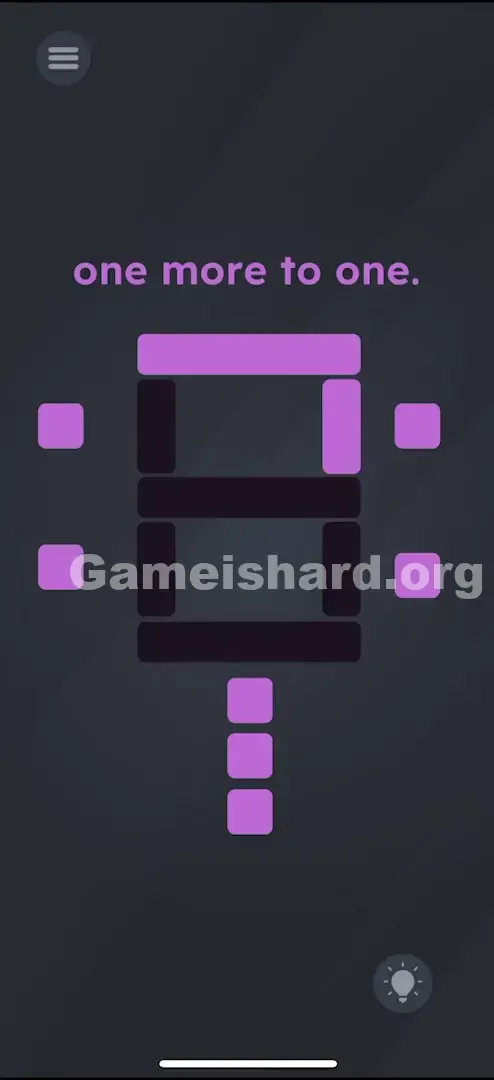
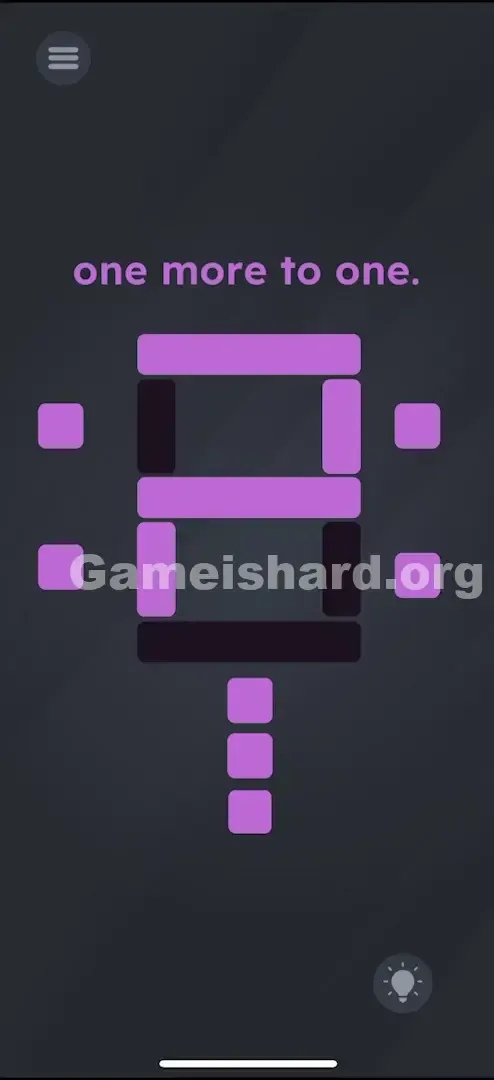
- Horizontal Bars: Tap all three bottom buttons . The top button of this trio lights the Middle bar. The middle button of this trio lights the Bottom bar. The bottom button of this trio lights the Top bar. (Basically: Just turn all three bottom buttons ON to get the three horizontal lines of the "2").
- The top button of this trio lights the Middle bar.
- The middle button of this trio lights the Bottom bar.
- The bottom button of this trio lights the Top bar.
- (Basically: Just turn all three bottom buttons ON to get the three horizontal lines of the "2").
- Top-Right Vertical: Tap the upper button on the right side . This lights up the vertical bar on the top right.
- Bottom-Left Vertical: Tap the lower button on the left side . This lights up the vertical bar on the bottom left.
- Verification: Does it look exactly like a clean digital “2”? If extra segments glow—like top-left or bottom-right—tap their matching buttons to switch them off.
If It Did Not Work
- Looks like “2” but won’t register? You probably have an unintended segment lit—maybe turning it into a distorted “8” or mirrored “6.” Double-check that top-left and bottom-right verticals are fully OFF.
- Nothing lights up? Confirm you’re tapping the purple squares—not the black segments.
Small Details That Matter
Precision isn’t critical—the buttons are generously sized—but logic is everything.
- Toggle Speed: No rush. There’s no timer.
- State Persistence: Buttons stay toggled. Mess up? Just flip the wrong ones back off—no restart needed.
- Visualizing the Z shape: Think of “2” as a jagged “Z” with a flat base. That zigzag pattern is your mental anchor. I cracked it once I accepted that the bottom three buttons handle all horizontals—even if their mapping feels counterintuitive. I hit all three first, then added the verticals.
Why This Solution Works
This level tests two core skills:
- Linguistic decoding: Can you translate “one more to one” into the equation 1 + 1 = 2?
- Indirect interaction: Unlike most games where you touch what you control, here you manipulate outputs through separate, non-obvious inputs—mirroring real-world interfaces like control panels or broken hardware. It treats the display like a coded lock: you know the answer (“2”), but you must figure out how the buttons serve as the key.
Bonus Tip
For replays or speedruns:
- Tap all three bottom buttons immediately.
- Tap Top-Right .
- Tap Bottom-Left .
- Done. Skip over parsing the riddle—you already know the math.
Do NOT waste time trying to drag the word “one” onto the screen. The text is purely informational—not interactive.
Alternative Attempts on Game Is Hard Level 34 (What Doesn’t Work, and Why)
- Making a '1': Using the two right-side buttons to form “1”. (The prompt signals addition—not display replication.)
- Making an '11': Lighting both vertical sides. (That’s not the sum—it’s just repetition.)
- Dragging the purple buttons: They’re fixed toggles—not draggable objects.
- Shaking the device: No effect. This is a pure touch puzzle.
- Lighting up everything (8): A panic move. Displays “8”, which isn’t 1+1.
- Using the "Back" or "Menu" button: That top-left UI element opens settings—not part of the puzzle.
Common Mistakes for Game Is Hard Level 34
- Misreading the clue: Assuming “one more to one” means “add one segment to ‘1’.”
- Mixing up button roles: Bottom buttons = horizontals; side buttons = verticals. Confusing them leads to wrong shapes.
- Leaving stray segments on: Accidentally keeping the bottom-right bar lit creates a mangled “a” or flipped “6.”
- Swiping instead of tapping: Swipes won’t reliably register—each button needs a deliberate tap.
- Overcomplicating the math: No binary, no sequences—just plain “2.”
Pattern Recognition: How to Spot This Trick in Future Game Is Hard Levels
The tell
Any time you see a segmented, clock-style display, assume the goal is to construct a specific digit—and expect the controls to be external buttons, not the segments themselves.
The habit
Pause before tapping. If the clue includes numbers or operation words (“one,” “add,” “plus,” “sum”), translate it into an equation first. The answer is almost always the result—not the ingredients.
Game Is Hard Level 34 FAQ (Short, Useful)
Q: Why isn't the number 1 working in Game is hard Level 34? A: The riddle "one more to one" is an addition problem. 1 + 1 = 2. You need to display the answer, not the components.
Q: Do I have to hold the buttons down in Game is hard Level 34? A: No, they are toggles. Tap once to turn on, tap again to turn off.
Q: Can I reset the lights without restarting in Game is hard Level 34? A: Yes, just tap the lit buttons again to turn them off manually. There is no "clear all" button inside the puzzle.
Q: Is there a specific order for the buttons in Game is hard Level 34? A: No. You can light up the segments in any order you want, as long as the final image forms the number 2.
More Game Is Hard Solutions
If this guide saved your streak, we’ve got plenty more where that came from. We write these guides to be fast, accurate, and free of the usual fluff you find on recipe blogs. Share this with your friends if they are stuck on the same level!