App updates can sometimes shuffle the order of puzzles. If this level 38 walkthrough doesn't match your screen, don't worry! You can browse our All Levels guide to find your exact puzzle by its picture.
(Target the letters surrounding the circle, not just the triangles in the center.)
Level Overview
What Makes This Puzzle Tricky
You’re greeted with a compass and the instruction “point towards North.” Your gut reaction? “North means up!” But tapping the triangles does nothing when aimed upward—and tilting your phone won’t help either. This level deliberately misleads you with real-world expectations, making it feel like the game isn’t responding at all.
Your Goal
Forget orienting arrows to North—you’re meant to reposition North to your arrows. The real goal is to redefine the compass itself: align all three triangles in one direction first, then relocate the “N” label to match that direction. It’s less about geography and more about reshaping the interface to fit your action.
How the Game Responds
- Tap-to-Rotate: Each blue triangle rotates with every tap—no drag needed.
- UI Drag & Drop: The cardinal letters (N, E, S, W) aren’t fixed labels—they’re interactive elements you can move freely.
- Logic Inversion: Success hinges on changing the reference point (moving North) instead of adjusting your input (pointing arrows).
It’s not testing your knowledge of directions—it’s testing how boldly you’ll interact with the UI.
What Appears on Your Screen
Let’s map out the layout clearly. The screen is clean, dark, and intentionally subtle.
At the top, teal text reads: point towards North.
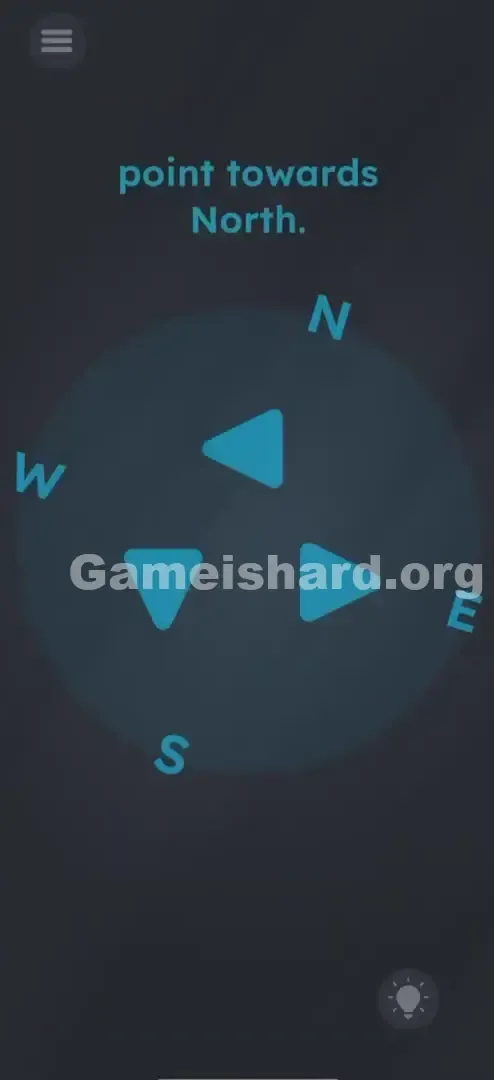
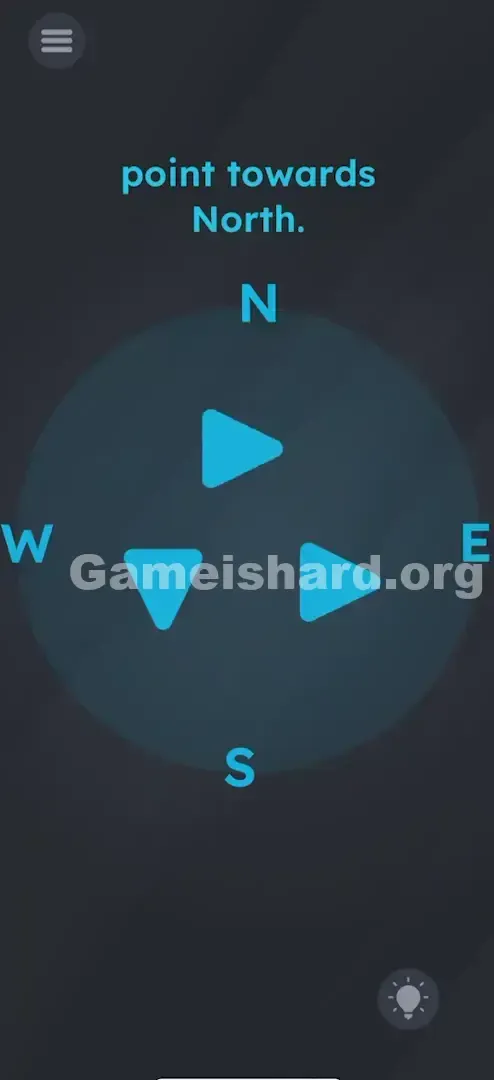
Centered is a faint grey circular outline—a minimalist compass face—with three blue triangles inside. By default, they face different directions (e.g., left, down, right), resembling stylized directional icons.
Around the circle sit four cardinal letters:
- N (North) sits near the top-right (roughly 1–2 o’clock).
- E (East) sits near the bottom-right (4–5 o’clock).
- S (South) sits near the bottom-left (7–8 o’clock).
- W (West) sits near the top-left (10–11 o’clock).
This off-kilter arrangement isn’t a bug—it’s your first hint that these labels aren’t locked in place.
Common Mistakes to Avoid
The Trap
The biggest mental roadblock is clinging to “true north.” When told to “point toward North,” your brain defaults to aiming arrows upward—or toward wherever the N currently lives. But no matter how precisely you line them up with the existing N or the top of your screen, nothing triggers. That silence is intentional: the level refuses to reward literal interpretation.
First Instincts That Fail
- The Gyroscope Tilt: Some players instinctively rotate their device, expecting motion-based feedback. This puzzle ignores sensors entirely—it’s purely touch-driven.
- The “Up” Bias: Even after noticing N is tilted rightward, many still aim arrows straight up, assuming vertical alignment is universally correct in UI design.
- Ignoring the Letters: Most treat the outer letters as static decoration—not puzzle pieces. They focus only on the triangles, missing the real interaction point.
Player Reactions
I cycled through every arrow combination—up, diagonal, inward—for nearly three minutes. Nothing worked. Then my finger accidentally brushed the W while reaching for a triangle, and it slid sideways. That tiny slip revealed the truth: those letters weren’t labels. They were movable objects—and I’d been solving the wrong half of the puzzle.
Step-by-Step Solution
Preparing the Move
Put your phone down flat or hold it steady. No shaking, no tilting—just focus on the three blue triangles in the center.
Executing the Solution
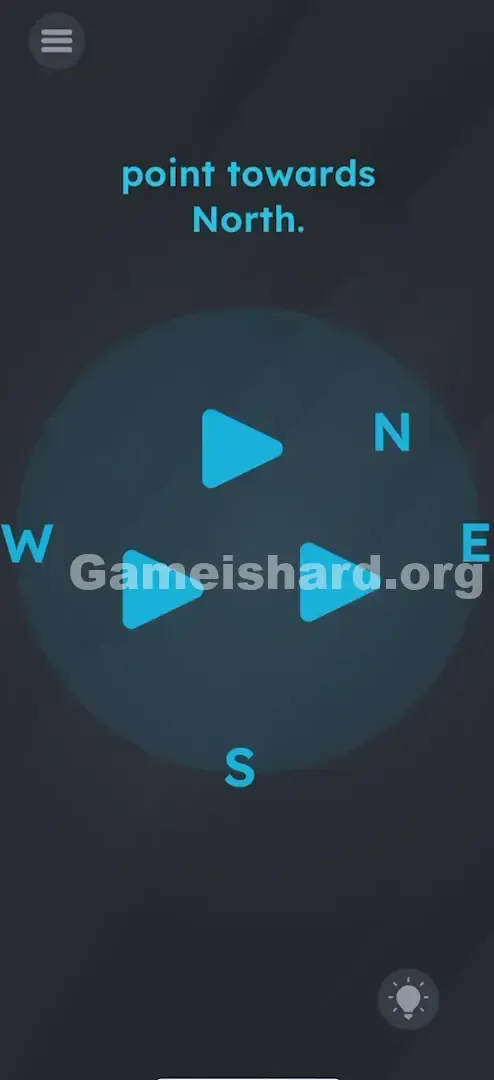
- Align the Arrows: Tap each of the three blue triangles one at a time. Keep tapping until all three face strictly to the Right (toward the 3 o’clock position/Right side of the screen).
- Locate the Target: Scan the outer ring. Find N (currently near top-right) and E (currently near bottom-right).
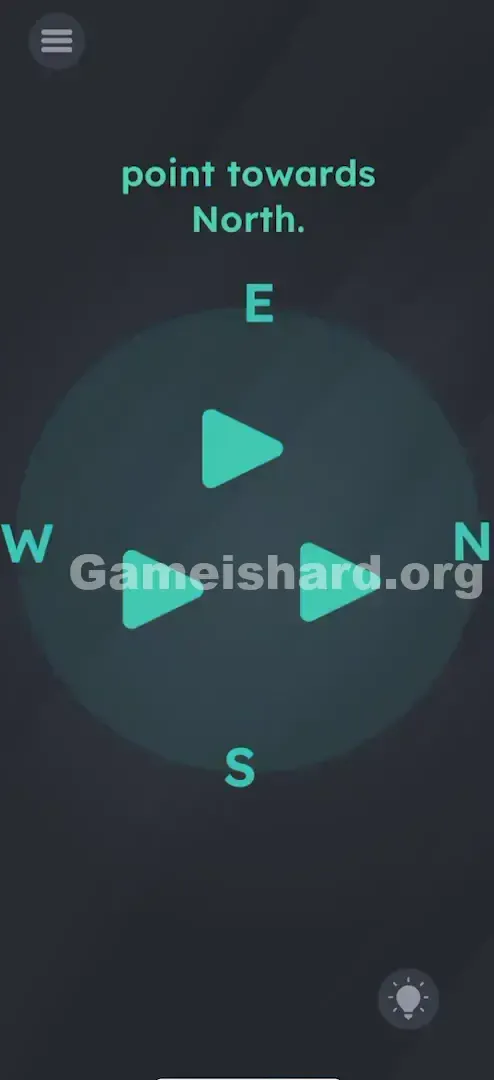
- The Swap: Press and hold the letter N . Drag it downward directly onto the letter E .
- Verification: The letters will exchange places—N lands on the right side, perfectly aligned with your arrows. The level completes instantly.
If It Did Not Work
- If the letters don't swap: You may not be dragging far enough—or releasing directly over E. Try slowing down and aiming carefully.
- If nothing happens after the swap: Double-check all three triangles. Even one slightly misaligned (e.g., pointing left or up) breaks the trigger.
- Reset: If letters get jumbled or overlapped, restart the level to restore their default positions.
Small Details That Matter
Success depends on pixel-perfect execution—not just intention.
- Snap Zones: The game expects N to land in E’s slot, not just somewhere on the right. Dropping it into blank space won’t count.
- Rotation Cycle: Triangles usually rotate in 90° increments per tap. Rushing leads to overshoot—tap deliberately and watch their orientation closely.
- Visual Alignment: The phrase “point towards North” becomes true only when both arrows and the N occupy the same horizontal axis. Arrows → N = solved.
I cracked it only after ditching vague dragging and committing to precise placement—dragging N straight onto E, not just “near” it.
Why This Solution Works
This level flips a core UI assumption: that text is untouchable. Here, “N” isn’t a label—it’s a manipulatable object. That shift reframes the entire challenge.
- Real-World Logic: North is absolute; I must adapt to it.
- Game Logic: My direction is absolute; North must adapt to me.
It’s essentially saying, “If reality doesn’t match your solution, edit reality.” It trains you to question whether interface elements are constraints—or components.
Bonus Tip
For speed or replay:
- Skip analyzing letter positions at the start.
- Tap all triangles to face Right—no exceptions.
- Grab N immediately.
- Drop it squarely onto E.
- Done.
Don’t waste taps trying to aim at the original N location—even perfect alignment there won’t satisfy the win condition, which is hardcoded to the Right + N-on-E combo.
Alternative Attempts of Game Is Hard Level 38 (What Doesn’t Work, and Why)
Here’s what seems logical—but fails, every time.
- Tilting the phone vertically: The game doesn’t read sensor data here.
- Pointing arrows UP: Feels right, but contradicts the level’s required configuration.
- Pointing arrows at the original N: Looks correct visually, but the win condition demands N be moved, not just targeted.
- Dragging the arrows: They only respond to taps—not drags.
- Shaking the phone: A common reset trick elsewhere, but useless here.
- Dragging the word “North” from the instruction: That text is decorative only—the interactive N is part of the compass ring.
Common Mistakes for Game Is Hard Level 38
- Leaving one arrow unaligned: Easy to miss if your thumb covers it during tapping—zoom in and verify all three.
- Moving E instead of N: Swapping E to N puts East where North belongs—backwards logic.
- Dragging N into the center: It won’t stick or register—only swapping with E works.
- Assuming it’s timed: There’s no countdown. Take your time—accuracy beats speed.
- Fighting the tilt: The compass layout is skewed on purpose—to nudge you toward interaction, not correction.
Pattern Recognition: How to Spot This Trick in Future Game Is Hard Levels
The Tell
When standard UI labels appear (like “North,” “Start,” or numbered options) alongside an impossible instruction (“Pick the largest”), test them. Tap or drag them first—before diving into complex logic.
The Habit
Interact with the HUD early and often. Score displays, buttons, headers, and even punctuation marks can be active elements. In Game is Hard, if something looks like it could move—and especially if the puzzle feels unsolvable—chances are, it should.
Game Is Hard Level 38 FAQ (Short, Useful)
Q: Can I point the arrows Up and move N to the top in Game is hard Level 38? A: Usually, no. The level’s detection is built around the Right-facing configuration. Stick with “all right + N on E.”
Q: Why won't the letter N move in Game is hard Level 38? A: Make sure you’re pressing directly on the letter—not the margin around it. Dry fingers or thick screen protectors can reduce sensitivity on small targets.
Q: Do I need to move S, E, and W too in Game is hard Level 38? A: No. Only N’s position matters for completion. The others are irrelevant to the win condition.
Q: Is there a specific order in Game is hard Level 38? A: Not required—but setting the arrows first gives you a clear visual target for where N needs to land.
More Game Is Hard Solutions
Stuck on the next puzzle? We’ve got step-by-step guides for every Game is Hard level—written by players who’ve already wrestled with (and beaten) these mind-bending challenges. Our walkthroughs skip fluff, load fast, and get you moving again in seconds.
Good luck on Game is hard Level 39 !