

App updates occasionally rearrange puzzle order. If this level 24 guide doesn’t match what you see, no stress! Use our All Levels directory to locate your exact puzzle by image.
No dragging or shaking required—just tap each shape cleanly and one at a time until the screen clears.
Level Overview
What Makes This Puzzle Tricky
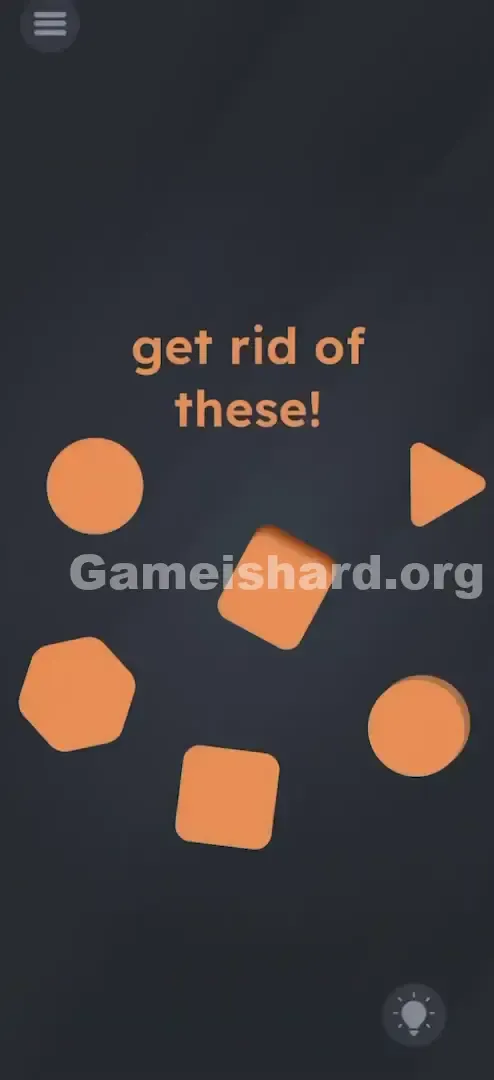
Level 24 opens with a stark grey background and six bold orange shapes scattered across the screen. The instruction “get rid of these!” instantly triggers instinctive physical responses—swiping, shaking, dragging—but none work. The shapes stay put, unresponsive, making it feel like a glitch. That’s intentional: the usual interaction rules from earlier levels don’t apply here.
Your Goal
Your goal is straightforward: remove all orange geometric shapes from the screen. But unlike previous cleanup challenges involving trash bins or gravity-based removal, this level relies entirely on sequence. It’s less about motion and more about recognizing and acting on a hidden logical pattern—disguised as a physics puzzle.
How the Game Responds
- Sequential Tapping: Order is critical; tapping out of sequence resets progress.
- Visual Logic: The sequence follows shape complexity—specifically, number of sides or vertices.
- Anti-Physics: Dragging, tilting, and shaking have zero effect.
- Pattern Recognition: You’ll need to identify each shape’s geometric properties (e.g., circles = 0 corners, triangles = 3, etc.).
- Precision: One mistap usually restarts the level. It’s not a bug—it’s a geometry puzzle.
What Appears on Your Screen
When Level 24 loads, you’re greeted with a minimalist dark grey interface. Here’s exactly what appears:
- The Prompt: Bold orange text centered at the top reads: "get rid of these!"
- The Shapes: Six distinct orange shapes are placed around the screen:
- A Circle in the top-left area.
- A Circle in the bottom-right area.
- A Triangle in the top-right.
- A Diamond (rotated square) in the dead center.
- A Square near the bottom-center.
- A Hexagon in the bottom-left.
- The Menu: A standard hamburger icon (three horizontal lines) sits in the top-left corner.
- The Hint: A lightbulb icon rests in the bottom-right corner. There are no interactive tools, no hidden zones, no trash icons—just shapes suspended in empty space.
Common Mistakes to Avoid
The Trap
The main pitfall is “puzzle fatigue.” By level 24, players are conditioned to expect unconventional solutions—shaking, rotating, or dragging elements off-screen. So when “get rid of these!” appears, the brain defaults to physical action instead of analytical observation. The game banks on that reflex—and hides the real answer in plain sight.
First Instincts That Fail
Players often exhaust every non-mathematical option first:
- Dragging shapes toward screen edges (they snap back into place).
- Multi-finger taps (the game only registers single, sequential taps).
- Shaking the device (gravity is disabled for this level).
- Random tapping (shapes may wobble but won’t vanish unless tapped in correct order).
Player Reactions
My first attempt involved dragging the word “these” onto shapes, convinced it was part of the solution. Then I tried merging circles and squares into cartoon faces. Nothing worked—until I paused and counted corners. The answer wasn’t hidden; it was staring right at me.
Step-by-Step Solution
Preparing the Move
Put down any impulse to drag or tilt. Hold your device steady and study each shape’s structure. The core rule is simple: tap in ascending order of side count.
Executing the Solution
Follow this exact tapping sequence based on geometric complexity:
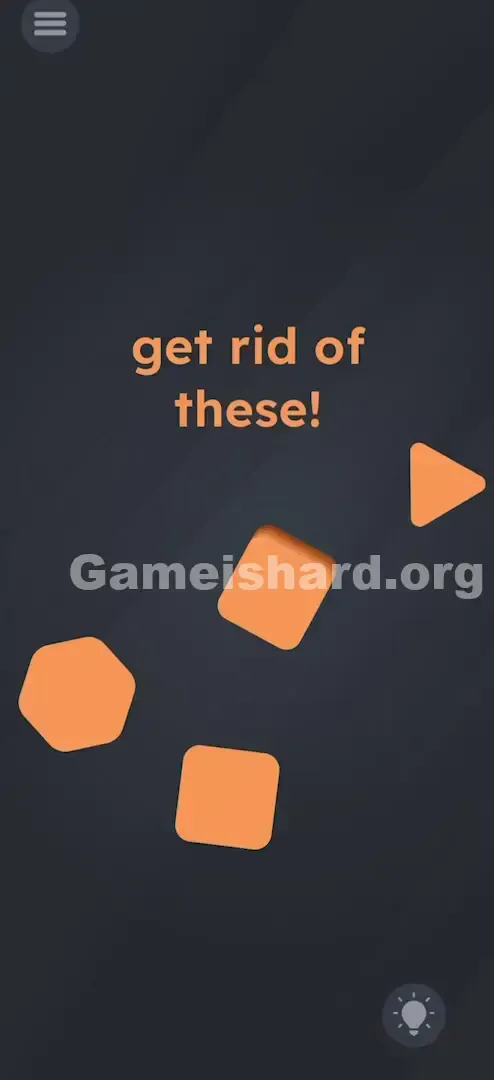
- Tap the Circles First: Circles represent the lowest complexity (0 or 1 side). Tap the Top-Left Circle . Tap the Bottom-Right Circle . (While either circle can technically go first, sticking with top-left → bottom-right ensures consistency.)
- Tap the Top-Left Circle .
- Tap the Bottom-Right Circle .
- (While either circle can technically go first, sticking with top-left → bottom-right ensures consistency.)
- Tap the Triangle: With 3 corners, it’s next. Tap the Top-Right Triangle .
- Tap the Top-Right Triangle .
- Tap the Square: Four corners make it step four. Tap the Bottom-Center Square .
- Tap the Bottom-Center Square .
- Tap the Diamond: Though also 4-sided, the diamond functions as step five here—likely due to visual distinction or rotational complexity. Tap the Center Diamond .
- Tap the Center Diamond .
- Tap the Hexagon: Its 6 corners seal the sequence. Tap the Bottom-Left Hexagon .
- Tap the Bottom-Left Hexagon .
Confirming It Worked
Each correctly tapped shape should vanish instantly with a subtle pop animation. If a shape jiggles but remains—or if previously cleared shapes reappear—you’ve broken the sequence. Restart from the first circle.
If It Did Not Work
- If nothing disappears: You may be tapping too quickly or missing the center. Press firmly and aim precisely.
- If shapes reappear: You likely tapped the triangle before finishing both circles. Reset and begin again.
- If the Diamond won’t vanish: Double-check that you cleared the Square immediately before it.
Small Details That Matter
Success hinges on clean, deliberate input—not speed.
- Tap Center Mass: Hit the geometric center of each orange shape. Edge taps often fail.
- One by One: Wait for the disappearance animation to complete before tapping the next shape—even a fraction of a second matters.
- No Swipes: Lift your finger fully between taps. Sliding across the screen can register as a drag, invalidating the tap. I solved it by slowing down—literally counting “one… two… three…” aloud between taps after my rushed attempts failed.
Why This Solution Works
This is a textbook ordinal puzzle: derive order from visual cues without explicit instructions.
- Geometric Hierarchy: Complexity is ranked by side count:
- Circle = 0/1
- Triangle = 3
- Square/Diamond = 4
- Hexagon = 6
- The "Diamond" Confusion: Yes, both square and diamond have four sides—but in this level’s logic, the diamond serves as the fifth element, possibly due to its rotated orientation or visual prominence. Treat it as position #5. The real trick? “Get rid of” sounds like an action verb—but here, it means identify and eliminate using logic, not force.
Bonus Tip
To breeze through this—or impress friends—keep this mental checklist handy:
- Spot both Circles right away.
- Tap them (top-left first, then bottom-right).
- Tap Triangle .
- Tap Square .
- Tap Diamond (the tilted square).
- Tap Hexagon . Skip the theatrics: shaking does nothing here—except waste your time.
Alternative Attempts of Game Is Hard Level 24 (What Doesn’t Work, and Why)
Here’s what wastes time—and why it fails:
- Dragging shapes together: No fusion mechanic exists in this level.
- Pinching to zoom: These aren’t scalable assets—just static UI elements.
- Tapping the instruction text: “Get rid of these!” is purely decorative.
- Waiting for auto-clear: No timer or fade mechanic is active.
- Using volume buttons: Audio sensors aren’t triggered here.
- Multi-finger taps: The engine expects strict one-tap-at-a-time input.
- Tapping largest-to-smallest: Size is irrelevant—only corner count matters.
Common Mistakes for Game Is Hard Level 24
- Mistake: Starting with the Hexagon because it looks most prominent. Correction: Always begin with the simplest shape—the Circle.
- Correction: Start with the simplest shapes (Circles).
- Mistake: Confusing Square and Diamond placement. Correction: Square (flat base) comes before Diamond (point-up orientation).
- Correction: Square (flat bottom) comes before Diamond (pointy bottom).
- Mistake: Tapping blank areas. Correction: Only orange pixels register—aim carefully.
- Correction: You must hit the orange pixels.
- Mistake: Trying to drag circles off-screen. Correction: Tap only—no dragging allowed.
- Correction: Stop dragging! Just tap.
- Mistake: Assuming left-to-right reading order applies. Correction: Spatial layout doesn’t matter—shape type does.
- Correction: The spatial position (left/right/top/bottom) is irrelevant. Only the shape type matters.
- Mistake: Thinking the level is broken when shapes don’t budge. Correction: It’s working perfectly—you just haven’t tapped the first Circle yet.
- Correction: It's not bugged; you just haven't found the correct starting shape (the circle) to trigger the removal.
Pattern Recognition: How to Spot This Trick in Future Game Is Hard Levels
The Tell
If shapes ignore physics, resist dragging, and offer no obvious tools—look closer. Are they uniform in color? Do they vary by sides, angles, or symmetry? That’s your cue to shift from action to analysis.
The Habit
When movement fails, think ordering. Scan for patterns like:
- Numerical progression (1 → 2 → 3).
- Alphabetical hints (if letters appear).
- Structural complexity (points → sides → curves).
- Color gradients (ROYGBIV or light-to-dark).
Game Is Hard Level 24 FAQ (Short, Useful)
Q: Does the order of the two circles matter in Game is hard Level 24? A: Usually, no. Either circle can initiate the sequence—but top-left first is safest.
Q: Why won't the Diamond disappear in Game is hard Level 24? A: You likely tapped it before the Square. The Square must be cleared first.
Q: Can I skip the animation in Game is hard Level 24? A: No—wait for full disappearance before tapping the next shape to guarantee registration.
Q: Is there a hidden object in Game is hard Level 24? A: No. Every needed element is visible against the dark background.
More Game Is Hard Solutions
That’s how you conquer Game is hard Level 24 . If this helped, explore our full library of concise, spoiler-free walkthroughs for every level at thegameishard.org—and share this guide with anyone still frantically shaking their phone!
Good luck on Game is hard Level 25 !