


App updates can sometimes shuffle the order of puzzles. If this level 22 walkthrough doesn't match your screen, don't worry! You can browse our All Levels guide to find your exact puzzle by its picture.
Target: You must keep steady pressure on the circle; do not tap it rapidly or slide your finger off the edge.
Level Overview
What Makes This Puzzle Tricky
You land on Game is hard Level 22 and see just one button. Your reflex kicks in—you tap. Nothing happens. Tap again—still nothing. Doubt creeps in. Is the game broken? Did your touch register? This level brilliantly manipulates your expectations, posing a simple question while demanding an action that defies every mobile gaming habit you’ve built.
Your Goal
The phrase how patient are you? isn’t decorative—it’s your full instruction set. There’s no hidden clue or secret path. Your only mission is to prove stillness. Turn the red circle green—not with speed or cleverness, but with sustained, unwavering contact.
Key Mechanics
- Long Press / Hold: The correct input isn’t a tap—it’s a continuous press.
- Time-Based Trigger: Progress only ticks forward while your finger stays planted.
- Psychological Trap: The level banks on frustration or impatience making you lift too soon.
- Visual Feedback Lag: No immediate response means you’ll second-guess yourself—even though the system is working perfectly. This isn’t a bug. It’s a deliberate test of composure.
What Appears on Your Screen
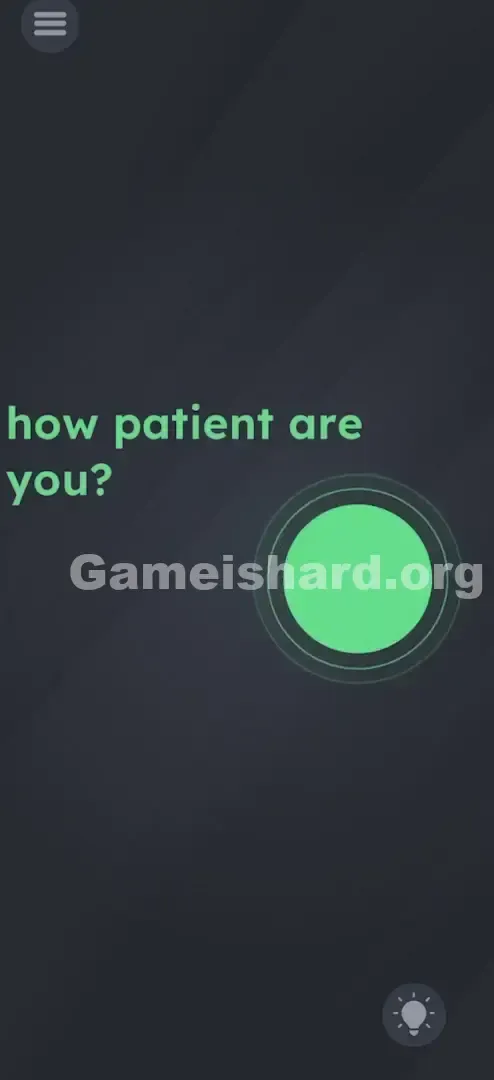
The screen is stripped bare—no clutter, no distractions. A moody dark gray background fills the display.
Near the top, soft red/pink text reads: how patient are you?
Below it, centered toward the right side, sits a bold, glowing red circle—clean, minimal, and unmistakably interactive, like a recording or emergency stop button.
That’s it. No numbers, no symbols, no subtle hints hiding in corners. Its stark simplicity is what makes it tricky—you instinctively assume something must be missing.
Common Mistakes to Avoid
The Trap: The Tapper's Instinct
Mobile games train us to react instantly—tap, swipe, flick. When we spot a button, we tap it. If it ignores us, we tap faster, harder, more frantically. Level 22 punishes that reflex. Every tap resets the internal timer—so rapid tapping feels like progress but actually undoes all your effort.
First Instincts That Fail
Frustration leads players down false paths:
- "Maybe I should wait without touching anything?" (No response.)
- "Could shaking the phone help?" (No motion sensors involved.)
- "Is the text draggable?" (It’s static and non-interactive here.)
Player Reactions
I stared at the screen for over a minute, convinced the answer was passive waiting. I set the phone down and waited—nothing. Then I tapped wildly—still nothing. The breakthrough came when I pressed my thumb down to drag the circle aside (thinking it masked something underneath) and caught a tiny visual flicker. That was my “aha” moment.
Step-by-Step Solution
Preparing the Move
Clear your head. Forget speed-based strategies. Position your hand so your thumb or index finger rests comfortably over the center of the red circle—without covering its edges, so you can spot the color shift.
Executing the Solution
- Place your finger directly in the center of the red circle .
- Hold it there. Don’t move. Don’t lift. Don’t wiggle your finger.
- Wait. Count slowly to about 5 or 6 seconds. Resist the urge to lift and check.
- Watch the edges. You’ll see the red snap instantly to green .
- Release. Once fully green, let go—the level completes immediately.
If It Did Not Work
If holding for 10+ seconds yields no change:
- You may be drifting slightly. Even small shifts break continuity and reset the timer.
- Sweat or oil on your screen can cause erratic touches—wipe it clean and retry.
- Avoid resting your palm on the screen; extra touch points may interfere with detection.
Small Details That Matter
Accuracy matters more than it appears. Though the circle looks large, the game demands uninterrupted input .
- The "Wiggle" Factor: Light pressure can trick your device into reading micro-taps instead of a hold. Press confidently—your touchscreen needs to register a solid “Touch Down” and hold.
- The Visual Cue: The transition isn’t gradual—it’s an instant switch from red to green. That’s why watching the perimeter is key—if your finger covers the whole circle, you’ll miss the signal.
- Time Requirement: Testing confirms it takes roughly 5 seconds . It feels longer because you’re doing nothing—but counting “One Mississippi, Two Mississippi…” keeps you anchored. I solved it by switching from thumb to index finger—my thumb tended to flatten and shift pressure; my index tip stayed precise and stable.
Why This Solution Works
This level uses pure Input Duration Logic —unlike puzzles based on where you touch or how you drag, this one cares only about how long you maintain contact.
It redefines the word “Patient” in gameplay terms:
- Literal Meaning: Enduring delay or stillness.
- Game Translation: Holding—not tapping, not dragging, not waiting passively. It’s a trust exercise. Most games reward patience with feedback—a pulse, a bar filling, a quiet tone. Level 22 gives you silence for nearly five seconds, forcing you to trust the process—and yourself.
Bonus Tip
For speed runs or replays:
- Skip reading the prompt entirely.
- As soon as the level loads, plant your finger on the red dot.
- Keep your eyes locked on it—timing can vary slightly between devices. Don’t: waste time dragging the word “patient.” Other levels use text interaction—but here, it’s pure misdirection.
Alternative Attempts of Game Is Hard Level 22 (What Doesn’t Work, and Why)
Here’s a list of dead ends I tested—and why they failed:
- Tapping "Patient": The text is purely visual—not interactive.
- Dragging the Button: The circle is fixed in place—no hidden layer beneath.
- Doing Literally Nothing: Leaving the phone idle for 60+ seconds does nothing—the game requires active input.
- Rubbing the Button: Back-and-forth motion breaks the hold command.
- Shaking the Device: No accelerometer support in this level.
- Volume Keys: Physical buttons won’t trigger the solution.
Common Mistakes for Game Is Hard Level 22
- The "Pulse" Tap: Holding for a second, lifting, repeating—each lift resets the timer.
- The "Peek" Lift: Lifting to peek under your finger—breaks continuity and delays success.
- Drifting Finger: Letting your finger slip off the button while glancing at the text or timer.
- Anticipation Release: Letting go at 4 seconds, assuming it’s enough—timing is strict.
- Covering the Screen: Using your whole hand triggers unintended inputs and cancels the hold.
Pattern Recognition: How to Spot This Trick in Future Game Is Hard Levels
The Tell
Words like Wait, Stop, Patient, Slow, or Hold are strong signals the level expects a long press. Also, if a button shows zero animation on tap—it’s likely waiting for a hold or drag.
The Habit
When tapping fails, your next move should always be a long press on every visible object. It’s the second-most common interaction in the game—after tapping. So if tap → nothing, try hold → nothing, then drag.
Game Is Hard Level 22 FAQ (Short, Useful)
Q: I've been holding it for a minute and nothing happened in Game is hard Level 22! A: You likely shifted your finger slightly or lost contact. Lift, wipe the screen, and press firmly again without moving.
Q: Do I need to tap the word "patient" first in Game is hard Level 22? A: No. The text is purely instructional. Ignore it and focus on the red circle.
Q: Can I use multiple fingers in Game is hard Level 22? A: It's risky. Multi-touch might confuse the app. Use one single finger for the best results.
Q: Is there a specific spot on the button I need to press in Game is hard Level 22? A: Aim for dead center. The edges can be finicky if your finger slips onto the background.
More Game Is Hard Solutions
If you’re stuck on another puzzle, skip the guesswork. We deliver direct, no-fluff solutions for every level—no bloated videos, just what works. Share this with friends still frantically tapping that red circle. Keep playing—and remember: patience pays off.