App updates can sometimes shift puzzle order. If this level 223 walkthrough doesn’t match what you’re seeing, no stress! Flip through our All Levels hub to locate your exact puzzle by image.
You’re literally assembling the answer from the previous stage using the on-screen shapes.
Level Overview
What Makes This Puzzle Tricky
You’re faced with a blunt question—but zero input method. It asks what was the answer?, yet there’s no keyboard in sight. You know the answer is 32, but there’s no way to type it. The interface feels deliberately deceptive—no hidden text field, no keypad, no secret toggle. What you see is the puzzle, but you’re interpreting it wrong.
Your Goal
Your job isn’t to type—it’s to build. You must physically construct “32” using the UI elements provided. Think of those squares as digit placeholders: left = tens, right = ones. This level tests both your memory of the prior answer and your willingness to treat abstract interface elements as manipulable objects.
Here’s what makes this puzzle tricky:
- Memory recall: You must remember that the last level’s answer was 32.
- Drag-based interaction: Those yellow circles aren’t just decoration—they’re draggable assets.
- Spatial representation: Position inside the boxes encodes digits—not color, size, or sequence.
- Multi-touch option: Fast fingers let you drag multiple circles at once. The UI isn’t eye candy—it’s your toolkit.
What Appears on Your Screen
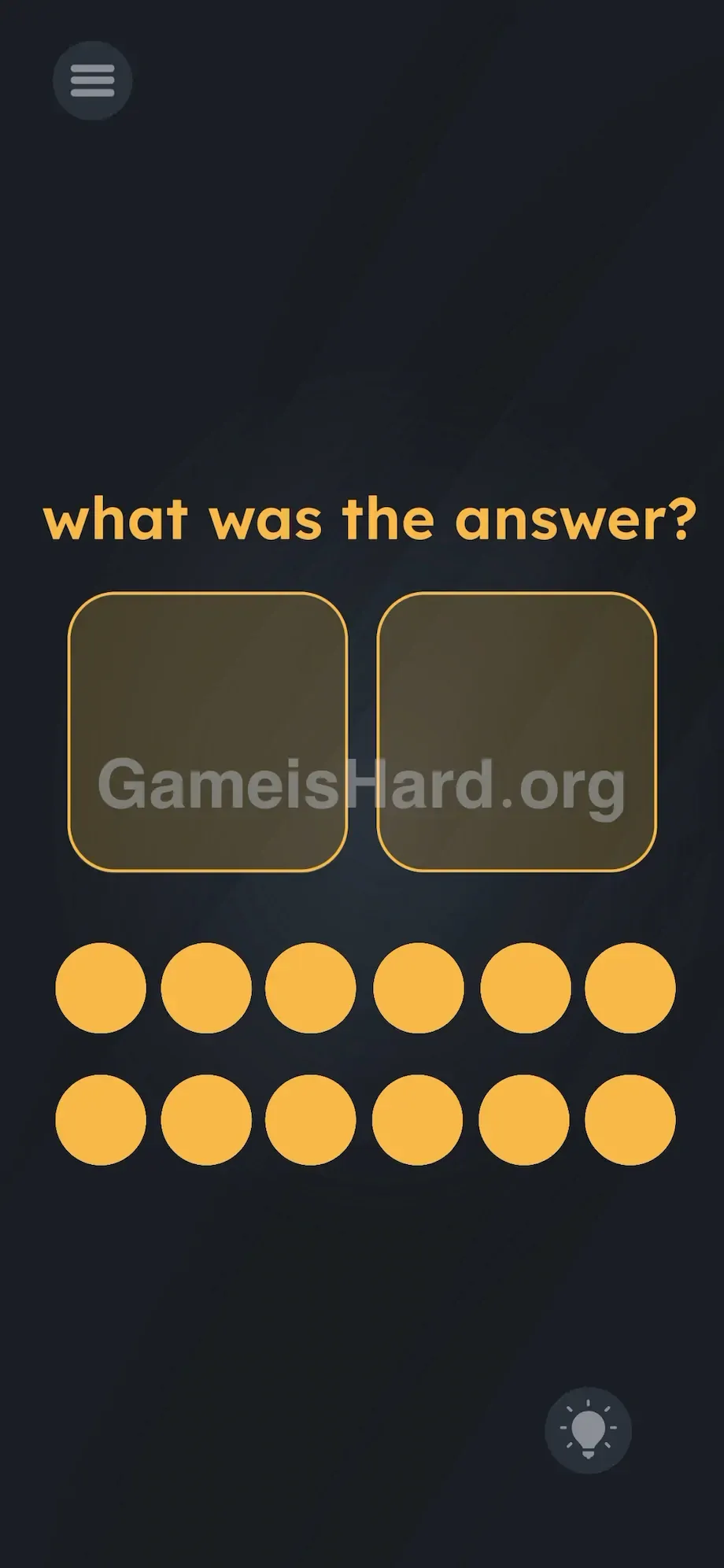
Let’s map the layout. At the top center, bold lowercase yellow text reads: what was the answer?
Directly beneath it sit two large, empty, rounded squares—side by side, outlined in thin yellow, with dark, hollow interiors. They resemble blank frames or unfilled slots.
The lower half of the screen holds twelve solid yellow circles—neatly arranged in two horizontal rows of six. They look like game tokens or pegboard pieces.
A standard hamburger menu (three lines) sits in the top-left corner. In the bottom-right, a circular hint button waits—ready to deduct points. No numbers. No letters. Just two empty boxes and a dozen dots.
Common Mistakes to Avoid
The Trap
It’s all about UI autopilot. Years of mobile use train us to hunt for a blinking cursor when we see a question. When it’s missing, we assume something’s hidden—and overlook the obvious: those bright yellow circles dominate half the screen. Most players dismiss them as visual fluff or progress indicators, not interactive pieces. We read the prompt—but forget to touch the world around it.
First Instincts That Fail
People tap the empty squares hoping a keypad will appear. Others swipe the question text offscreen. One player even tried voice input—shouting “thirty-two” into their mic. Some rapidly tap the yellow circles expecting lights, sounds, or sequences. Nothing triggers. Tapping does nothing. The puzzle rejects conventional logic—you don’t tell the game the answer; you show it.
Player Reactions
Instant facepalm. I stared for nearly three minutes hunting for hidden “3” and “2” glyphs in the background. Tried dragging the level number from the pause menu. Then—by accident—I swiped a yellow circle and watched it move. Everything clicked. It’s basic place value dressed up as a mind-bender.
Step-by-Step Solution
Preparing the Move
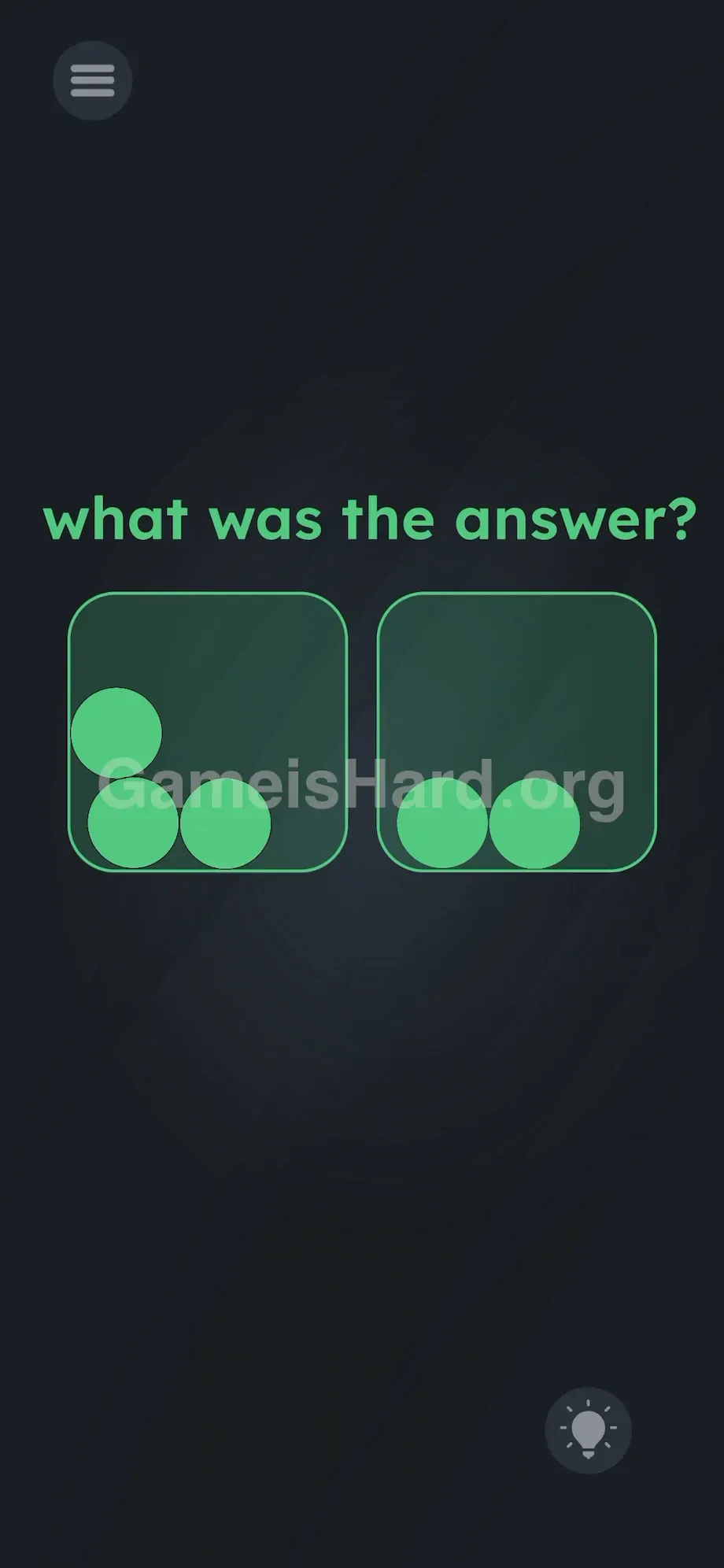
Two things get you through level 223: remembering the last answer (32), and grasping how the squares function. Left box = tens place. Right box = ones place. So you need three circles in the left, two in the right.
Executing the Solution
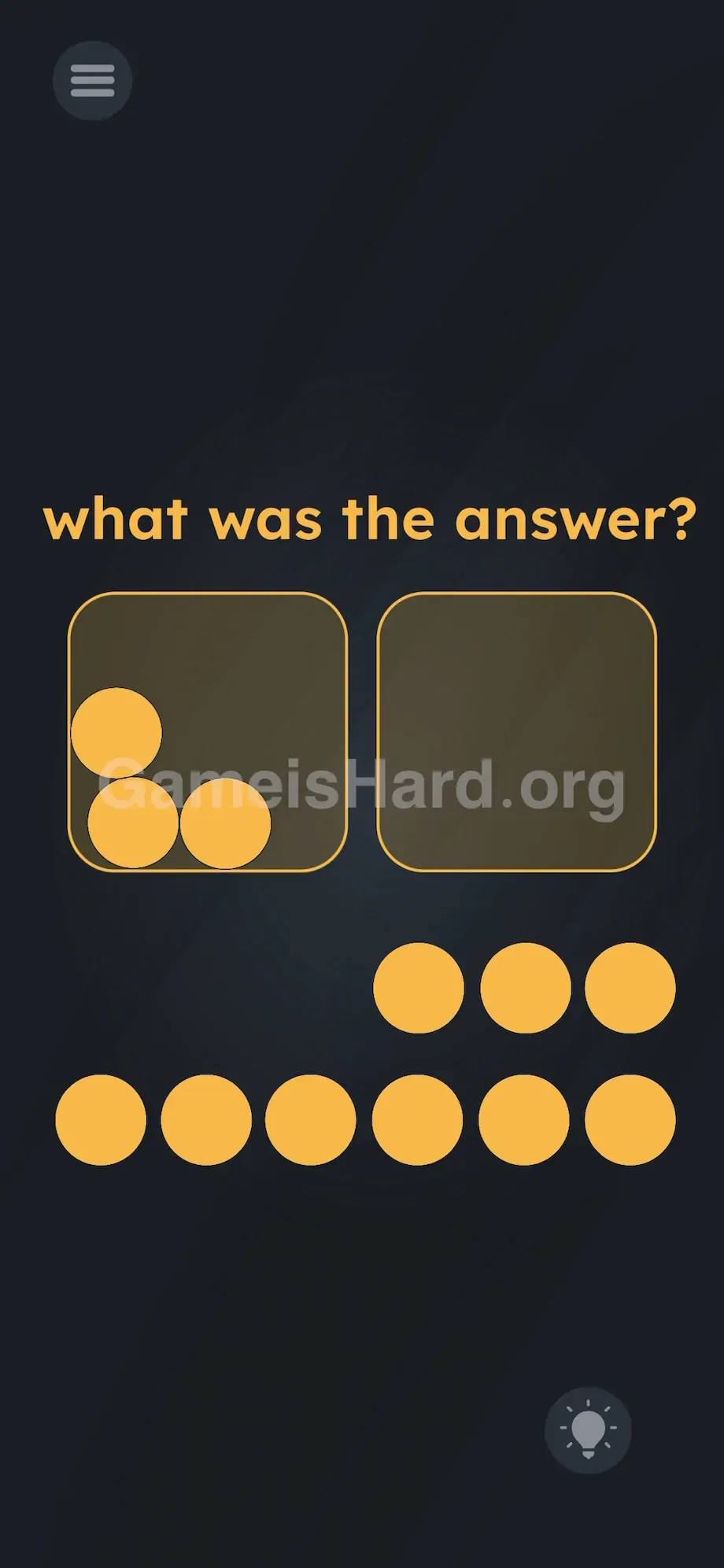
- Tap and hold any yellow circle from the bottom grid.
- Drag it upward and drop it fully inside the left square.
- Repeat twice more—add two more circles to the left square. You’ll now have exactly three dots there.
- Now pick up another yellow circle from the remaining pool.
- Drag and release it inside the right square.
- Grab one final circle and drop it into the right square. You’ll now have exactly two dots there.
- Lift your finger off the screen. Once the configuration hits three-left / two-right, the game instantly registers “32.” All elements—including the prompt—flash green, confirming success.
If It Did Not Work
No green flash? Check placement first: every circle must sit fully inside the square’s border—not hovering on the edge. Also double-check your count: it’s easy to overshoot and drop four into the left box during quick drags. If you misplace one, just drag it back down to reset. If a circle vanishes off-screen due to a glitch, force-close the app and restart the level.
Why This Solution Works
This level brilliantly breaks digital expectations. It leans into the game’s central idea: text and UI aren’t static—they’re physical. The question is a red herring; the real puzzle lives in the interface.
Instead of typing “32,” you assemble its visual equivalent—turning abstraction into tangible form. It treats numbers as weight, quantity as volume. You’re filling containers to express value—a concept echoed in earlier levels where dragging words or tilting your device solved riddles. The message is clear: stop reading the screen like a page. Start playing with it like a sandbox. Can’t type it? Build it.
Bonus Tip
Skip the overanalysis. To blast through this in under five seconds and keep your speedrun clean, follow this precise flow:
- Tune out the question text entirely.
- Use two fingers to drag two circles into the left square at once.
- Add one more circle to the left square with a single drag.
- Drag two circles into the right square simultaneously.
- Lift all fingers cleanly—let the validation trigger. Don’t waste time aligning dots neatly inside the boxes. The game only checks whether each circle’s bounding box falls entirely within the square’s bounding box. Quantity—not position—is what matters.
Frequently Asked Questions
What was the answer from the last level? The prior level’s solution was precisely 32—and the game expects you to recall it unaided.
Why won’t my shapes turn green? A circle is likely straddling the square’s edge, or your count is off. You need exactly three in the left square and exactly two in the right. Pull all circles out and re-drop them centered inside each box.
Do I need to pick specific circles from the bottom grid? Nope—all twelve yellow circles are functionally identical. Grab from either row, or alternate freely.
Is my game broken if there’s no keyboard? Not at all. The missing keyboard is the puzzle. You’re meant to use the circles—not keys—to respond.
More Game Is Hard Solutions
Hit a wall on the next level? We deliver fast, clutter-free guides for every headache-inducing stage. No filler, no fluff—just the precise moves you need to advance. Share this guide with your Discord squad if they’re stuck on the “missing keyboard” illusion. Browse our full directory for instant answers.