
App updates can sometimes shuffle the order of puzzles. If this level 47 walkthrough doesn't match your screen, don't worry! You can browse our All Levels guide to find your exact puzzle by its picture.
Don't touch the ball first; focus your fingers on the empty space or the box outlines to resize the cage.
Level Overview
What Makes This Puzzle Tricky
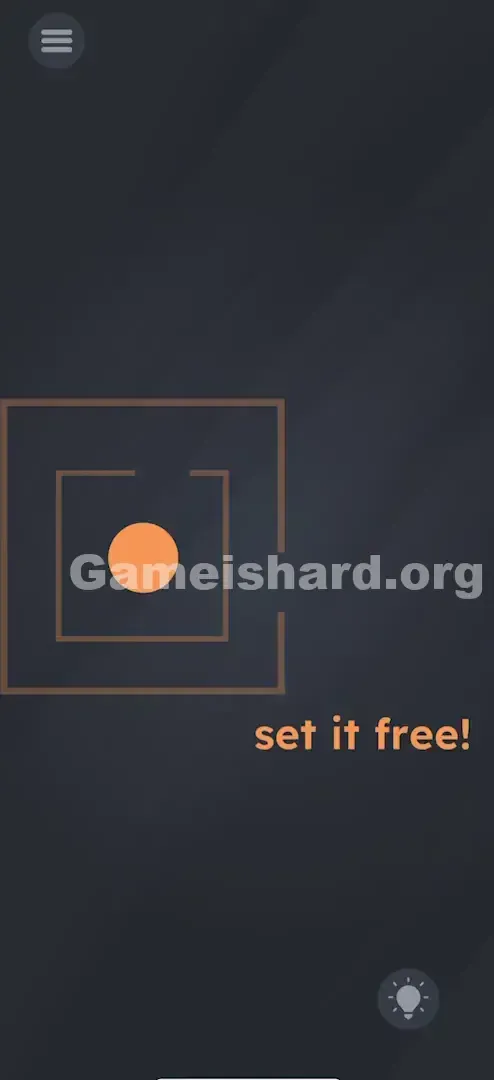
You’re faced with an orange ball locked inside a double-layered cage — two nested square frames. At first glance, it seems like a classic maze escape. You instinctively try dragging the ball, nudging it toward the narrow gap on the right. But no matter how hard you push, it won’t budge. It feels broken — until you realize the real puzzle isn’t where the ball moves, but how big the space around it is.
Your Goal
Your mission in Game is hard Level 47 is straightforward: get the orange ball out of the cage. The phrase “set it free!” isn’t just flavor text — it’s a literal instruction. This isn’t about finding a hidden path or timing a jump. It’s about reshaping the environment itself so the exit becomes possible.
How the Game Responds
- Multi-touch / Pinch-to-Zoom: This is the core mechanic. The game engine treats the cage as scalable vector art — not fixed scenery.
- Object Properties: The brown square frames aren’t static background elements; they’re interactive objects with adjustable scale.
- Physics Dragging: The ball obeys strict collision rules — it only passes through gaps wider than its diameter.
- Logic Trap: The illusion is that the layout is fixed. It’s not. You’re meant to alter it.
It’s not a maze. It’s a cage renovation.
What Appears on Your Screen
The scene is clean and minimal: a dark grey backdrop with two concentric brown square frames centered on screen. Both squares have matching gaps on the right side. Nestled snugly inside the inner frame sits a solid orange ball. Below the setup, bold playful text reads: set it free! Standard UI elements — menu icon top-left, hint bulb bottom-right — round out the interface. Visually, the ball is clearly larger than either gap. No amount of brute-force dragging will make it fit — unless you change the math.
Common Mistakes to Avoid
The Trap
This level preys on “maze mindset” — the automatic assumption that walls are absolute, unchangeable boundaries. Decades of platformers, puzzle games, and arcade titles train us to treat geometry as rigid. Game is hard Level 47 flips that script: here, the walls are the puzzle — and they’re fully editable.
First Instincts That Fail
Many players start by tilting or shaking their device, hoping gyroscope physics will roll the ball out. Others swipe rapidly, trying to “break” through collision detection. Some even tap the gap repeatedly, expecting it to widen like a door. None of these work — because the solution isn’t about manipulating the ball’s motion, but transforming its container.
Player Reactions
I spent over two minutes stuck — tapping the text, dragging the gaps, even trying to pinch the ball itself. Then, by accident, I placed two fingers on the frame and spread them apart. The whole cage bloomed outward — and suddenly, the answer clicked. It wasn’t clever. It was simple. Just overlooked.
Step-by-Step Solution
Preparing the Move
Pause. Lift your finger off the ball entirely. Your job isn’t to move the ball yet — it’s to expand the space it’s trapped in.
Executing the Solution
- Position your fingers: Place two fingers (thumb and index finger work best) on the screen — ideally centered over the square frames for maximum responsiveness.
- The Gesture: Perform a “pinch-out” motion — gently slide your fingers away from each other.
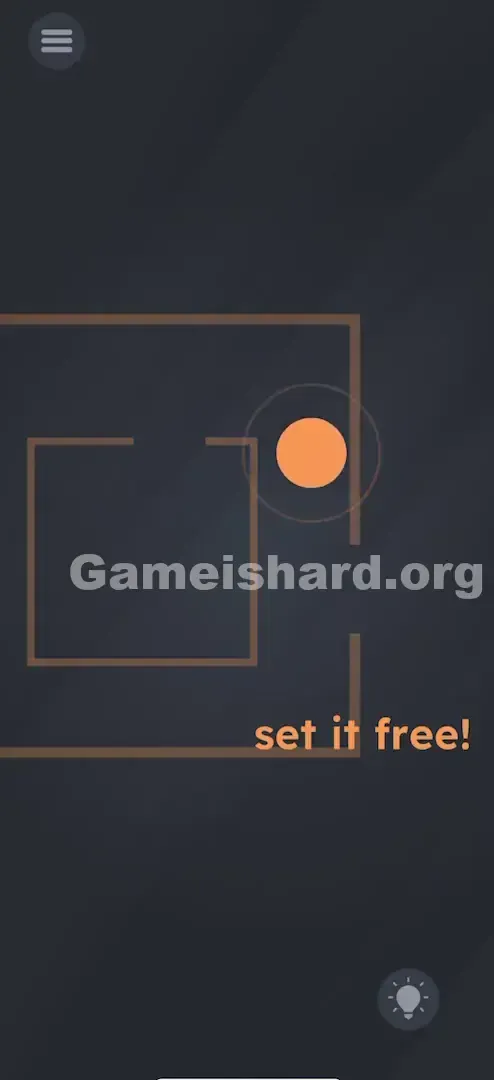
- Watch the Scale: As you spread, the brown frames grow larger. Keep going until the right-side gaps look comfortably wider than the orange ball.
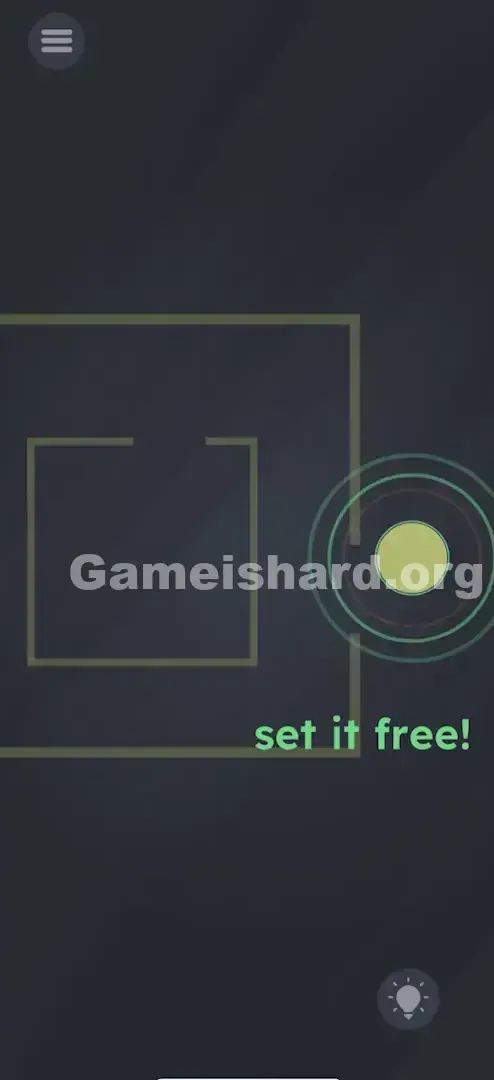
- The Escape: Lift both fingers, then use just one finger to tap and hold the orange ball. Drag it smoothly through the enlarged gaps — all the way to the right edge of the screen.
If It Did Not Work
- It's not zooming: Avoid starting your pinch on the ball. The game interprets that as a drag command. Begin on blank space or directly on the brown frame lines instead.
- The ball is still stuck: You haven’t scaled enough. There’s zero downside to making the cage huge — keep spreading until the gaps dominate the screen if needed.
Small Details That Matter
Collision detection here is precise — and unforgiving. A slight brush against the frame halts movement instantly.
- Oversize it: Don’t aim for “just enough.” Make the opening 2–3× the ball’s width.
- Drag Speed: Move slowly. A quick flick may cause the ball to rebound off the inner wall before clearing the outer frame.
- One Finger vs Two: Scaling requires two fingers. Dragging requires one. These must be separate actions — no multitouch dragging. Phase 1: Resize. Phase 2: Move.
I wasted time trying to shrink the ball — logical, but wrong. In this level, only the cage responds to scaling.
Why This Solution Works
This puzzle reveals that interface and environment are one and the same. Under the hood, those brown squares are scalable sprites — and the developer left their scale property unlocked, mapping it to a standard multi-touch gesture.
This reflects a broader design pattern across the game:
- Level 1 thinking: Move the character.
- Level 2 thinking: Move obstacles.
- Level 3 thinking (this level): Change obstacle properties — size, rotation, gravity.
“Set it free” isn’t dialogue — it’s a direct command to you, the player, to take control of the world itself. You’re not inside the cage. You are the screen.
Bonus Tip
For speedrunners or repeat attempts:
- Skip the ball entirely at first launch.
- Pinch out immediately — no hesitation, no waiting for animations.
- Once scaled, drag the ball right in one fluid motion.
Don’t test limits. The default constraints are illusions.
Alternative Attempts of Game Is Hard Level 47 (What Doesn’t Work, and Why)
Here’s what fails — so you skip the trial-and-error:
- Pinching the ball to shrink it: The ball’s scale is locked. Only the frames respond.
- Rotating the phone for gravity: No gravity system exists here — movement is purely touch-driven.
- Shaking the device: Triggers nothing. Not a mechanic in this level.
- Dragging the word “free”: Text is decorative — no interactivity.
- Rubbing or swiping the walls: Unlike some other puzzle games, there’s no erasing or dissolving mechanic here.
- Tapping the gaps: Gaps aren’t doors — they’re just breaks in lines. Tapping does nothing.
- Waiting passively: No timer, no auto-trigger. Action is required.
Common Mistakes for Game Is Hard Level 47
- Using one finger to scale: The gesture only registers with two distinct touch points.
- Zooming only part of the cage: Ensure both frames grow together — pinch near the center to scale the full group.
- Dragging mid-pinch: Confuses input recognition. Finish scaling before touching the ball.
- Stopping too soon: The win condition requires the ball to fully exit the cage area — drag it all the way to the screen’s right edge.
- Assuming a crash: When the ball won’t budge, it’s not frozen — you’re just interacting with the wrong layer.
Pattern Recognition: How to Spot This Trick in Future Game Is Hard Levels
The Tell
If you see a geometric shape (square, circle, triangle) enclosing an object — and the obvious exit is physically too narrow — scaling is almost certainly the answer. Too-small hole? Enlarge the hole — or shrink the object (though here, only the cage scales).
The Habit
When facing static-looking puzzles:
- Try dragging every element.
- Try pinching every major object — especially containers or borders.
- Make pinch-to-zoom part of your first-second scan. It takes less than two seconds — and solves dozens of levels.
Game Is Hard Level 47 FAQ (Short, Useful)
Q: Can I shrink the ball instead of enlarging the box in Game is hard Level 47? A: No. In Game is hard Level 47 , the ball’s size is locked. You must enlarge the frames.
Q: Does it matter where I pinch on the screen in Game is hard Level 47? A: Generally, no, but pinching directly over the squares is the most consistent way to get the game to recognize the gesture.
Q: I dragged the ball out but the level didn't end in Game is hard Level 47? A: Drag it further away. Move it all the way to the edge of the screen to ensure it triggers the completion zone.
Q: My touch isn't registering. A: Ensure your fingers are dry and you are using two distinct points of contact. If your fingers are too close together, the phone might think it's one finger.
More Game Is Hard Solutions
That’s the scaling trick for Game is hard Level 47 . If this guide saved your phone from being thrown across the room, we’ve got plenty more no-nonsense fixes for the rest of the game. Share this with your friends when they get stuck—don’t tell them the answer, just send the link. Good luck on Game is hard Level 48 !