
App updates can sometimes shuffle the order of puzzles. If this level 253 walkthrough doesn't match your screen, don't worry! You can browse our All Levels guide to find your exact puzzle by its picture.
Do not hit them one after the other. Your phone must register all three touch points at the exact same millisecond to clear the stage.
Level Overview
What Makes This Puzzle Tricky
You read the words. You tap the first circle. Then the second. Then the third. Nothing happens. You try again—faster this time. Still no success. The level isn’t broken—it’s testing your instinct. Most mobile interactions train us to use one finger at a time: scrolling, tapping, swiping. Level 253 flips that script entirely. It gives you the simplest instruction possible—but demands precise physical coordination. Game is hard Level 253 doesn’t judge how quickly you read. It measures how well your fingers sync.
Your Goal
Trigger your device’s multi-touch sensor to detect three distinct inputs at once. Forget reading the prompt like text—treat your phone like a rhythm pad or arcade cabinet.
- Multi-touch
- Timing / waiting
- Text drag / UI drag (Avoid this trap) It’s not a typo. It’s ammo.
What Appears on Your Screen
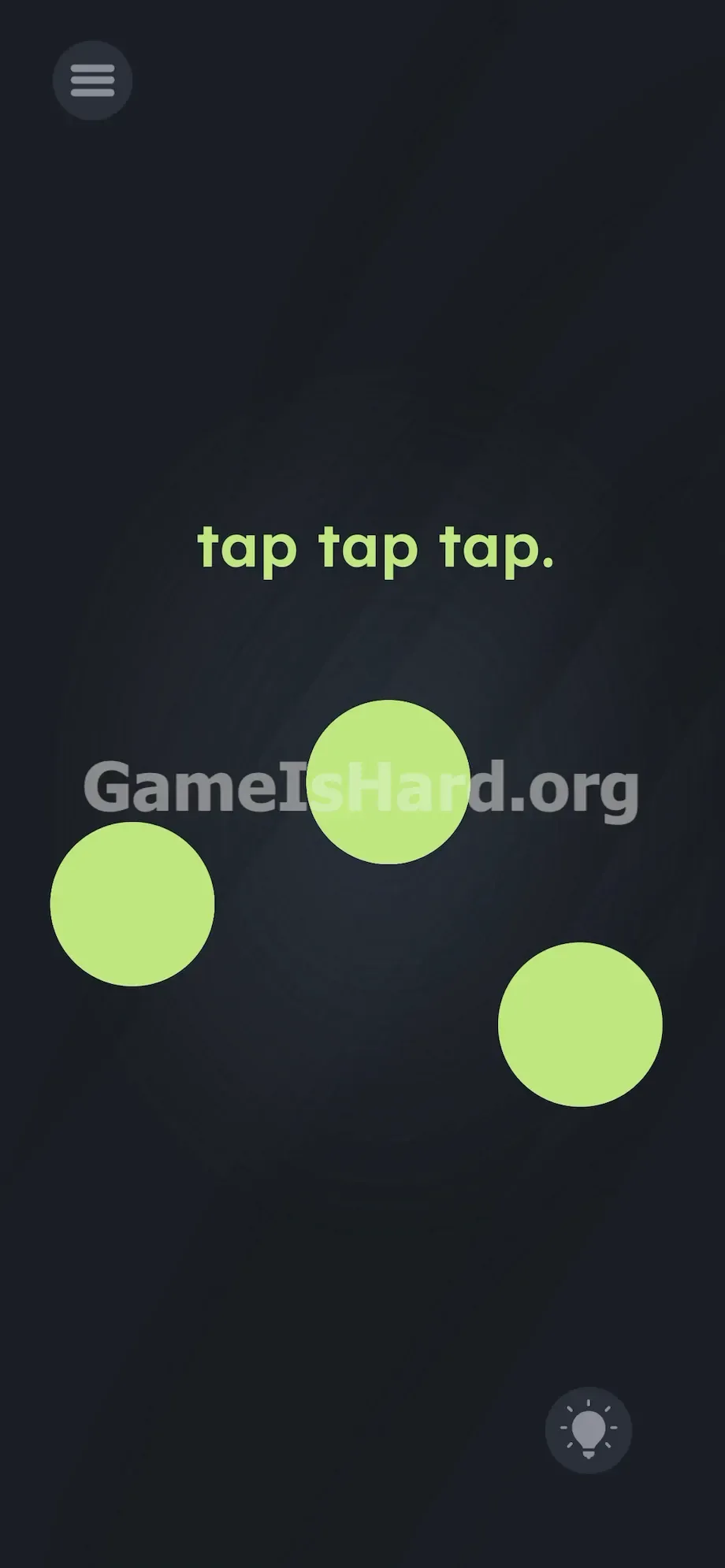
Let’s break down the visual layout. The background is a calm, dark slate gray—no distractions. Centered near the top third of the screen sits the instruction: tap tap tap. in bold, lowercase, neon-green font. Notice the period at the end—it looks like a full sentence, like a strict command.
Below that line sit the only interactive elements: three large, unmarked light green circles, perfectly matching the text’s color.
One circle sits slightly higher in the center; the other two sit lower and wider—left and right—forming a loose triangular arrangement. They don’t animate, pulse, or highlight. They just wait, static and silent. Their spacing is deliberate—you can’t reach them all with one thumb.
The standard hamburger menu appears top-left. The hint lightbulb rests bottom-right. No sliders, no hidden text, no moving parts. Just three words—and three circles. Its simplicity is the trap.
Common Mistakes to Avoid
The Trap
UI habit is the culprit. We’re wired to read left-to-right—and our hands follow suit. Seeing “tap tap tap” triggers a mental sequence: tap one, then another, then the last. So you go left → center → right. Fail.
You blame speed next—tapping faster. Still fail. You even try triple-tapping the same circle. Still fail. The level uses language against you: the spaces between the words trick your brain into spacing out the taps. That’s the exact mistake it wants.
First Instincts That Fail
Some players try dragging the words themselves onto the circles. Nope. Others shake or tilt their phone while tapping the middle dot. Nothing works. Many waste minutes waiting for the circles to flash in order—like a memory game. But this isn’t about pattern recognition. It’s a hardware test—and the UI is lying to you.
Player Reactions
I spent several minutes frantically tapping with my thumb like I was in a high-BPM rhythm challenge. Thought my timing was off by milliseconds. Cleaned my screen, restarted the app—then remembered: modern phones track ten fingers at once. Instant facepalm.
Step-by-Step Solution
Preparing the Move
Put your phone down—don’t hold it. One-handed attempts won’t work. The circles are too far apart for a single thumb. Rest your device flat on a stable surface: desk, table, or knee. Free up your dominant hand so three fingers—index, middle, ring—are fully extended and ready to strike.
Executing the Solution
- Position your index, middle, and ring fingers directly above the three light green circles. Double-check alignment.
- Press down—firmly and instantly—on all three circles at the exact same moment.
- Watch the level complete the instant all three touch points register together.
If It Did Not Work
Failed? You missed the razor-thin timing window. Even a single millisecond gap between touches registers as separate taps—and resets the level instantly.
Check your finger placement. If you’re using a thick tempered-glass protector, press just a little harder.
Watch for palm rejection. If your hand’s side brushes the phone’s edge while tapping, your OS may ignore your fingertips altogether. Arch your hand high—like holding a baseball—so only your very tips contact the screen.
Accidentally taking a screenshot? Many Android and iOS devices capture screens with a three-finger downward swipe. If your fingers slide even a millimeter while pressing, your OS overrides the game. Tap straight down—no sideways motion.
Why This Solution Works
This level tests hardware fluency—not puzzle logic. The game acts like a tactile instrument. The prompt isn’t a command—it’s misdirection. “tap tap tap.” looks like step-by-step instructions, but it’s really camouflage.
By demanding simultaneous input across three fixed points, the developer breaks your default single-finger reflexes. Mobile design trains us to rely on thumbs—swiping feeds, liking posts, scrolling endlessly. Level 253 weaponizes that habit. It forces a coordinated, physical response to bypass a mental assumption.
Bonus Tip
Skip the frustration—don’t attempt this mid-walk or one-handed. Here’s the fastest, most reliable method:
- Lay your device flat on a non-slip surface.
- Cluster your first three fingers tightly together.
- Strike the green circles like hitting a three-note chord on piano keys.
- Ignore the text prompt entirely—it’s there to distract.
- If your hand span can’t comfortably cover all three circles, use two fingers from your left hand and one from your right to guarantee perfect synchronization.
Frequently Asked Questions (Short, Useful)
Why is my tap not working? You’re tapping the circles in sequence. Tapping them one at a time always fails. All three must register at the exact same instant.
Can I drag the circles together to make them overlap? No. The light green circles are fixed in place and cannot be moved.
Do I need to tap the text itself? No. The words tap tap tap. serve only as visual flavor—and psychological bait. Interact only with the large circular buttons beneath them.
My phone screen won't read my fingers, what now? Wipe the display with a clean microfiber cloth. Oil, dust, or moisture can interfere with multi-touch sensitivity. Also ensure no part of your palm or hand is resting on the phone’s edge during the tap.
More Game Is Hard Solutions
Our guides cut straight to the point—no filler, no fluff. Designed for speed and clarity so you breeze past frustrating levels and stay in flow. Share this walkthrough with friends on Discord if they’re stuck. Keep pushing forward.