App updates can sometimes shuffle the order of puzzles. If this level 244 walkthrough doesn't match your screen, don't worry! You can browse our All Levels guide to find your exact puzzle by its picture.
You are solving a geometric logic puzzle—think Sudoku, but with shapes and colors instead of digits. Pull pieces from the edges and place them into the empty cells, following the two clear rules displayed on-screen.
Level Overview
What Makes This Puzzle Tricky
After surviving wave after wave of deceptive riddles, hidden taps, and misleading text, the game suddenly shifts tone—and drops you into a clean, silent geometry challenge. No missing keys. No invisible elements to rub or shake loose. Just a stark 4x4 grid waiting for your input. You might’ve tapped, swiped, or even tilted your phone, expecting something to break or reveal itself. It won’t.
Your Goal
Your mission is to fill the blank grid using all 16 edge pieces—each unique in both shape and color. The instructions at the top aren’t hints or misdirection—they’re strict, literal constraints. This is pure logic dressed as a brain teaser. Let go of the “gotcha” mindset and focus on the rules.
- UI drag: Every piece must be manually dragged and dropped into position.
- Logic Trap: The real hurdle isn’t complexity—it’s trusting that the rules mean exactly what they say.
- Visual Processing: You’ll need to track shape and color independently—don’t let them blur together.
- No Multi-touch: Keep it simple. One finger. One piece. One placement at a time. This time, the words are the solution—not camouflage. Treat them as instructions, not bait.
What Appears on Your Screen
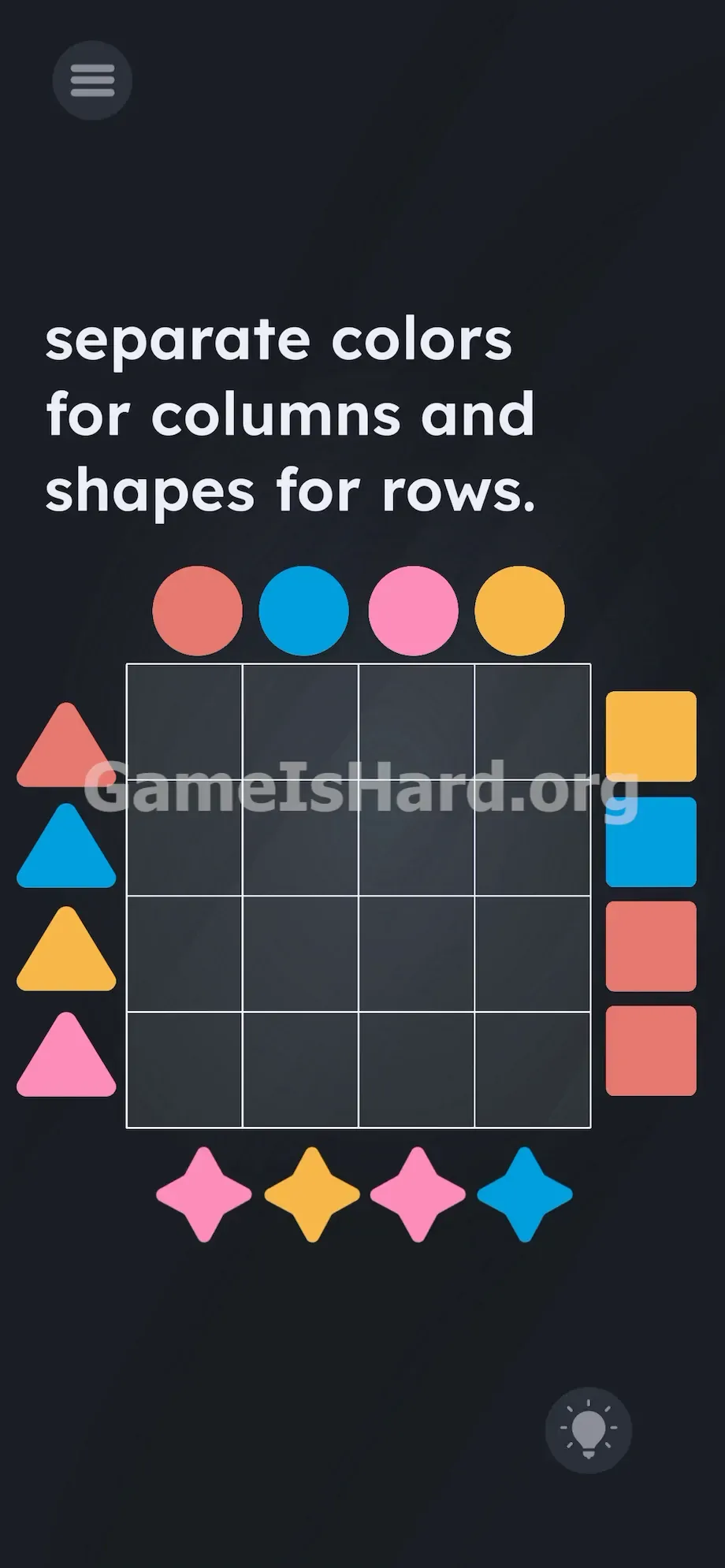
The layout is minimal but purposeful. At the very top, crisp white text spells out your task: separate colors for columns and shapes for rows.
Below it sits an empty 4×4 grid—clean, symmetrical, and deceptively simple. Around its perimeter sit 16 distinct pieces, each assigned one shape and one color.
At the top edge: four Circles.
On the left: four Triangles.
On the right: four Squares.
Along the bottom: four Stars.
Colors include yellow, blue, pink, and a deep salmon-red—mixed deliberately across shapes. Nothing is off-screen or obscured. Even the standard lightbulb hint icon rests quietly in the bottom-right corner, silently daring you to overthink it.
Common Mistakes to Avoid
The Trap
It’s classic UI distrust. After dozens of levels built on deception, your instincts scream “It can’t be this straightforward!” So you ignore the plain-language instructions and hunt for hidden layers. But here, “colors” isn’t draggable text. “Shapes” isn’t a button. There’s no lie—just logic disguised as simplicity.
First Instincts That Fail
Players skip straight to workarounds instead of engaging with the puzzle itself. None of these do anything:
- Shaking your device hoping gravity will solve it for you.
- Tapping the instruction text to trigger a word swap or reveal.
- Attempting to drag the words colors or shapes into the grid.
- Stacking shapes outside the board to “mix” colors.
- Swiping sideways looking for a secret second panel.
Player Reactions
I stared at this screen for over three minutes—tried dragging the title, rotating my phone, even pressing volume buttons. When I finally picked up a Triangle and dropped it into the grid—and it snapped cleanly into place—I facepalmed hard. Sometimes the answer really is just what the game tells you.
Step-by-Step Solution
Preparing the Move
Count your pieces: 16 total, each with a unique shape-color combo. Remember—the two rules never overlap. Columns only judge color. Rows only judge shape. Hold those boundaries firmly in your mind.
Executing the Solution
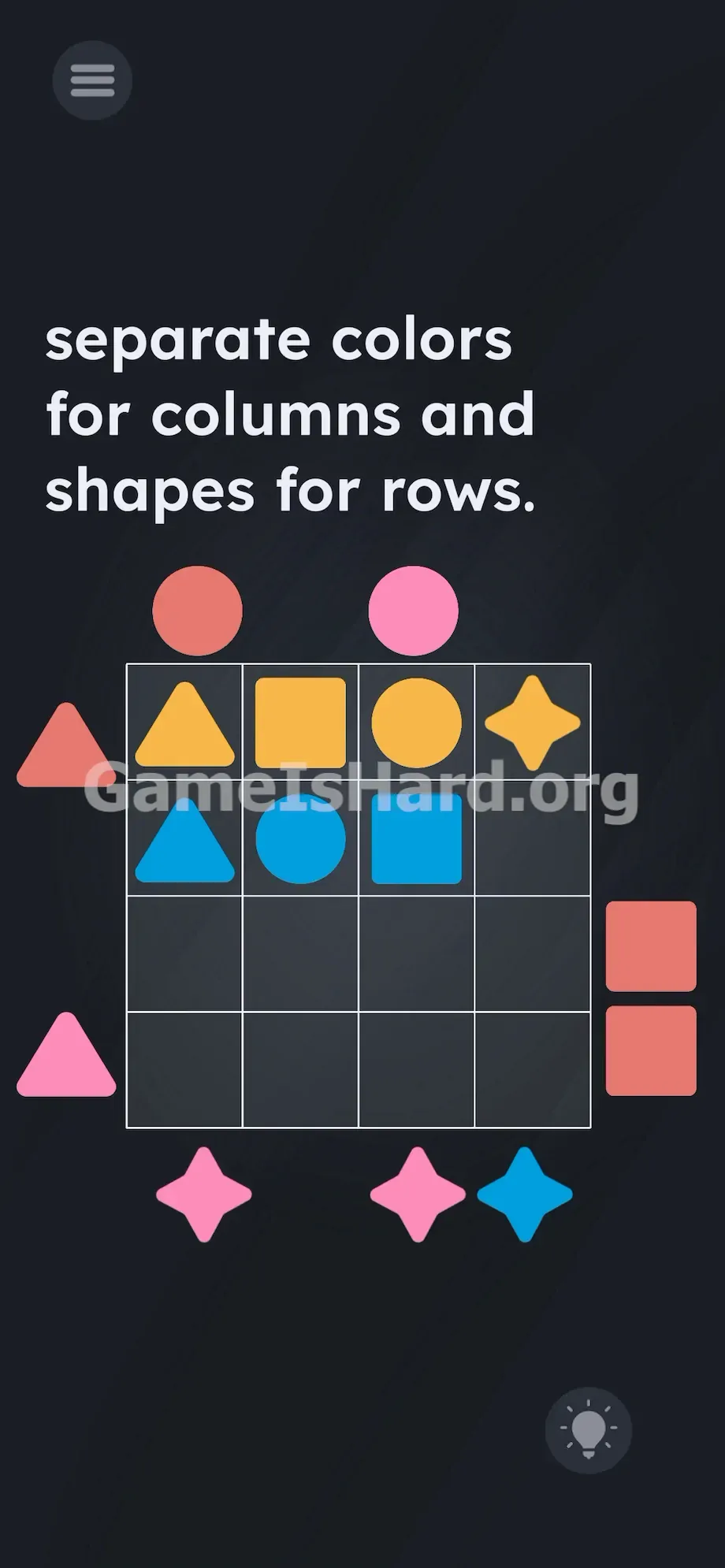
- Grab a starting piece: Tap and hold any shape on the outside of the grid. Let's start with a Circle from the top row.
- Place it in a row: Drag it directly into the top row of the 4x4 grid. The rule says "no same shape in the same row." You now know that only one circle can exist in this horizontal line. You must fill the rest of that specific row with exactly one Triangle , one Square , and one Star .
- Check your columns: Drop the piece. Now look at the vertical column you just dropped it into. The rule is "no same color in the same column." If you placed a blue circle, you cannot put a blue square, blue triangle, or blue star anywhere else in that exact vertical line.
- Pick the next piece: Grab a different piece. Let's say a yellow Square .
- Place and verify: Drag it into the grid. Put it in a row that doesn't have a square yet. Put it in a column that doesn't have a yellow piece yet.
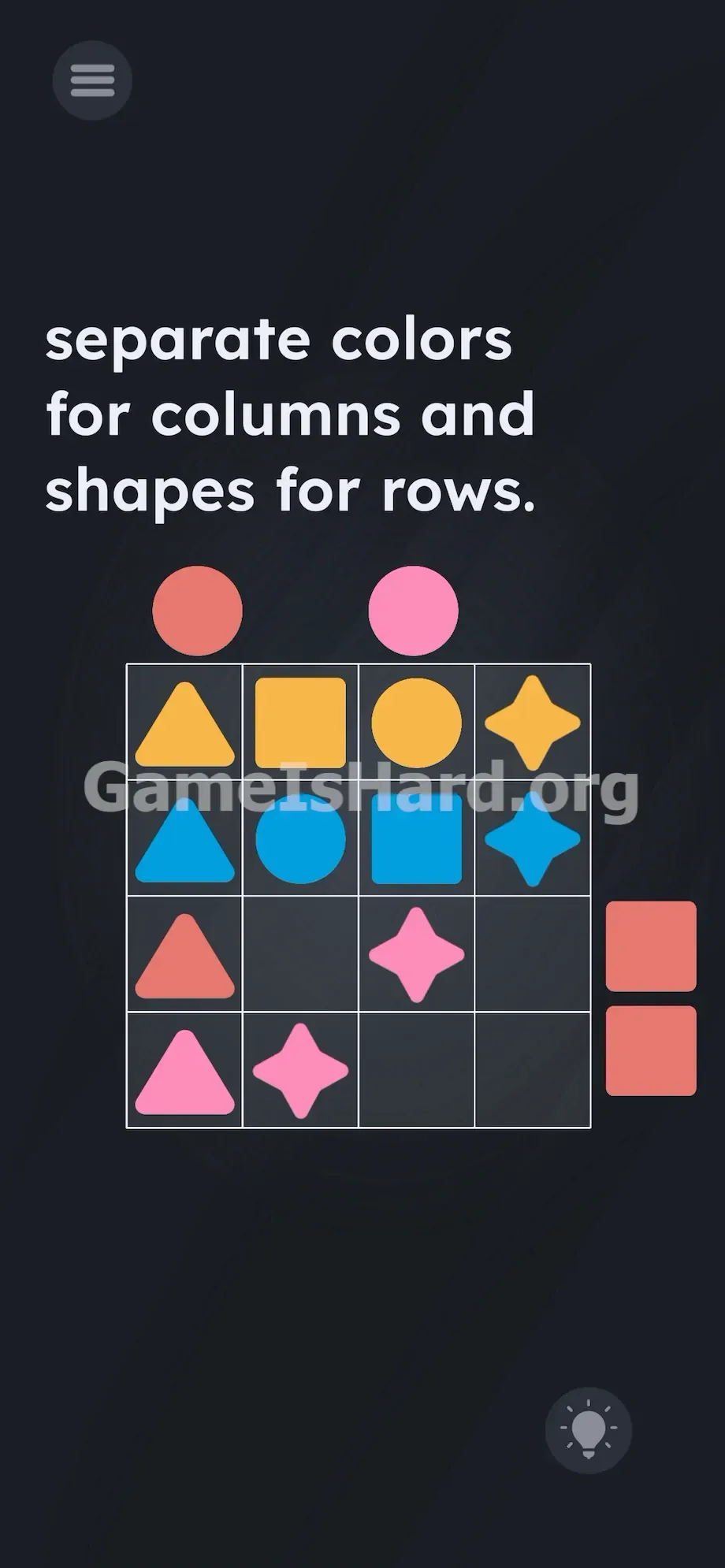
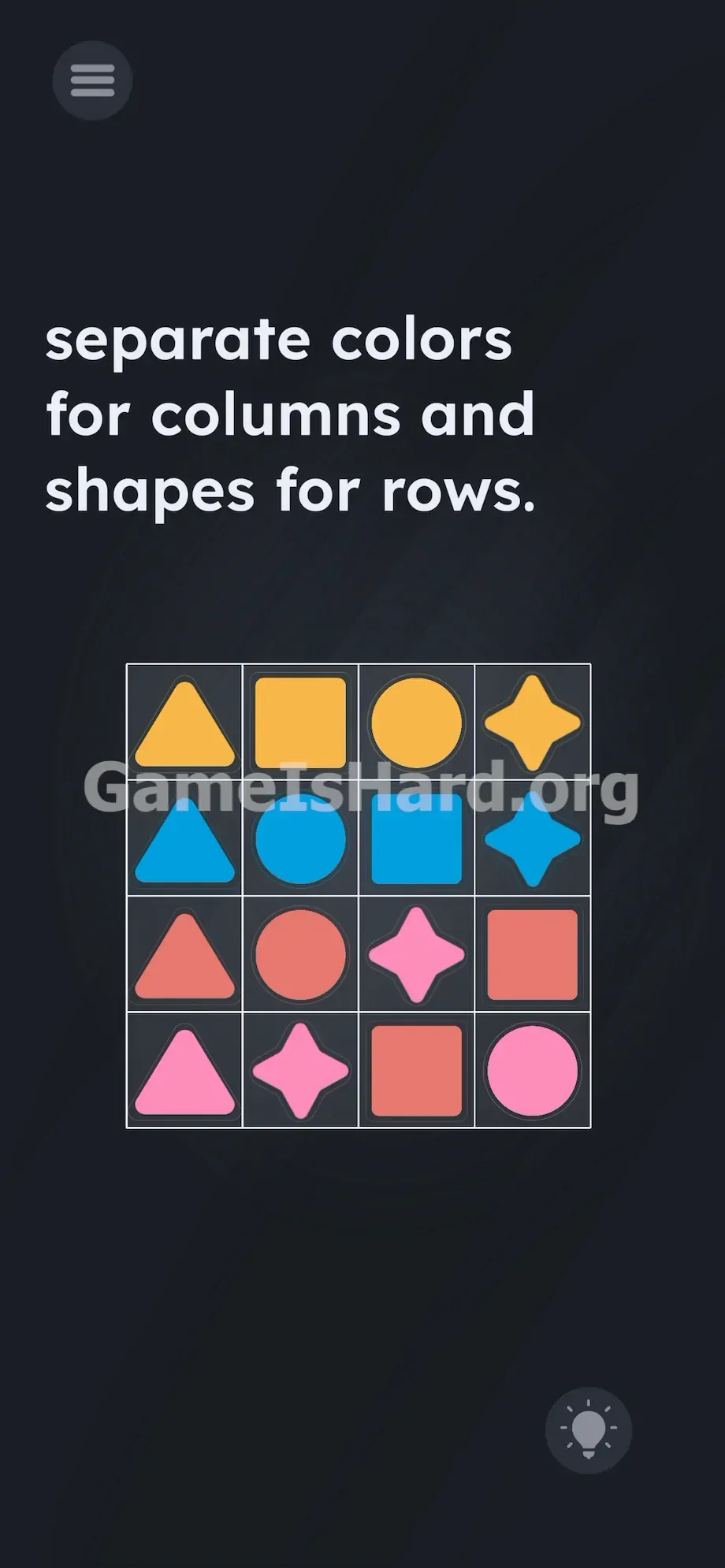
- Fill the board: Keep dragging and dropping. Work methodically. The level clears automatically the exact second the final 16th piece is placed correctly into the grid.
If It Did Not Work
If you get stuck, you definitely broke one of the two rules without realizing it. It happens fast. Drag a placed shape back out to the dark gray area outside the grid to clear space.
Double-check your vertical lines. Are there two pink shapes stacked in the same column? Pull one out. Double-check your horizontal lines. Did you accidentally drop two triangles in the same row? Move one immediately. The touch detection can get crowded on smaller screens. Make sure you drop the piece directly in the center of the grid squares so the game registers the exact location.
Why This Solution Works
This level zeroes in on your ability to isolate and manage separate constraints. Gone are motion sensors, hidden zones, and fake-out text. What remains is pure cognitive discipline—forcing you to suppress instinctive multitasking and process shape and color as entirely independent variables.
You expect sleight-of-hand. Instead, you get clarity. The prompt isn’t hiding anything: “Separate colors for columns” means every vertical line must contain four distinct hues. “Shapes for rows” means every horizontal line must contain four distinct forms. Your job is to treat them like parallel tracks—never merging, never influencing each other. That mental separation is harder than it sounds, especially when both properties live in the same object. Slow down. Focus on one rule at a time.
Bonus Tip
Random placement leads to dead ends fast. You’ll quickly block yourself in and waste time resetting. Instead, follow a tight, repeatable pattern:
- Fill one entire row first. Pick the very top row. Put one of each shape in it ( Circle , Triangle , Square , Star ). Ignore the colors for a second. Just get the shapes placed.
- Check the colors you just committed to. Look at the four columns you just started.
- Move to the second row. Place the next four shapes. Intentionally stagger your color choices so they absolutely do not match the colors sitting directly above them in the columns.
- Work top to bottom. It limits your options in a good way. By the time you hit the fourth row, it becomes a basic process of elimination. You just plug in whatever color and shape is missing.
Frequently Asked Questions
Is there a hidden trick in this level?
No. There are no invisible buttons, no text to drag, and no phone sensors to trigger. You just have to solve the 4x4 grid using the shapes provided on the screen. Play it straight.
Can I reset the board if I mess up?
You don't need a dedicated reset button. Just drag any placed shape back out of the grid and drop it in the dark background. This instantly frees up the square so you can fix your mistake without losing your entire board layout.
Do shapes matter in the columns?
Read the prompt carefully. It explicitly says separate colors for columns . It completely ignores shapes for columns. You can absolutely put two triangles in the same vertical column as long as they are completely different colors.
Do colors matter in the rows?
No. The prompt only demands shapes for rows . You can have two blue pieces sitting right next to each other in the same horizontal row, as long as one is a square and one is a circle. The two rules operate completely independent of each other.
Why won't my piece snap into place?
Mobile touch detection can be picky. If your finger is slightly off-center, the game might think you are trying to drop the shape on a grid line instead of inside the box. Drag the shape slowly and aim the dead center of the shape right at the dead center of the grid square.
More Game Is Hard Solutions
Stuck on the next puzzle? We keep these guides fast, accurate, and totally free of fluff. Share this walkthrough with your friends on Discord when they inevitably get stuck on this exact geometry test. Keep pushing forward and check back with our other guides when the game inevitably decides to start lying to you again. You got this. Go beat the next level.