
App updates can sometimes shift puzzle order. If this level 245 walkthrough doesn’t match what’s on your screen, no stress! Use our All Levels directory to locate your exact puzzle by image.
Level Overview
What Makes This Puzzle Tricky
You’re faced with a completely blank input field—no equations, no clues, just a cryptic phrase. You tap. Nothing happens. You try dragging text or swiping edges. Still nothing. The game deliberately misdirects you, hiding the answer outside its own interface. This level thrives on making you overthink while the solution stares you in the face.
Your Goal
This puzzle demands a fourth-wall break. Your goal isn’t buried in the app—it’s embedded in your device’s real-time system clock. You’ll read the time displayed in your status bar, extract each digit, sum them, and enter the result.
- Fourth-wall break
- System clock reading
- Text input
- Basic addition
- Timing / waiting
It’s not a mistake—it’s intentional design.
What Appears on Your Screen
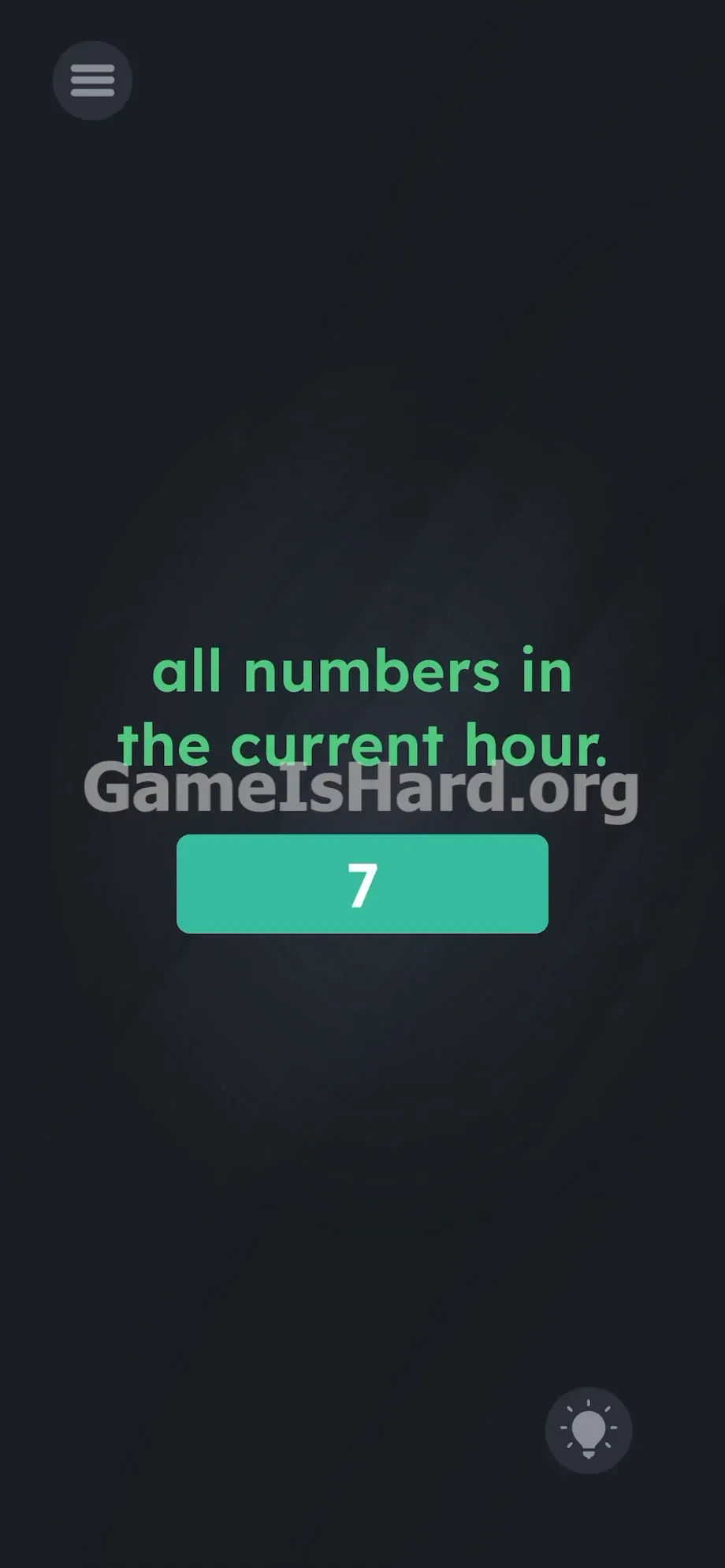
The screen feels unnervingly bare. A subtle dark texture fills the background. Centered, in bright blue font, sits the two-line phrase: all numbers in the current hour.
Directly beneath it rests an empty, blue-outlined input box—waiting silently for your response. No keypad appears until you tap inside the box.
In the top-left corner sits the standard grey Menu button (three horizontal lines). In the bottom-right corner is the circular Lightbulb hint button.
That’s all. No hidden symbols, no movable elements, no sliders—just minimal text and an open field. Notice how the phrase starts lowercase and ends with a period: it reads like a firm instruction, not a riddle. Every visual choice funnels your attention toward the center—and away from the status bar just above it.
Common Mistakes to Avoid
The Trap
Most players fail due to UI blindness—a natural habit of ignoring system-level info while gaming. Your brain automatically filters out battery icons, signal bars, and especially the clock—even though it’s only half an inch above the game. The level banks on you assuming “current hour” refers to something inside the app.
First Instincts That Fail
I tried every internal workaround first: counting letters in “hour,” entering “12” for a clock face, dragging the word “numbers” into the box, even swiping screen edges hoping for a hidden timer. None worked—because the answer lives outside the app entirely.
Player Reactions
Instant facepalm. After five minutes of frustration, I accidentally pulled down my notifications—and there it was: my phone’s clock, bold and obvious. The realization hit instantly. I’d been tricked—not by the game’s code, but by my own screen habits.
Step-by-Step Solution
Preparing the Move
Stop focusing on the center of the screen. Lift your eyes upward—to the very top edge of your physical phone display, where your battery, signal, and clock live.
Executing the Solution
- Check the real-time clock shown on your device. For example, if your phone displays 16:00.
- Break that time into its individual digits.
- Add those digits together. For 16:00, it’s 1 + 6 + 0 + 0 = 7.
- Tap the input box in the middle of the screen to activate your phone’s keyboard.
- Type your calculated total (in this case, 7).
- Press the confirm, return, or enter key to submit and complete the level.
If It Did Not Work
- The minute changed: If you calculate for 10:45 (1 + 0 + 4 + 5 = 10), but the clock shifts to 10:46 before you submit, the answer will be rejected. Speed matters—recalculate and resubmit immediately if this happens.
- Time format issues: The game reads exactly what your phone shows. Use 24-hour digits if that’s your setting (e.g., 14:30 → 1 + 4 + 3 + 0). If your clock says 4:00 PM, use 4 + 0 + 0 = 4—no conversion needed.
- Keyboard blocking UI: If the keyboard covers the submit area, tap outside the input box to dismiss it and regain full screen visibility.
- Accidental Hints: Tapping the Lightbulb icon wastes a hint coin and only gives vague direction (“check your phone”). Skip it—you already have the precise method here.
Why This Solution Works
This level tests your awareness of the hardware running the app—not just the app itself. The boundary between game and OS is intentionally blurred.
Level 245 uses a classic “sandbox escape” design. The app requests access to your system time and pulls live updates—meaning the correct answer resets every 60 seconds. Two players solving it at different minutes will get different answers. There’s no universal static number—only a consistent process. The developers anticipate you’ll search for a fixed answer, so they built a dynamic mechanic instead. The phrasing is the lure; the status bar is the puzzle. Your system data becomes part of the gameplay—training you to look beyond the app frame and leverage built-in OS tools.
Bonus Tip
Skip trial-and-error. Execute cleanly and quickly.
- Glance at your status bar the moment the level loads.
- Isolate the visible digits.
- Add them mentally.
- Type and submit before the minute ticks over.
No shaking, tilting, or voice commands needed—this is purely about reading your clock and doing quick arithmetic.
Frequently Asked Questions
Why is the game rejecting my correct math? You likely calculated based on a time that just expired. Example: You see 09:14 (1+4=5), but your phone advances to 09:15 as you type—the answer is now 1+5=6. Always verify the clock right before hitting submit.
Do I need to convert my time to 24-hour format? No. Use only the digits shown on your screen. If it reads 2:30, sum 2 + 3 + 0. If it reads 14:30, sum 1 + 4 + 3 + 0. The game reads your OS output directly.
What if I’m playing at midnight? At 00:00, the sum is 0 + 0 + 0 + 0 = 0—type “0”. At 23:59, it’s 2 + 3 + 5 + 9 = 19—type “19”.
What if my status bar is hidden? Gently swipe down from the very top bezel to reveal your notification shade or quick settings—your clock will appear. Do the math, swipe back up, then enter the result.
Does the date matter for this puzzle? No. The prompt specifies “current hour”—ignore month, day, and year entirely. Focus only on the clock digits.
More Game Is Hard Solutions
Our guides are built for speed, accuracy, and zero filler. We explain why the trick works—not just what to type—so you learn, not just copy. If your friends are stuck on these clever UI illusions, send them this guide. Stop staring at blank fields. Go beat the next level.