App updates can sometimes shuffle the order of puzzles. If this level 17 walkthrough doesn't match your screen, don't worry! You can browse our All Levels guide to find your exact puzzle by its picture.
Level Overview
What Makes This Puzzle Tricky
At first glance, it feels like a classic schoolroom lever puzzle — but something’s off. A tilted bar, obvious weight imbalance, yet none of the blocks budge when you tap or drag them. Your usual balance instincts fail. That frustration? It’s intentional. The game sets up a familiar scenario — then quietly shifts where the real control lies.
Your Goal
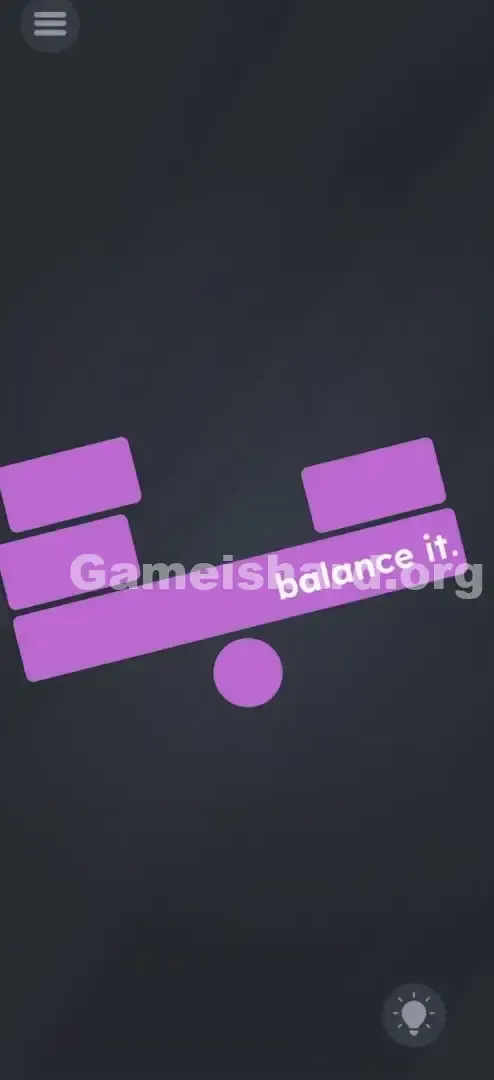
Your only goal is to make the bar perfectly horizontal — dead level with the ground. The prompt says “balance it,” but unlike most scale puzzles, you won’t be adding or removing mass. Instead, you’ll shift the pivot point itself to achieve equilibrium.
Key Mechanics involved
- Draggable UI Elements: That small pink circle isn’t just set dressing — it’s the interactive heart of the puzzle.
- Physics Logic (Fulcrum): Moving the pivot closer to the heavier side reduces its effective leverage, balancing the load.
- Visual cues: The bar stays stubbornly tilted until you land exactly on the center-of-gravity sweet spot.
- Red Herrings: The purple rectangles on top are locked in place — they’re visual anchors, not manipulable objects. It’s not broken. It’s basic leverage — cleverly disguised.
What Appears on Your Screen
Let’s map the layout clearly so nothing gets missed.
You’re looking at a stylized purple/pink structure against a dark grey backdrop.
- The Main Bar: A long purple rectangle leaning sharply downward on the left.
- The Weights: Two stacked purple rectangles sit firmly on the left end — the heavier side. One lone rectangle rests on the right — the lighter side.
- The Text: White words “balance it.” appear on the right side of the bar.
- The Fulcrum: A small purple circle sits centered beneath the bar — the pivot holding everything up. The scene looks rigid and unyielding. The left side dips low, nearly touching the base; the right floats high and empty.
Common Mistakes to Avoid
The Trap
It’s all about expectation. Years of puzzle games train us to fix imbalance by adjusting weight — so we instinctively reach for the blocks. But here, the cause of imbalance isn’t the mass — it’s the pivot’s position. The game hides the solution in plain sight, buried under a layer of misleading familiarity.
First Instincts That Fail
- Tapping the heavy blocks: A natural first move — but they won’t respond.
- Dragging the blocks: You’ll try sliding the single right-side block left to even things out. It won’t move an inch.
- Tilting your phone: Mobile reflexes kick in — you tilt right hoping gravity kicks in. The game ignores motion sensors entirely.
Player Reactions
I spent over a minute swiping at the blocks, convinced I was missing a flick gesture. Then, by accident, my finger brushed the pink circle — and the whole bar snapped into place. The answer wasn’t on the problem — it was underneath it.
Step-by-Step Solution
Preparing the Move
Forget the rectangles above. They’re static props. Your sole focus should be the small pink circle sitting beneath the bar’s center — that’s your lever’s anchor point.
Executing the Solution
- Press and hold the pink circle at the bottom.
- Gently drag it leftward.
- Watch the bar closely — as the circle moves toward the heavier left side, the raised right end will begin lowering.
- Stop dragging the moment the bar becomes completely flat and level.
Confirming It Worked
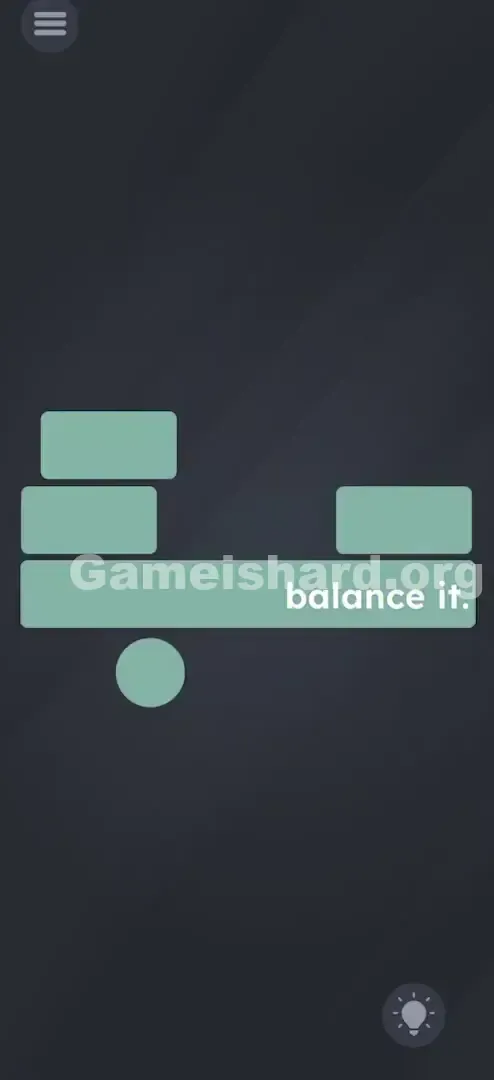
Success triggers an instant green flash across the entire purple structure, followed by the “Level Passed” confirmation. If the bar wobbles without turning green, you haven’t hit the exact balance point yet — nudge the circle slightly left or right until it locks in.
If It Did Not Work
- The bar isn't moving: You’re likely dragging the bar itself — double-check that your finger is squarely on the pink circle.
- I moved it left but nothing happened: You probably didn’t move it far enough. With two blocks on the left and one on the right, the fulcrum must shift significantly left to compensate.
- My finger covers the circle: Try tapping just below it — that way you can see how the circle aligns with the bar as you drag.
Small Details That Matter
Precision is non-negotiable here — the win condition depends on hitting a specific X-coordinate.
- The Sweet Spot: You’re not aiming for “somewhere left” — aim roughly under the inner edge of the leftmost block. Shortening the lever arm on the heavy side is what creates balance.
- Speed: Rushing causes overshoot. The bar updates in real time — go slow and steady.
- Snap Mechanics: There’s no auto-snap. The bar only registers success when the circle lands exactly at the right pixel — no approximation.
- I fixed it by: Noticing the “balance it.” text — but realizing it’s purely decorative here. Don’t treat it as a physical object or weigh it into your calculations.
Why This Solution Works
This isn’t a glitch — it’s clean physics dressed as UI deception.
- Archimedes’ Law of the Lever: Unequal weights balance when the fulcrum shifts closer to the heavier mass. That’s the core principle being tested.
- Object Hierarchy: Every distinct shape on screen is fair game for interaction — especially isolated ones like this circle. Game is hard trains you to question what’s movable, not just what’s obvious.
Bonus Tip
For speed or replay:
- Go straight for the pink circle — no hesitation.
- Slide left quickly until the bar begins rotating.
- Then ease up and fine-tune until green flashes.
- Never touch the rectangles — they’re time-wasters.
Alternative Attempts of Game Is Hard Level 17 (What Doesn’t Work, and Why)
Here’s what wastes time — so you can skip it:
- Tapping the “heavy” blocks: They’re fixed sprites — zero interactivity.
- Dragging the “light” block: It’s fused to the bar — immovable.
- Shaking the phone: No sensor input is active in this level.
- Two-finger rotation: The bar rotates only in response to fulcrum movement — manual twisting does nothing.
- Rubbing the text “balance it”: Unlike other levels, this text is purely visual — no hidden function.
- Dragging the bar directly: It’s a passive element — only reacts when the fulcrum moves.
- Flipping the phone upside down: Gravity is screen-relative here — no accelerometer involvement.
Common Mistakes for Game Is Hard Level 17
- Assuming the circle is fixed: Most seesaw puzzles lock the pivot — but here, it’s the only thing that isn’t locked.
- Overshooting the balance: Push the circle too far left, and the single right-side block becomes dominant due to extended leverage — tipping the bar right.
- Quitting too early: A slight nudge won’t do it — you need a meaningful leftward shift to overcome the weight difference.
- Trying to break the blocks: Rapid tapping or aggressive swipes won’t crack them — this isn’t a destruction mechanic.
- Over-analyzing the text: That period in “balance it.” isn’t draggable — it’s punctuation, not a puzzle piece.
Pattern Recognition: How to Spot This Trick in Future Game Is Hard Levels
The Tell
When you face a physics-based setup — seesaws, hanging scales, suspended beams — and the obvious elements (weights, ropes, objects) refuse interaction, shift focus to the support system: fulcrums, hooks, bases, or anchor points.
The Habit
Always scan the puzzle’s frame first. If the contents are locked, the container — or what holds them up — is almost certainly the key. And if you spot a simple, standalone shape (a circle, square, or dot) separate from the main cluster? Tap and drag it immediately.
Game Is Hard Level 17 FAQ (Short, Useful)
Q: Can I remove the blocks on the left in Game is hard Level 17? A: No. They’re part of the fixed challenge — no deletion or movement possible.
Q: Does the text “balance it” add weight in Game is hard Level 17? A: No. In this level, the text has no physical properties — it’s purely visual.
Q: I moved the circle left, but the right side dropped too low in Game is hard Level 17! A: You pushed the fulcrum too far left. Nudge it back right, just a little, until the bar flattens.
Q: Is there a trick with the phone tilt sensor in Game is hard Level 17? A: No. Level 17 uses touch-only interaction — no motion sensors involved.
More Game Is Hard Solutions
That’s how you master the physics behind Game is hard Level 17. If this walkthrough helped, you’ll love our direct, spoiler-free guides for every level — because the puzzles only get more delightfully twisted from here. Bookmark us before tackling Game is hard Level 18!