App updates occasionally shift puzzle order. If this level 297 guide doesn’t match what you’re seeing, no stress! Flip through our All Levels hub and find your exact puzzle by image.
Make sure the lines drop cleanly into the empty space. If a line clips or touches any of the dots, the win condition will not trigger.
Level Overview
What Makes This Puzzle Tricky
“They want some privacy.” Sounds simple—until you realize there’s no wall tool, no pen, no barrier menu. You’re left staring at five orange dots inside a red square, wondering if the solution involves turning off your screen or squinting at the text. Nope—the answer is built right into the level’s structure. You just haven’t noticed it yet.
Your Goal
Your goal is to fully separate all five orange dots—no shared space, no overlapping zones. You need clean, enclosed cells. Since dragging the dots does nothing and there’s no drawing interface, you’ll pull your “walls” straight from the red frame itself.
- UI drag: Interacting with fixed borders as active tools.
- Precision placement: Dropping lines with pixel-level accuracy.
- Multi-touch: Helpful for stabilizing your device while swiping.
- Hidden mechanics: Treating the outer boundary like a limitless source of dividers. That red frame isn’t just decoration—it’s your supply depot.
What Appears on Your Screen
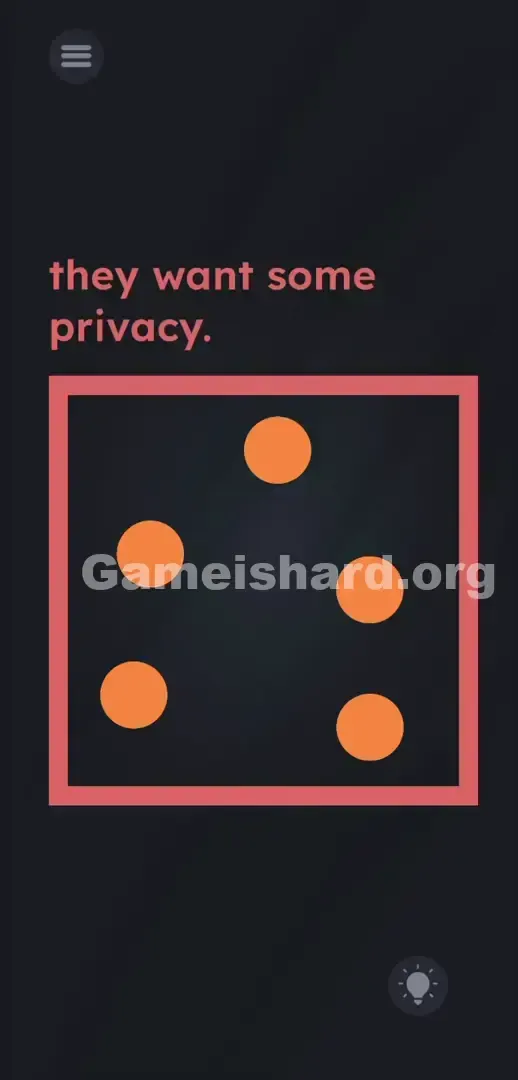
Let’s map the layout. The background is solid dark grey. In the top-left corner, the phrase they want some privacy. appears in soft reddish-pink—standard font, normal spacing, no hidden clues in punctuation or capitalization.
Centered below it sits a bold, thick red square that dominates the screen. Inside, five orange balls sit unevenly spaced: two near the left edge, one high in the center, and two stacked vertically on the right.
The familiar three-line hamburger menu sits top-left; the hint lightbulb rests bottom-right. Nothing moves. No floating tools, no buttons, no visible controls—just static geometry and silence. It feels deliberately barren.
Common Mistakes to Avoid
The Trap
UI autopilot. Years of mobile gaming teach us to ignore borders—they’re boundaries, not interactables. That thick red outline? Most players assume it’s just the stage’s edge, locked in place like scenery. But here, it’s the only thing you should touch.
First Instincts That Fail
You likely tried drawing lines between the dots first—like sketching on glass. When that failed, maybe you tapped the text, dragged “privacy” around, or even covered the screen with your palm hoping for a literal privacy mode. None of it works. This isn’t a sensor trick or wordplay puzzle—it’s pure spatial interaction.
Player Reactions
I spent over two minutes poking and swiping randomly. Then my thumb accidentally caught the left border—and snap—a red line peeled away like tape. Instant “aha,” followed by instant embarrassment.
Step-by-Step Solution
Preparing the Move
Forget framing—it’s functional. That red square isn’t holding the puzzle in; it’s feeding the solution out. Think of it as a line dispenser. Your job is to carve five private rooms using its edges.
Executing the Solution
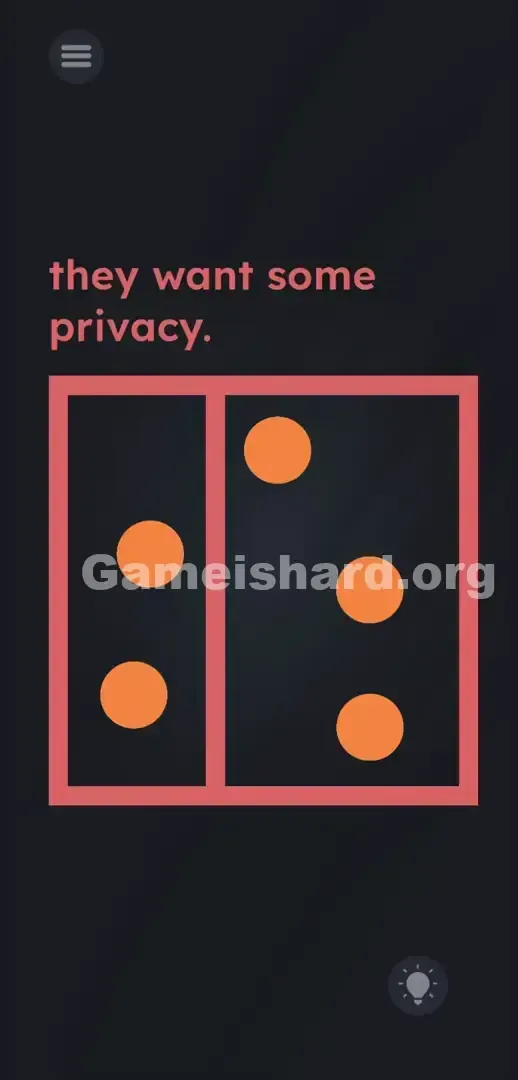
- Tap and hold the inner edge of the left side of the red box .
- Drag your finger toward the right side of the screen. You will pull a straight red vertical line away from the border.
- Position this line carefully between the orange balls on the left and the ball in the middle. Release your finger to drop it.
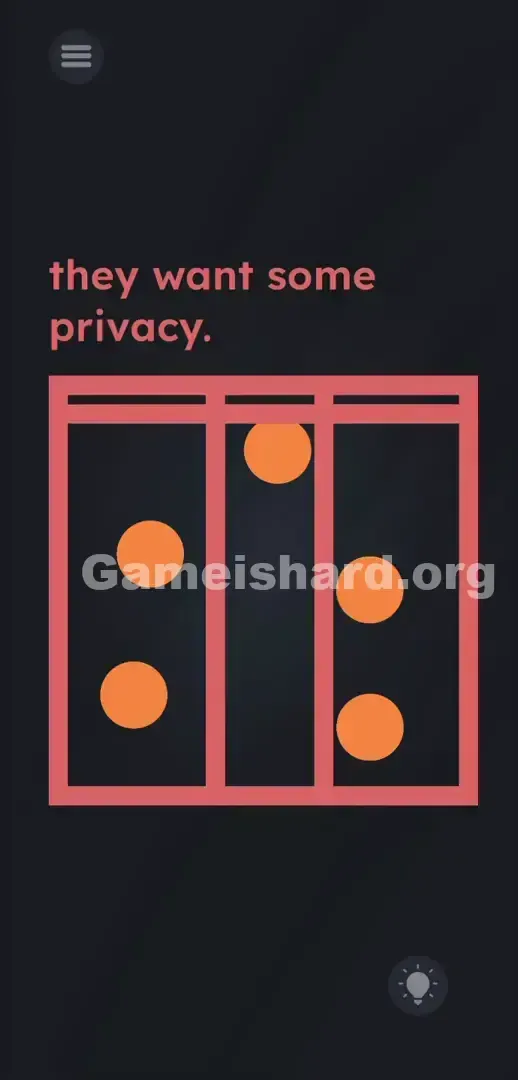
- Go back to the left edge of the box , tap and hold again, and drag a second vertical line out. Place this one between the middle ball and the right-side balls.
- Tap and hold the top edge of the red box . Drag your finger downward to pull a horizontal line.
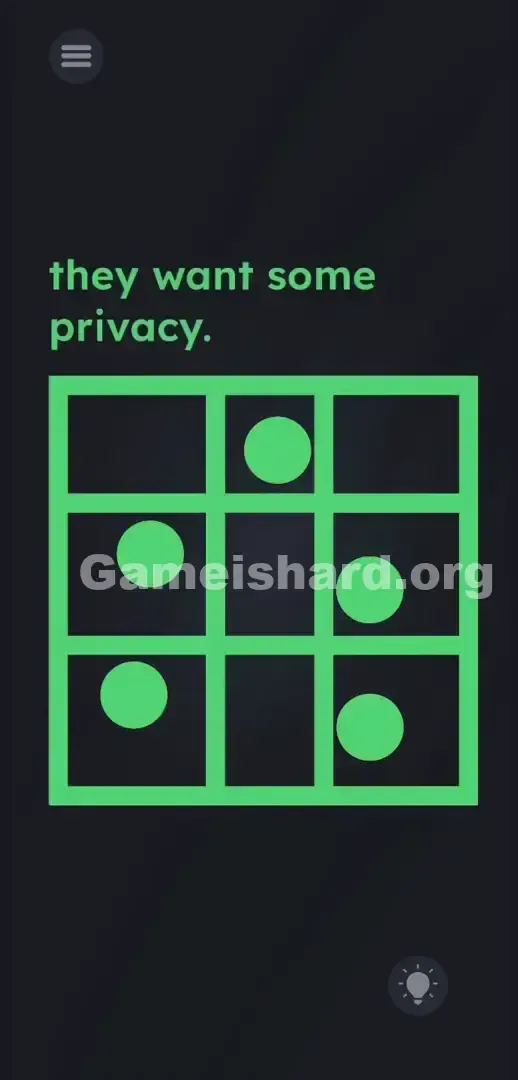
- Drop this horizontal line between the two balls stacked on the right side.
- Pull one final horizontal line from the bottom edge of the box . Move it up to separate the two balls stacked on the left side.
- Verify that every single orange ball is boxed into its own individual square cell. The level completes automatically the millisecond the board is fully partitioned.
If It Did Not Work
If the level refuses to complete, check your line placement closely. A line cannot clip, cross, or even slightly graze an orange ball . The collision detection is strict here. If a red line overlaps an orange pixel, the game refuses to register the cell as valid. Grab the offending line, drag it slightly into the open dark grey space, and drop it again.
If the screen stops responding entirely, force close the app. Sometimes dragging too many lines rapidly out of bounds breaks the touch registration. Reopen the app and pull the lines out slower.
Why This Solution Works
This level nails the series’ signature “environment-as-tool” design. Instead of handing you objects, it makes the interface itself the puzzle piece. The prompt is thematic—not instructional. It nudges you toward isolation, but the real challenge is retraining your brain to see static UI elements as dynamic resources. We overthink language and miss the physics right under our thumbs. That’s the core trick: linguistic misdirection masking tactile problem-solving.
Bonus Tip
Here is the fastest way to blast through this level without getting stuck tweaking pixel-perfect line placements:
- Always pull the vertical lines first. It splits the board into three easy columns.
- Pull the horizontal lines second to cut those columns in half.
- Keep your finger far away from the balls while dragging. Use the empty grey space to route your lines.
- Do not drop a line until you are absolutely certain it has clear empty space on both sides. Do not waste time trying to shake your phone. The gravity sensor is turned off for this stage.
Frequently Asked Questions
Can I draw diagonal lines on this level?
No. The game forces the lines to stay perfectly parallel to the edge you pulled them from. Grabbing the top or bottom edge always gives you horizontal lines. Grabbing the left or right edge always gives you vertical lines. You cannot rotate them.
What happens if I accidentally touch a ball with the line?
Nothing catastrophic happens. You don't fail or take damage. The win condition simply won't trigger. Just grab the line again with your finger and shift it over a few pixels until it sits completely in the empty space.
Is there a limit to how many lines I can pull from the box?
Functionally, no. You can drag out plenty of lines. You only need exactly four lines to separate the five dots cleanly. Keep it simple. Too many lines clutter the screen, block your vision, and make it much harder to avoid touching the dots by mistake.
How do I get rid of an extra line I don't need?
If you pulled out a fifth or sixth line by mistake and it's ruining your layout, just drag it entirely outside the boundaries of the red box or back into the edge it came from. It usually snaps away or disappears, cleaning up your workspace.
Does the text at the top of the screen do anything?
Surprisingly, no. The words they want some privacy. are purely a thematic clue telling you what to do (build walls). The text itself is completely static. Leave the letters alone.
More Game Is Hard Solutions
We build these guides to be fast and no-fluff. When you hit a wall, you need answers, not life stories about how much we love puzzle games. We break down the exact mechanics so you can get past the gimmicks and back to playing. Share this guide with your friends hitting the same annoying roadblocks in their playthrough. Keep grinding!