App updates can occasionally shift puzzle numbering. If this level 159 walkthrough doesn’t match what you’re seeing, no stress! Flip through our All Levels hub to locate your exact puzzle by its visual layout.
Level Overview
What Makes This Puzzle Tricky
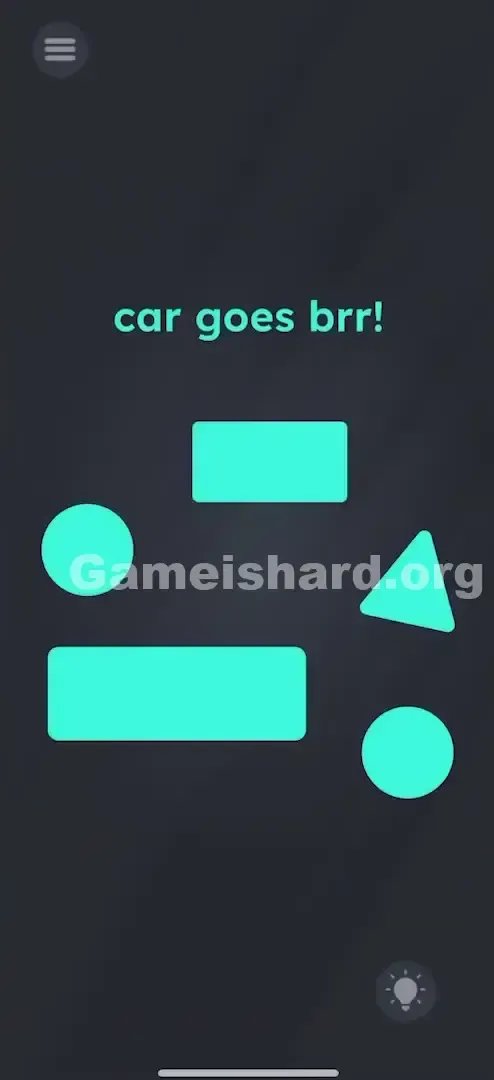
You're greeted with a jumble of bright green shapes against a dark background — less like a puzzle, more like a geometry toy box got tipped over. The cheeky phrase “car goes brr!” adds flavor but zero direction. Many players jump in trying to spell “CAR,” rotate shapes, or tap wildly. Pause. This isn’t about hidden codes or physics tricks — it’s about assembling a simple, recognizable car silhouette.
Your Goal
Your task is literal: build a visual representation of a car using only the shapes shown. No riddles, no wordplay — just drag-and-drop construction. Think of it as arranging puzzle pieces to match a classic road-sign icon.
Key Mechanics in this level:
- Drag and Drop: Every green shape moves freely across the screen.
- Object Stacking: Position matters — the game checks vertical layering (e.g., “roof” must sit on top of “body”).
- Red Herrings: Not every shape belongs in your final build. It’s not a mistake. It’s intentional design.
What Appears on Your Screen
The interface uses a sleek dark grey backdrop with vibrant mint-green elements.
- Top of screen: the playful prompt “car goes brr!”
- Below it: five scattered geometric pieces — One Long Rectangle, One Short/Small Rectangle, Two Circles, and One Triangle.
- One Long Rectangle .
- One Short/Small Rectangle .
- Two Circles .
- One Triangle .
- There are no outlines, grids, or snap-to guides — just a clean, open canvas.
Common Mistakes to Avoid
The Trap
The Triangle is the main source of confusion. Since triangles often appear in simple drawings (like house roofs or arrowheads), players assume it must be part of the car — maybe as a spoiler, hood ornament, or futuristic detail. But this level sticks to minimalism: a standard icon-style car has no triangle.
First Instincts That Fail
- Shaking the device: “Will the car move if I shake it?” Nope — no motion controls here.
- Tapping the text: “Is ‘brr’ interactive?” It’s purely thematic flavor.
- Forcing the Triangle into the design: Even light contact between the triangle and your car structure can block completion — the detection system is strict.
Player Reactions
I wasted nearly 90 seconds building a sharp-edged “cybertruck” with the triangle perched on top. I kept thinking, They wouldn’t include a useless shape… right? Wrong. As soon as I dragged the triangle offscreen, the level passed instantly. Classic misdirection — and totally fair.
Step-by-Step Solution
Preparing the Move
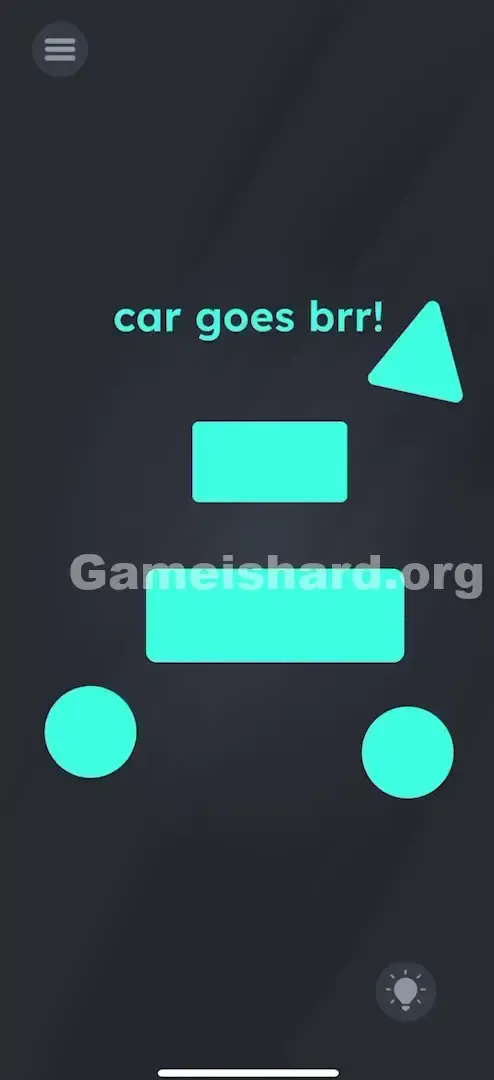
Start by clearing space in the middle of the screen. Move the Triangle far to one side — ideally outside the active play zone — so it can’t interfere with recognition. Focus only on the four essential pieces: the two rectangles and two circles.
Executing the Solution
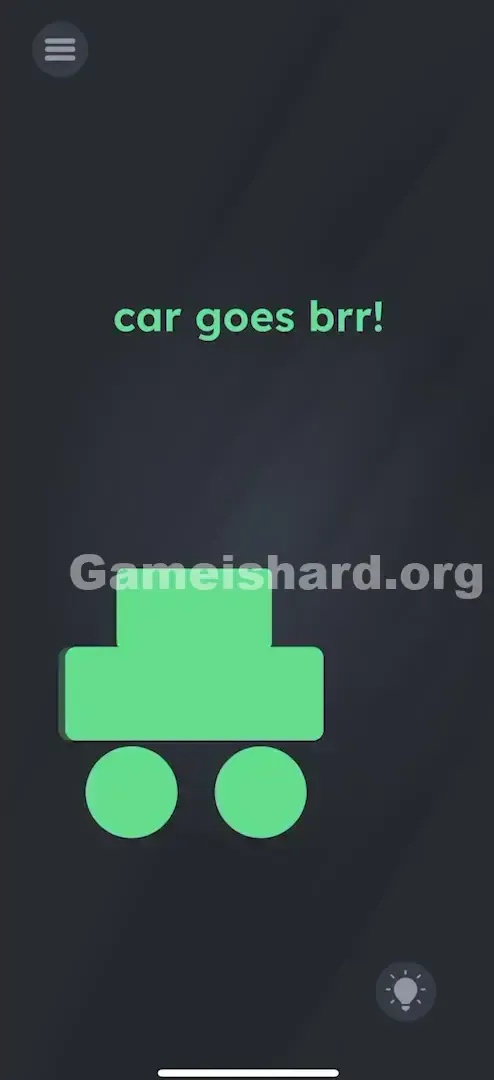
- The Chassis: Drag the Long Rectangle to the center of the screen. This forms the main body of your car.
- The Cabin: Drag the Small Rectangle and set it directly atop the long rectangle, centered horizontally — like a roof or windshield area.
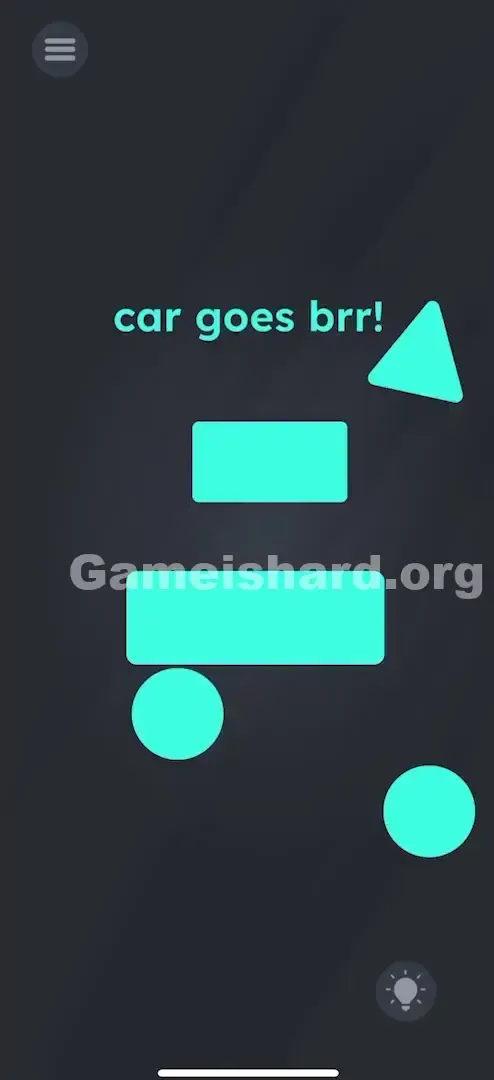
- The Wheels: Drag both Circles and position them beneath the long rectangle — one near the front-left corner, the other near the front-right corner.
- Verification: You may need to nudge the circles slightly upward until they visibly touch the bottom edge of the long rectangle. Once the arrangement registers as a car, the level completes automatically.
If It Did Not Work
- Not triggering? Adjust the Small Rectangle — make sure it’s snug against the top of the long rectangle, not hovering above it.
- Still stuck? Check wheel placement — they shouldn’t float mid-air or drift too far apart. They need to visually connect to the chassis.
- The Triangle: Seriously — double-check that it’s fully isolated from your car build.
Why This Solution Works
This level trains you to spot what’s essential versus what’s decorative. It challenges the natural urge to use every piece given — a habit that’ll trip you up later. In design terms, it’s about recognizing signal (the rectangles + circles) versus noise (the triangle).
This pattern repeats throughout Game is hard: future levels drop extra buttons, fake prompts, or irrelevant icons. Learning to discard distractions now makes Level 200+ much smoother. Under the hood, the game uses basic collision hitboxes — looking for precise positional relationships, not artistic flair.
Bonus Tip
Keep it ultra-simple. Forget realism, speed, or style — aim for the most generic “car” symbol you’ve ever seen on a highway sign.
- Long block = body
- Short block on top = cabin
- Two circles below = wheels
- That’s all.
No racecar curves. No tank treads. No bicycle pedals. The engine runs on simplicity — and nothing else.
Frequently Asked Questions
Q: Do I need to use the triangle? A: No. The triangle is a decoy. Remove it from the build zone entirely.
Q: Does the car need to be centered? A: Centering helps, but placement isn’t locked — what matters is how the pieces relate to each other.
Q: Why isn’t the level finishing when I built the car? A: Likely because parts aren’t touching properly — ensure the wheels contact the chassis and the roof sits flush on the body.
Q: Can I rotate or tilt the roof? A: No. The game expects strict vertical stacking — the small rectangle must be positioned higher on the Y-axis than the long rectangle.
More Game Is Hard Solutions
If the next puzzle leaves you scratching your head, skip the frustration. Our walkthroughs are built for speed, clarity, and zero spoilers — just pure, practical help. Bookmark us, share the link, and let your friends know where you found the real answers when they hit their own “impossible” moment. Keep playing!