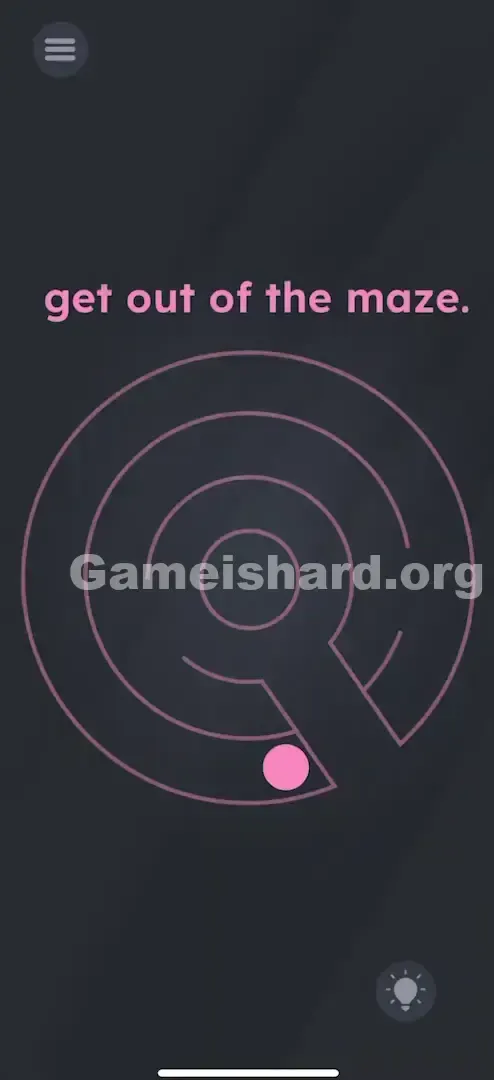



App updates can sometimes shuffle the order of puzzles. If this level 155 walkthrough doesn't match your screen, don't worry! You can browse our All Levels guide to find your exact puzzle by its picture.
You need to time your taps perfectly when the ball is aligned with the openings between the rings.
Level Overview
What Makes This Puzzle Tricky
You’re staring at a clean, circular maze—tilting your device back and forth—but the pink ball keeps slamming into walls. You see the gaps clearly. You know exactly where it needs to go. Yet nothing seems to work. It feels like the physics engine glitched or the collision detection failed. But it’s not broken—you just haven’t discovered the hidden interaction yet.
Your Goal
Your mission is to navigate the pink ball from the innermost ring all the way to freedom outside the maze. At first glance, it resembles a classic tilt-based labyrinth—but relying solely on gravity won’t get you through.
Key Mechanics in Game is hard Level 155:
- Tilt Sensors (Gyroscope): Tilting your phone physically steers the ball.
- Timing: Success hinges on precise moments—not just direction.
- Tap Interaction: The screen isn’t passive. You must tap the ball to trigger movement that gravity alone can’t deliver. It’s not a mistake—it’s your jump button.
What Appears on Your Screen
The interface uses a sleek, dark grey minimalist design.
- Top Center: The instruction "get out of the maze." sits front and center—simple, direct, and deceptively straightforward.
- Center: A spiral-style circular maze drawn in thin pink lines, with intentional gaps linking each concentric ring.
- The Actor: A small pink ball starts confined within one of the inner rings.
- UI Elements: Standard navigation icons—the hamburger menu in the top-left corner and the hint bulb in the bottom-right. Everything looks normal—which makes the hidden mechanic even harder to spot.
Common Mistakes to Avoid
The Trap
This level preys on years of muscle memory from physical marble mazes—where tilting is all you need. Your brain instantly defaults to “Tilt Mode” as soon as it sees ball + maze. You assume perfect alignment + tilt = passage. When that fails, you tilt harder, faster, more frantically. That’s exactly what the level wants you to do.
First Instincts That Fail
- Over-Tilting or Shaking: Players often jerk their phones aggressively, trying to force momentum—or even fling the ball through sheer willpower.
- Dragging Attempts: Some try swiping or dragging the ball manually, but the controls ignore finger-drag input entirely.
- Passive Waiting: Sitting still does nothing. Gravity pulls, but vertical lift requires active input—not patience.
Player Reactions
I spent over two minutes rotating my phone every which way, convinced I’d missed a micro-gap or misread the layout. Then—by accident—I tapped the screen mid-tilt… and watched the ball leap cleanly through the opening. The answer had been right under my thumb the whole time.
Step-by-Step Solution
Preparing the Move
Hold your phone steadily—at an angle that gives you smooth, responsive control. Identify the pink ball and locate the nearest gap in its current ring.
Executing the Solution
- Gently tilt your phone to roll the ball—no rushing needed.
- Steer it carefully until it lines up directly with an opening in the wall.
- Tap the ball the moment it reaches that gap. This triggers a controlled hop across the boundary into the next outer ring.
- Keep repeating: Tilt to position, Tap to advance—until the ball clears the final ring and exits completely.
If It Did Not Work
- Ball barely moves: Double-check if screen rotation lock is interfering (though most games override this). More likely, you need slightly stronger or more deliberate tilting.
- Jumping but colliding with walls: Your tap timing is off. You must tap only when the ball is precisely centered on the gap—not before, not after.
- Controls feel reversed: Gyro behavior varies across devices. Just observe how the ball responds to tilt and adjust your hand motion accordingly.
Why This Solution Works
This level challenges your ability to merge two distinct input types at once: gyro-driven tilt and touch-triggered action.
Most Game Is Hard levels separate these inputs—drag-only, shake-only, or tilt-only. Level 155 breaks that pattern by demanding coordination. It shatters the illusion that mobile games always assign one function per input method—and reminds you that touchscreen interaction remains active, even in a “tilt game.”
Bonus Tip
For speed-runners or repeat players:
- Hold your phone upright—not flat—to let gravity accelerate movement naturally.
- You don’t need to stop and line up perfectly—you can roll past the gap and tap mid-motion for a fluid “drive-by” jump.
- Ignore the on-screen text’s implication of a pure maze challenge; this is really a rhythm-and-timing test disguised as a navigation puzzle.
Frequently Asked Questions
Q: Do I have to use tilt controls? A: Yes. The ball only moves via your phone’s gyroscope. Finger-dragging has no effect on lateral motion.
Q: My ball keeps bouncing back when I tap? A: You’re hitting the solid wall instead of the gap. Precision matters—the jump only succeeds when the ball is perfectly aligned with open space during the tap.
Q: Can I jump over solid walls? A: No. The jump mechanic only works at designated gaps. Solid sections are impassable—even with perfect timing.
Q: Is there a specific exit I need to reach? A: No. Once the ball jumps beyond the outermost ring, the level completes automatically.
More Game Is Hard Solutions
If another puzzle is giving you trouble—or quietly misleading you—explore our full library of guides. We cut through the confusion and tell you exactly what to tap, tilt, or shake. Share this with the friend still spinning their phone upside down trying to crack level 155!
Good luck—and remember: the UI isn’t always telling the whole story.