App updates can sometimes shuffle the order of puzzles. If this level 160 walkthrough doesn't match your screen, don't worry! You can browse our All Levels guide to find your exact puzzle by its picture.
Level Overview
What Makes This Puzzle Tricky
At first glance, it’s just a box full of triangles—like a gridlocked intersection. You instinctively try dragging the blue triangle with your finger, but nothing happens. Worse yet, your finger blocks your view and leads straight to a crash. Tapping frantically changes nothing. The game isn’t broken—it’s waiting for input from an unexpected place: your phone’s hardware buttons.
Your Goal
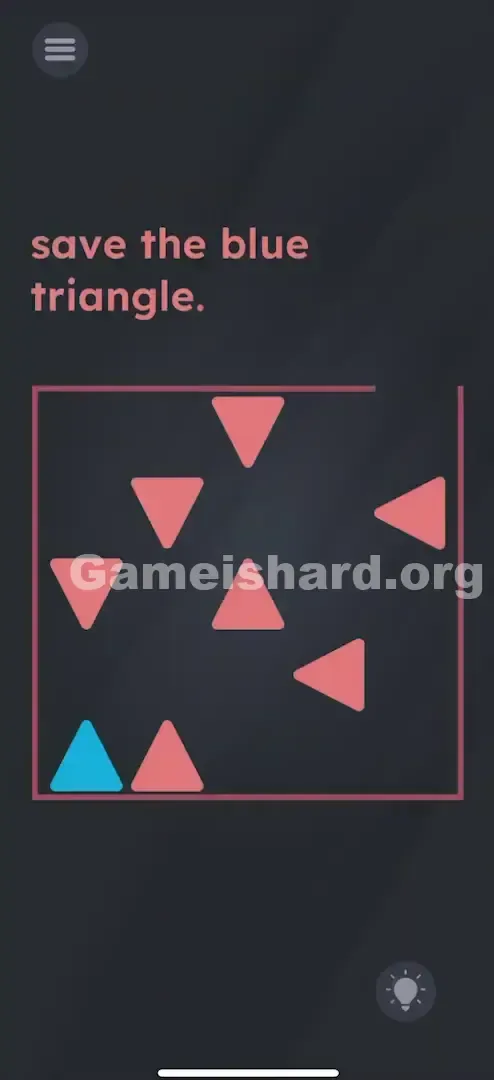
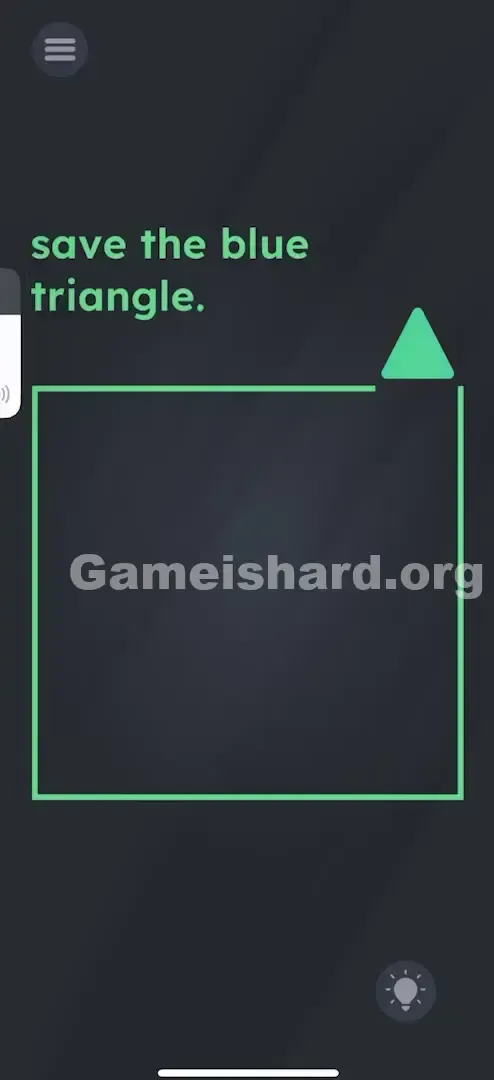
Your mission is to “drive” the blue triangle safely out of the enclosure. The prompt “save the blue triangle” signals an escape challenge—you must steer it through tight gaps between stationary red triangles and exit cleanly through the open gap in the top-right corner.
Key Mechanics
- Hardware Buttons: Movement bypasses the touchscreen entirely—your volume keys are now the throttle.
- Tank Controls: Forward and backward are independent from turning—like classic remote-controlled vehicles.
- Collision Detection: Even the slightest contact with a red triangle triggers an instant reset.
- Rotation: Screen taps act as your steering input—each one rotates the triangle clockwise. This isn’t a logic puzzle. It’s a precision driving test.
What Appears on Your Screen
The interface is minimal and geometric.
- Top: A single line of instruction: save the blue triangle.
- Center: A large, outlined square boundary.
- Inside the Box: One blue triangle starts in the bottom-left corner. Seven or eight red triangles are scattered across the space, creating narrow pathways.
- One blue triangle sitting in the bottom-left corner.
- About seven or eight red triangles scattered randomly, blocking direct paths.
- The Exit: The square outline has a deliberate break—the opening sits at the top-right edge. It mimics a sliding-block puzzle visually, but touch-based movement does absolutely nothing.
Common Mistakes to Avoid
The Trap
We’re wired to interact with mobile games via touch. When something won’t move under our finger, we assume it’s broken. But Game is hard Level 160 deliberately moves controls off-screen—forcing you to treat your device as a physical controller, not just a display.
First Instincts That Fail
- Dragging: Your first move will likely be to drag the blue triangle. It won’t budge.
- Tilting: You might tilt your phone, expecting physics-based motion. Gravity plays no role here.
- Waiting: Some levels reward patience—but this one demands active, intentional input.
Player Reactions
I stared at it for over two minutes, convinced I needed to rearrange the red shapes first—or maybe pinch the box open. Then, while adjusting my podcast volume, I accidentally hit the rocker—and the blue triangle lurched forward. I nearly dropped my phone.
Step-by-Step Solution
Preparing the Move
Position your phone so both volume buttons are easily reachable with your fingers, and keep one thumb free to tap the screen. You’re no longer holding a phone—you’re holding a compact gamepad.
Executing the Solution
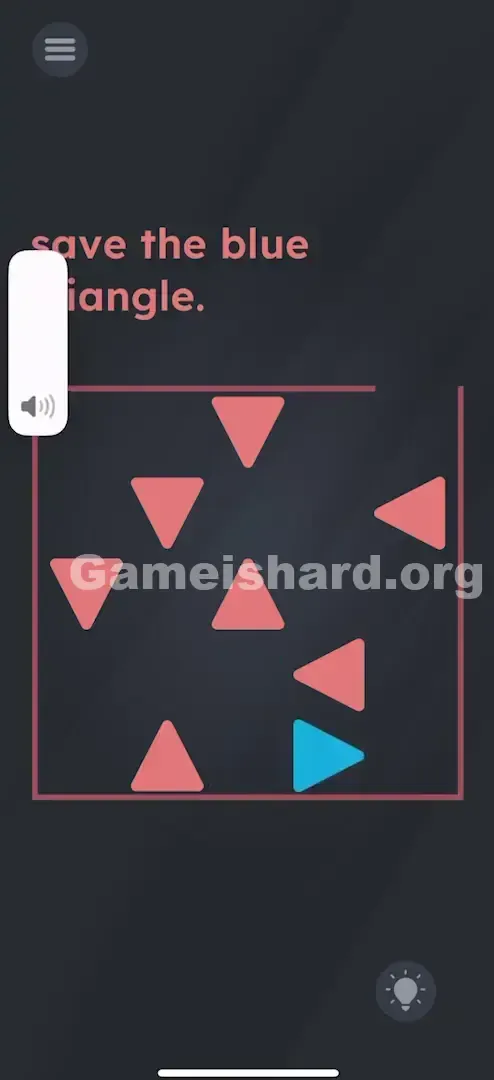
- Move Forward: Press and hold Volume Up . The blue triangle advances in the direction its tip points.
- Move Backward: Press and hold Volume Down . This reverses your path—ideal for quick retreats from danger zones.
- Steer: Tap anywhere on screen to rotate the blue triangle clockwise. Keep tapping until it faces clear space.
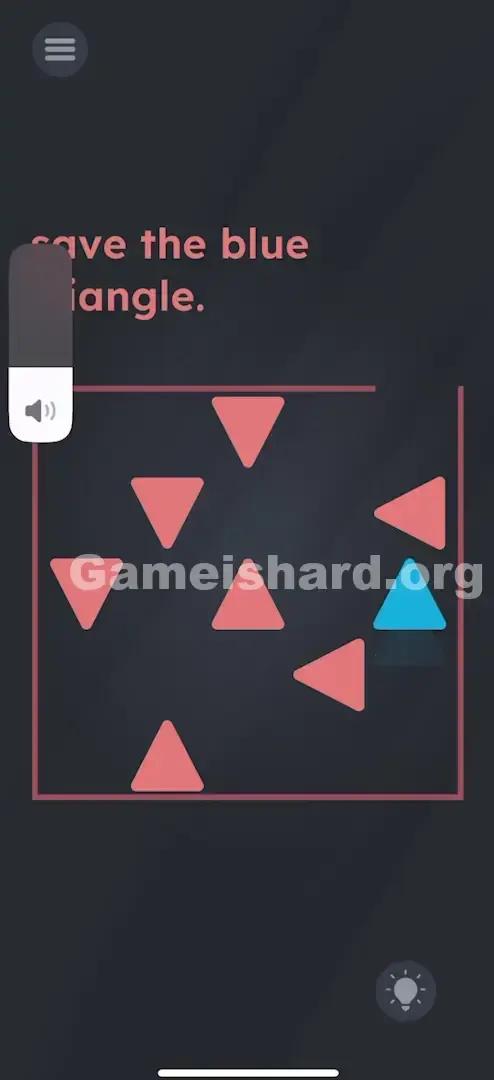
- Escape: Alternate between volume-button movement and screen taps to navigate around red obstacles. Target the top-right gap—and ensure the entire blue triangle clears the box boundary.
If It Did Not Work
- If the volume HUD appears: Some devices show a system overlay when pressing volume. Ignore it—the triangle still responds underneath.
- Hit detection is strict: Brushing against even the tip of a red triangle resets the level. Move deliberately. Rotate before advancing—not mid-maneuver.
Why This Solution Works
This level uses a “Hardware Break”—a clever design twist that exploits how users expect apps to behave. Since nearly every mobile interaction happens on-screen, mapping movement to physical buttons forces you to rethink your device as hardware first, interface second.
It also shifts focus from pure logic to fine motor control. While most Game is Hard puzzles rely on deduction, this one leans into real-time coordination. The mismatch between tap-to-turn and button-to-move creates intentionally clunky, tank-like handling—turning a simple maze into a test of timing and spatial awareness.
Bonus Tip
- Tap, don’t hold. Use short, controlled presses on Volume Up instead of holding it down—this prevents overshooting into red hazards.
- Rotate in place. You can spin the triangle without moving forward or backward. Pause, aim, then proceed.
- Reverse more often. Sometimes backing up (Volume Down) gives cleaner repositioning than attempting a full turn in tight corners.
Frequently Asked Questions
Why isn't the blue triangle moving when I drag it? Touch-based movement is disabled here. Only your phone’s physical volume keys control motion.
Does tilting the phone help? No—the accelerometer isn’t used. Only volume buttons and screen taps register input.
I keep hitting the red triangles when I rotate! Rotation pivots around the triangle’s center. If you’re too close to a red shape, rotating may swing your side or tail into it. Back up a bit before turning.
Can I destroy the red triangles? No—they’re fixed, immovable hazards. Your only option is careful navigation.
More Game Is Hard Solutions
If another puzzle has you stumped, our guides cut straight to what works—no fluff, no guesswork. Keep your streak alive and share this tip with anyone still trying to drag that triangle with their thumbs!
Good luck driving.