

App updates can sometimes shuffle the order of puzzles. If this level 162 walkthrough doesn't match your screen, don't worry! You can browse our All Levels guide to find your exact puzzle by its picture.
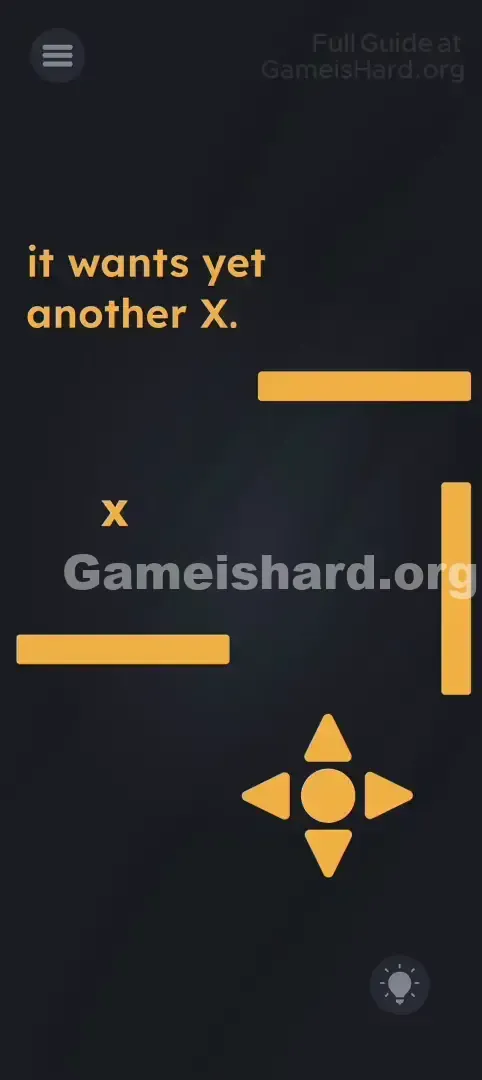
You are piloting the D-pad itself to the target, not dragging it.
Level Overview
What Makes This Puzzle Tricky
You’re faced with a classic D-pad and a lone X target. Your fingers instinctively press the arrows — but nothing happens. You try swiping or dragging the pad — still no response. The controls seem broken because the input system flips conventional logic entirely.
Your Goal
Your goal is simple: get the yellow Center Circle (the hub of the arrow keys) to land directly on the small X. It’s a grid-based navigation challenge — but with invisible boundaries and deliberate, two-step movement.
Key Mechanics:
- Button Logic (State switching vs Action)
- Step-by-step movement
- Obstacle avoidance This isn’t a bug — it’s a clever test of control awareness.
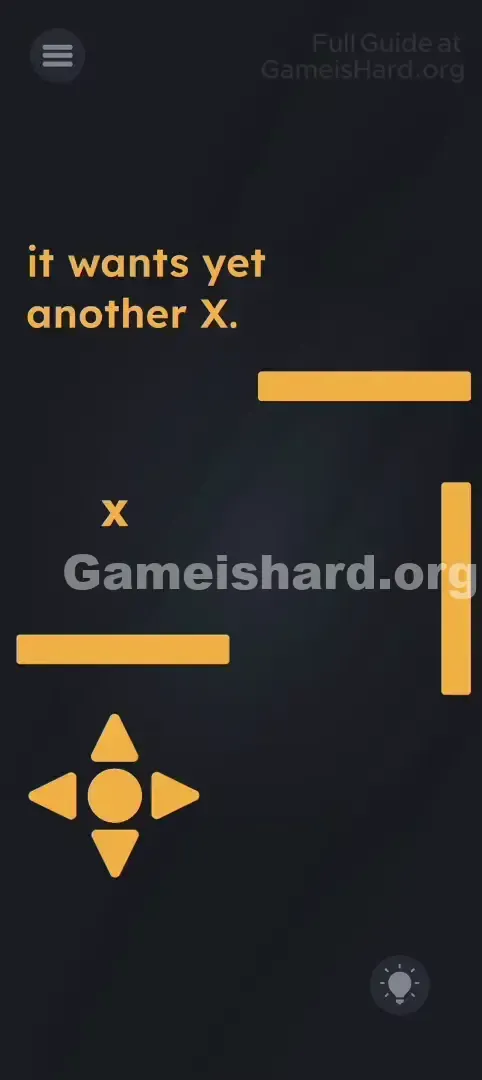
What Appears on Your Screen
The background is dark, with the cryptic prompt: "it wants yet another X."
A small yellow X floats near the middle-left of the screen.
Chunky yellow rectangular barriers surround the play area like walls.
At the bottom left sits a standard D-pad: four directional arrows (Up, Down, Left, Right) framing a central yellow Circle.
Common Mistakes to Avoid
The Trap
Your reflexes work against you. In nearly every game, pressing an arrow triggers instant motion — here, tapping any arrow does nothing visible at first. That illusion of unresponsiveness makes players assume the level froze or that they need to drag UI elements instead.
First Instincts That Fail
- Holding an arrow: Expecting smooth continuous movement — but the level only responds to taps.
- Dragging the D-pad: The layout is static; dragging has zero effect.
- Tapping the X: The target stays put — you must bring the circle to it.
Player Reactions
I spent over a minute frantically tapping “Right,” convinced my screen was lagging. Then, out of curiosity, I tapped the center circle — and watched it jump. Instant facepalm moment.
Step-by-Step Solution
Preparing the Move
Zero in on the D-pad at the bottom. That yellow Center Circle isn’t just decoration — it’s your avatar. The arrows aren’t movement keys; they’re direction setters — like a steering wheel. The circle is your “go” button.
Executing the Solution
- Set Direction: Tap the Up Arrow once. No movement yet — you’ve just programmed the next move as “Up.”
- Move: Tap the Center Circle . The entire D-pad shifts one tile upward.
- Navigate: To reach the X , you’ll need to weave around the yellow barriers. Tap Right Arrow , then tap Center Circle (move right). Tap Up Arrow , then tap Center Circle (move up). Keep alternating: Direction -> Move -> Direction -> Move .
- Tap Right Arrow , then tap Center Circle (move right).
- Tap Up Arrow , then tap Center Circle (move up).
- Keep alternating: Direction -> Move -> Direction -> Move .
- Touch the Target: Continue this precise, stop-and-go motion until the Center Circle lands exactly on the X .
If It Did Not Work
- Hit a wall? If tapping the Center Circle does nothing, you’re blocked by a yellow barrier or the screen edge. Choose a different direction and try again.
- Moving the wrong way? The game holds your last selected direction. To move Right three times, tap Right Arrow once, then tap the Center Circle three times. To change course, tap the new arrow before tapping the circle.
Why This Solution Works
This level reimagines what a controller is. Most games merge input and action (press Jump → character jumps). Here, they’re split into two distinct actions: choosing a direction (state), then executing movement (action).
Think of it like coding a basic robot command or playing a turn-based strategy game — you must plan deliberately. The arrows set a variable (e.g., Direction = Up), and the center button runs the function (Move(Direction)). It feels awkward at first, but it proves you’re thinking — not just reacting.
Bonus Tip
For faster replays or speedruns:
- Tap Right Arrow .
- Tap Center Circle multiple times until you clear the bottom wall.
- Tap Up Arrow .
- Tap Center Circle until you line up horizontally with the X.
- Tap Left Arrow .
- Tap Center Circle to complete the final move.
- Remember: You only need to tap the arrow once per direction — it stays active until changed.
Frequently Asked Questions
Why won't the D-pad move when I drag it? Because dragging isn’t supported here — this level uses tap-only logic. The D-pad is fixed in place.
I tapped the arrow but nothing happened? That’s expected. Tapping an arrow only sets your intended direction — you must tap the Center Circle to actually move.
Can I run into the yellow walls? You won’t crash or lose progress — but movement halts. Treat them like solid walls and navigate around them.
Is there a hidden object? Nope — no secrets or hidden elements. The entire puzzle lives in how the controls behave.
More Game Is Hard Solutions
Stuck on another mind-bending level? Our guides cut straight to the solution — no filler, no fluff. Visit the main site for all Game Is Hard walkthroughs. Share this with the friend currently debating whether their phone deserves a throw across the room over Level 162. You’ve got this!