


App updates occasionally reorder puzzles. If this level 216 walkthrough doesn’t match what you see, no problem! Flip through our All Levels directory to locate your exact puzzle by image.
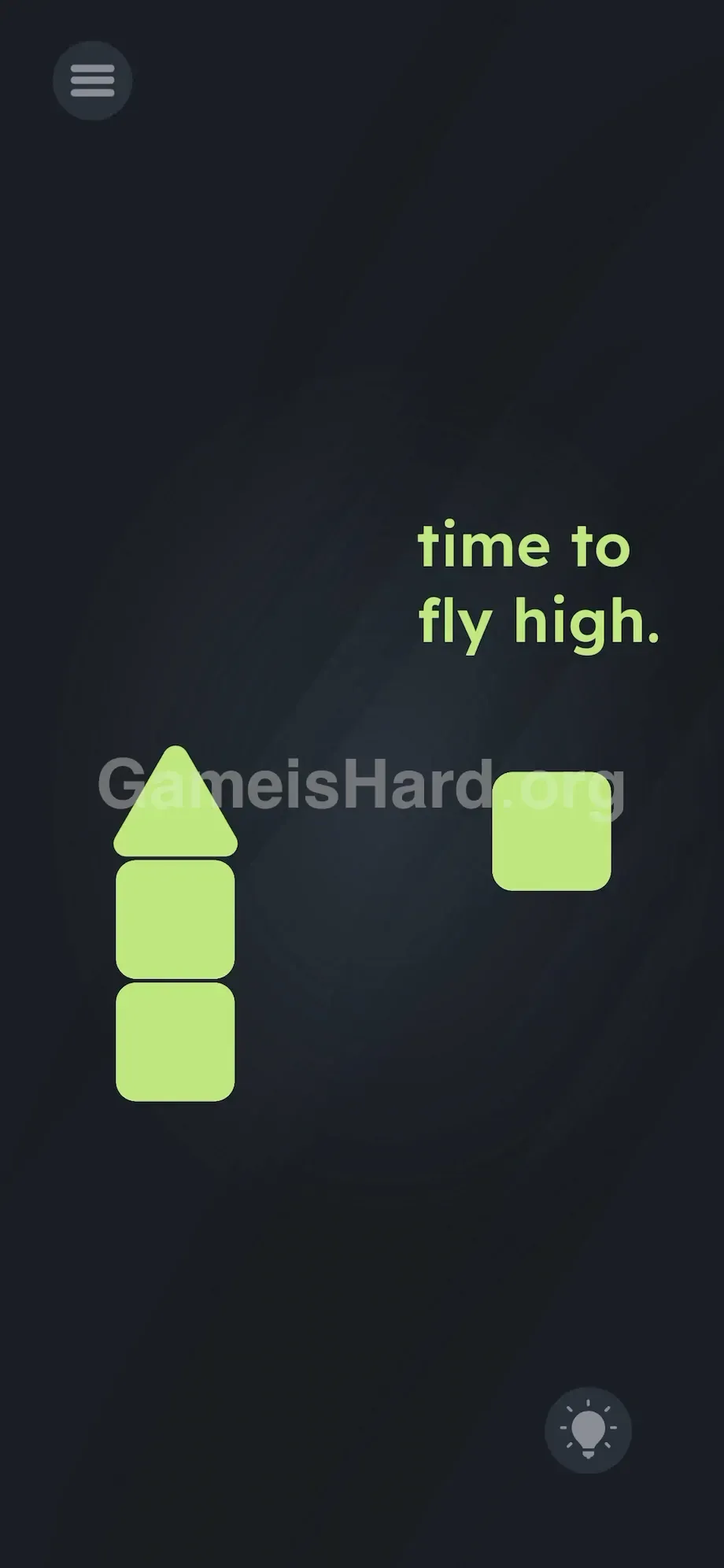
Using only one box gives too little thrust to lift off; adding all three makes the rocket too heavy to rise.
Level Overview
What Makes This Puzzle Tricky
You’re greeted with a minimal scene: a few green shapes and the phrase time to fly high. It feels like an early sketch—simple, unassuming. Tapping the triangle does nothing. Tapping the boxes does nothing. Trying to drag the text? It stays locked in place. That’s the signature “hidden assembly” design of Game is hard Level 216. There’s no blueprint, no hint that pieces are meant to be combined—you just have to figure out the vehicle is built from loose parts. It’s deceptively static until you notice the physics engine is already live and waiting.
Your Goal
Your mission is straightforward: get the triangle airborne. But in Game is hard, “straightforward” rarely means “simple.” You need to realize the triangle acts as a nose cone—and those green boxes? They’re fuel tanks.
- UI drag: You must reposition physical objects to precise relative positions.
- Physics Logic: A subtle weight-vs-thrust system runs behind the scenes.
- Multi-part assembly: Components snap together only when aligned correctly.
- Trigger Action: Launch begins with a single tap—not a hold or swipe. It’s not a typo. It’s ammo.
What Appears on Your Screen
The layout is intentionally bare—a classic sign that the answer hides in plain sight. Top-left holds the standard three-bar menu icon. Bottom-right shows the lightbulb hint button, which usually confirms something you’ve already suspected.
Center-right displays the lime-green text time to fly high. Just below and slightly left of that, you’ll spot the interactive elements:
- One triangle (your rocket’s tip).
- Three identical green boxes (potential body sections and fuel). They’re scattered loosely—no launch pad, no button, no target zone. You’re operating in empty space. The missing “Launch” button is the biggest clue: one of these objects is the trigger.
Common Mistakes to Avoid
The Trap
The most common pitfall? Assuming “more equals better.” Players see three boxes and assume they must use every item on screen. So they stack all three under the triangle, tap—and nothing happens. Maybe a slight wobble, but no lift-off. In real life, extra fuel helps—but here, extra mass overloads the engine. The game never states the weight limit outright.
First Instincts That Fail
Some try dragging fly high onto the triangle, guessing the text itself powers flight—reasonable, since earlier levels sometimes treat words as tools. Others shake or tilt their device, hoping motion triggers lift-off. A few even swipe upward on the triangle like it’s a flick-based sport. None work—because this isn’t about gestures. It’s about building.
Player Reactions
Instant facepalm. I spent nearly three minutes balancing the triangle on a single box while tilting my phone, convinced it was a precision balance test. When the second box snapped into place beneath it, the simplicity hit me—I’d been overcomplicating a preschool-level build. The level lures you into believing it’s deeper than it really is.
Step-by-Step Solution
Preparing the Move
Start by centering the triangle. Move it toward the middle of the screen so you have clean vertical space underneath to assemble your rocket. If it’s too low, there won’t be room for proper stacking.
Executing the Solution
- Step 1: Tap and hold one green box. Drag it straight down beneath the triangle—aim for visual centering (pixel-perfect alignment isn’t required).
- Step 2: Pick up a second green box. Place it directly under the first one. Your final stack should read: Triangle → Box → Box.
- Step 3: Leave the third box untouched—don’t move it, rotate it, or attach it anywhere.
- Step 4: Tap the triangle once, firmly and cleanly.
If It Did Not Work
- The Rocket isn't moving: Verify your stack count. One box = no lift. Three boxes = too heavy. Only two works.
- The Triangle just falls over: Your boxes may be misaligned left or right. Adjust them into a tight vertical column.
- Tapping doesn't work: Ensure you’re tapping—not holding—the triangle. A quick, deliberate tap triggers launch.
- UI Glitch: If shapes freeze at screen edges, open the menu and restart. Dragging off-screen can occasionally break physics.
Why This Solution Works
This level tests your ability to filter out distractions. Like many brain-teaser games, it hands you three items when only two matter—it’s a classic “Goldilocks” challenge.
- One Box: Too weak—insufficient thrust.
- Three Boxes: Too heavy—exceeds lift capacity.
- Two Boxes: Just right—optimal balance of power and mass. This pattern repeats across the series. The game checks whether you’ll default to using everything—or test incrementally to discover the exact requirement. Every added object carries a hidden property—usually weight—that changes the outcome.
Bonus Tip
Resist the urge to use every item. Game is hard often drops “decoy” objects purely to mislead.
- Clarify the goal first (get the triangle off the ground).
- Start minimal (try one box).
- Add one more (introduce the second).
- If it launches—stop. Don’t add the third just because it’s there. Skip interacting with the thegameishard.org watermark or background text—they’re purely decorative in this level.
Frequently Asked Questions
Q: Why won’t my rocket launch with three boxes? A: The engine (triangle) has a fixed thrust output. Three boxes exceed its lifting capacity—weight beats power here.
Q: Does box order matter? A: No. Since all boxes are identical, vertical stacking is the only requirement—not sequence.
Q: I tapped “fly high” and nothing happened. Why? A: That text is instructional only—not interactive. The triangle must physically leave the screen.
Q: Can I arrange boxes side-by-side? A: No. Horizontal placement won’t register as a rocket. Only vertical stacking activates the flight mechanic.
More Game Is Hard Solutions
Stuck on the next puzzle? Don’t stress—we craft these guides to be fast, practical, and distraction-free. Level 216 is just the beginning of the physics-based curveballs. Share this walkthrough with friends currently debating whether their phone deserves a time-out.
Stay calm. You’ve got this!