


App updates can sometimes shuffle the order of puzzles. If this level 273 walkthrough doesn't match your screen, don't worry! You can browse our All Levels guide to find your exact puzzle by its picture.
Keep your finger held down on the main object and sweep the extreme edges of your display in one continuous, fast motion.
Level Overview
What Makes This Puzzle Tricky
You jump into the level and hit a wall right away. The prompt tells you to find multiple balls — yet only one appears on screen. You tap it. Nothing. You try dragging the instruction text. No response. You’re staring at a huge, empty black space, wondering if the game crashed. It hasn’t. The real trick? The game pretends its interface ends where the visible elements stop — but the puzzle lives beyond those edges.
Your Goal
Your mission is to physically uncover three missing objects that fit perfectly into the hollow outlines beneath the prompt. This isn’t about solving wordplay or decoding symbols — it’s a lightning-fast search operation using the only interactive item you’ve been given.
- UI drag: The central object is fully draggable.
- Hidden object: The targets are completely invisible until you drag the purple ball directly over their precise locations.
- Timing / waiting: A stealthy, invisible countdown forces urgency — hesitation means instant reset.
- Multi-touch: Not mandatory, but a smooth, uninterrupted swipe avoids touch-input gaps. That vast dark area isn’t just background — it is the puzzle.
What Appears on Your Screen
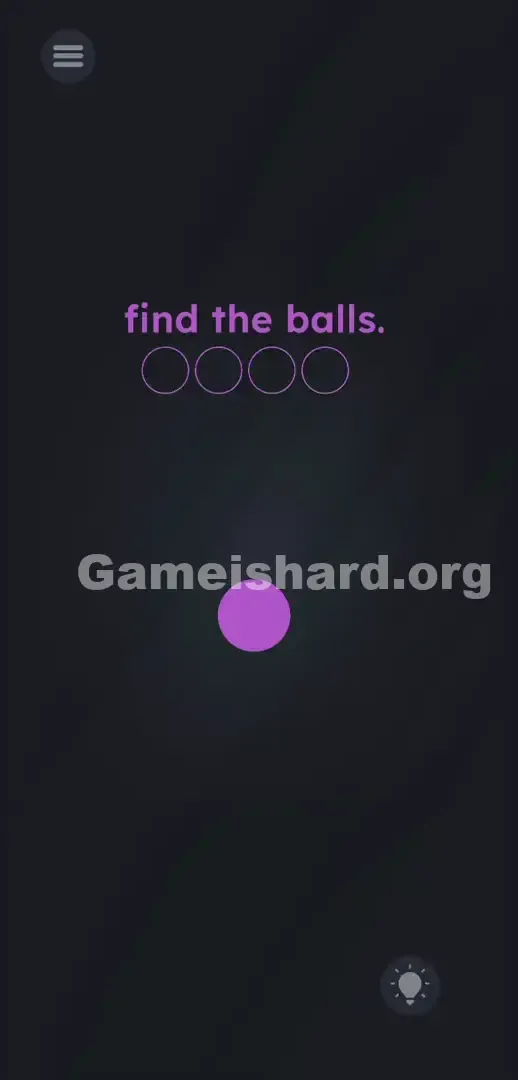
Let’s map out what’s actually visible. The screen is filled with a deep, muted gray-black void. At the top center, the instruction “find the balls.” appears in soft pinkish-purple lowercase letters.
Just below it sits a horizontal line of four thin, empty circular outlines — clearly meant to hold something you need to collect.
Dead center of the screen rests a single solid purple ball — matching both the text color and outline tint.
In the top-left corner sits the standard three-line hamburger menu icon. In the bottom-right corner glows the hint lightbulb. Outside of these, the screen feels totally barren — no sliders, no subtle visual cues, no hidden buttons, and no misleading spacing in the font.
Common Mistakes to Avoid
The Trap
This level exploits “UI Blindness” and a punishing hidden mechanic. Past levels train you to deconstruct text — so players instinctively try pulling apart the “O” in “balls” to fill the circles. When that fails, the massive negative space tricks your brain into assuming those dark zones are inactive.
The cruelest part? The invisible timer. If you accidentally drag the purple ball into a corner and spot a flash of color, you’ll likely pause — lift your finger to process it — and instantly lose progress as the timer resets. That makes you doubt the correct move was ever valid.
First Instincts That Fail
Frustration leads to wild guesses: tapping the empty circles like buttons (no effect), shaking the phone hoping objects fall (nothing drops), or flipping the device upside-down (zero change).
Player Reactions
I wasted nearly four minutes dissecting the text — yanking at the dot above the “i,” trying to tear the “b” apart. Total facepalm moment. When I finally dragged the purple ball by accident and saw a flicker in the corner, I paused… and the game wiped everything. I yelled at my phone. A hidden speed test buried inside a hidden-object puzzle? That’s next-level developer mischief.
Step-by-Step Solution
Preparing the Move
Treat the instruction text and empty outlines as distractions. Your sole focus is the solid purple ball in the center. Get ready to move fast. Wipe your screen and thumb — you need clean, responsive contact for a rapid, unbroken motion.
Executing the Solution
- Press and hold your finger firmly on the solid purple ball in the center of the display. Do not lift your finger from this point forward.
- Drag the purple ball aggressively up into the absolute top-left corner of your phone screen. Push it right against the bezel. You will see one of the empty outlines below the text fill up with solid color.
- Immediately swipe your finger across the top edge to the top-right corner. Hit the edge hard. A second outline will fill.
- Without hesitating, drag straight down into the bottom-right corner. The third outline fills.
- Finally, whip the ball straight across the bottom edge into the bottom-left corner. The final outline will trigger.
If It Did Not Work
- The outlines keep emptying out: You are moving too slow. Game is hard Level 273 has an invisible reset timer that kicks in if you take more than a second or two between corners. Stop lifting your finger. Use one massive, continuous square motion.
- I hit the corner but nothing happened: Phone cases and thick screen protectors can sometimes mess with edge detection. Make sure you are dragging the purple ball as far into the physical corner of your device as the screen allows.
- The app froze: If you swipe too frantically, some older phones drop the touch input. Force close the game, reopen the level, and try a slightly smoother, highly deliberate square motion.
Why This Solution Works
This level tests two core ideas: interaction beyond the visible frame and composure under pressure.
First, it treats the screen like a dark room — and the purple ball is your flashlight. The game breaks the expectation that every needed element must be visible upfront. Instead, you must actively probe the UI’s “dead zones.” The instruction is misdirection; the emptiness is the challenge.
Second, the invisible timer is a psychological trap. With no visible countdown, the game makes you question whether your correct action was accidental — unless you execute flawlessly and confidently. It’s brilliant, infuriating design built entirely on perceptual sleight-of-hand.
Bonus Tip
Forget dragging to each corner separately. Don’t return to the center. Think of the puzzle as tracing your phone’s outer edge.
- Grab the purple ball .
- Slam it into any corner.
- Drag your finger in a massive, continuous box shape around the absolute perimeter of the screen.
- Do not let go of the screen until all four outlines under find the balls. turn solid. Don’t waste time guessing which ball hides where. Order doesn’t matter — speed does.
Frequently Asked Questions
Why does my progress keep resetting in Game is hard Level 273? The game is running a secret background timer. If too much time passes between finding the first hidden object and the next, the level resets your progress to zero. You must hit all four corners in rapid succession.
Does the order of the corners matter? No. You can start in the bottom-right and go counter-clockwise, or start top-left and go clockwise. The trigger only cares that you hit the designated pixel coordinates in the corners before the clock runs out.
I don't see any hidden balls, am I doing it wrong? The hidden objects sit just off-screen. You’ll only catch a partial glimpse when the purple ball drags directly over them in the corners. Watch the empty outlines near the text — they’ll fill as confirmation.
Can I just tap the corners of my screen? Absolutely not. Tapping does nothing. The game requires direct physical overlap between the purple ball and the hidden targets located precisely in the corners. Dragging is mandatory.
More Game Is Hard Solutions
Stuck on the next puzzle? We cover every brutal stage of this game. Our guides are designed to be fast, highly actionable, and free of nonsense so you can get back to playing.
Share this guide with your friends on Discord if they are raging at the invisible timer. Keep swiping, keep thinking outside the box, and check back here when the game decides to lie to you again.